Test Your OAuth Connection From a Channel
The Test OAuth button on the Web Service Connections page exercises only the token request to the Identity Provider. It does not call the Resource Server. This chapter walks through a minimal channel that uses one of the connections you built in the previous exercises to make a real call through QIE's mapping engine. It is the smallest possible scaffold for verifying end-to-end that the access token is fetched and attached to a downstream HTTP request.
Channel Overview
The channel has three nodes:
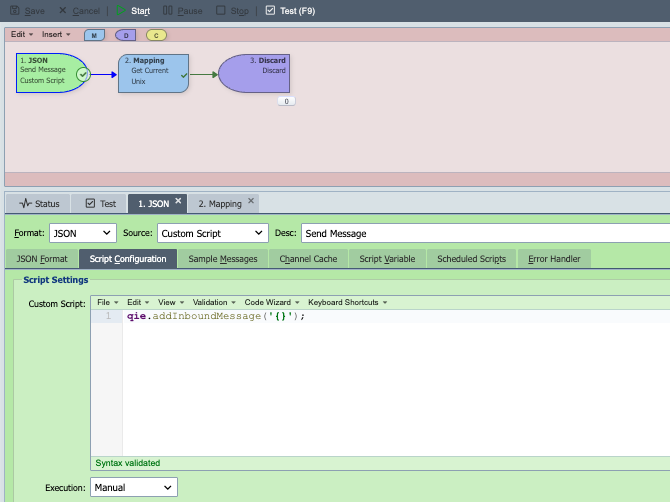
- JSON Custom Script source: produces a single empty JSON message (
{}) each time the channel runs. This message is just a vehicle for triggering the mapping node; its content is not used. - Mapping node: calls the OAuth-protected Web Service Connection. QIE handles the token dance automatically when the call is made.
- Discard destination: completes the message without sending it anywhere. The response from the Resource Server is captured in the message log and can be inspected in the Test window or in Message History.
Step 1: Create the Channel
In QIE, open the zone that contains your OAuth Web Service Connection and create a new channel. Set the channel Type to anything that suits your workflow. The type chosen here does not affect the OAuth call.
Step 2: Configure the Source Node
Set the source node up as a Custom Script source with format JSON and the script:
Set Execution to Manual. You trigger the channel from the Test window, not from an external system.
Step 3: Configure the Mapping Node
A mapping node is created automatically when the channel is created. Open it and add the two mapping functions described below, in this order. Order matters. The timestamp values must be written to the message cache before the Web Service call builds the JWT.
3a. Add the Timestamp Custom Script
Add a Custom Script mapping function named Get Current Unix Timestamp that stores the current and future Unix timestamps in the message cache. QIE reads these values when it signs the JWT for the OAuth token request.
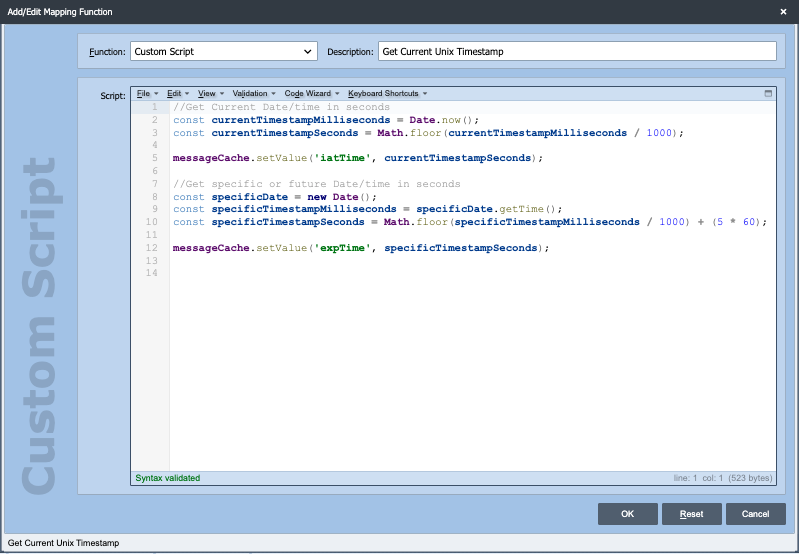
//Get Current Date/time in seconds
const currentTimestampMilliseconds = Date.now();
const currentTimestampSeconds = Math.floor(currentTimestampMilliseconds / 1000);

messageCache.setValue('iatTime', currentTimestampSeconds);

//Get specific or future Date/time in seconds
const specificDate = new Date();
const specificTimestampMilliseconds = specificDate.getTime();
const specificTimestampSeconds = Math.floor(specificTimestampMilliseconds / 1000) + (5 * 60);

messageCache.setValue('expTime', specificTimestampSeconds);
iatTime is the issued-at time (now, in seconds) and expTime is the expiration time (five minutes from now, in seconds). Both are written to the message cache where QIE looks for them when populating the iat and exp claims marked as "(Set by JWT)" in the Token Config.
3b. Add the Web Service Call
Add a Web Service mapping function after the timestamp script with these settings:
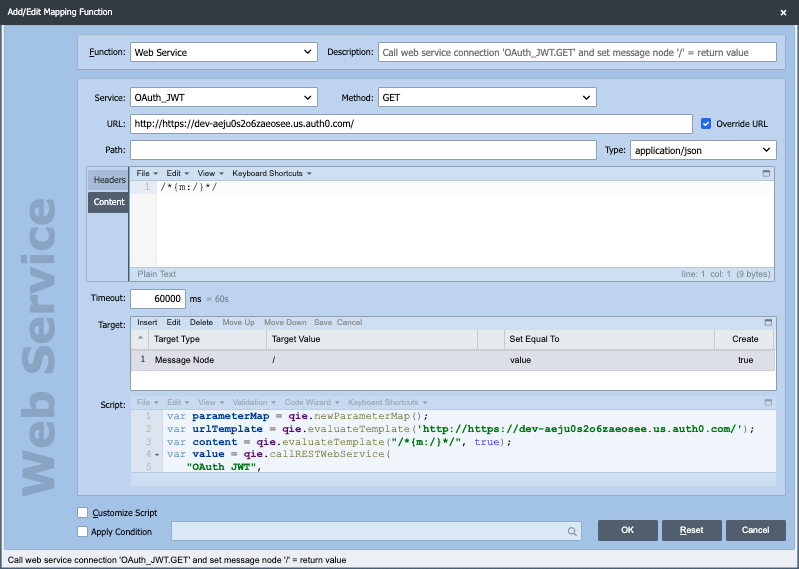
- Service: select the Web Service Connection you built in one of the previous exercises (for example,
OAuth_JWT). - Method:
GET(or whichever method the Resource Server expects for the endpoint you are calling). - URL: leave blank to use the Endpoint URL configured on the Web Service Connection, or check Override URL and enter a full URL to call a specific endpoint.
- Type:
application/json(or the Content-Type the Resource Server expects). - Target: set the message node target to
/with Create checked, so QIE replaces the entire message body with the response.
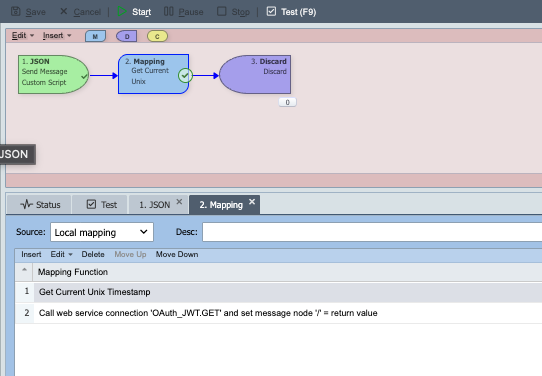
When both functions are saved, the mapping node lists them in order:
Step 4: Discard the Result
Add a Discard destination node and connect the mapping node's pass branch to it. The Discard sender marks the message complete without sending it anywhere; the Resource Server's response is preserved in the message log.
Step 5: Run the Channel
Open the channel's Test tab and click Start, then Test (F9). The Test log shows each node's input and output. On the mapping node you should see:
- The outbound HTTP request to the Resource Server, including the
Authorization: Bearer ...header QIE attached. - The Resource Server's response, which is what gets written into the message body.
If the token request to Auth0 fails, the mapping node throws an error and the message is routed to the error queue. Open the failed message to see the underlying response from Auth0 (commonly invalid_client, invalid_grant, or invalid_audience. See the troubleshooting list in Step 7 of the JWT Payload Exercise).
What Happens Behind the Scenes
When the mapping node calls the Web Service Connection for the first time, QIE:
- Checks the connection's token cookie cache. If a valid access token exists, skips to step 5.
- Builds the token request body (client_id + client_secret, or a signed JWT assertion, depending on the connection's Authentication setting).
- POSTs the token request to the Identity Provider's Token Server.
- Caches the returned access token in a cookie associated with the connection, keyed by the configured Token Refresh policy.
- Sends the actual mapping-function request to the Resource Server with
Authorization: Bearer <access_token>in the header. - Returns the response to the mapping node.
This is exactly the flow shown in the diagram on the OAuth 2.0 Basics chapter.