Socket (HL7 MLLP) Sender
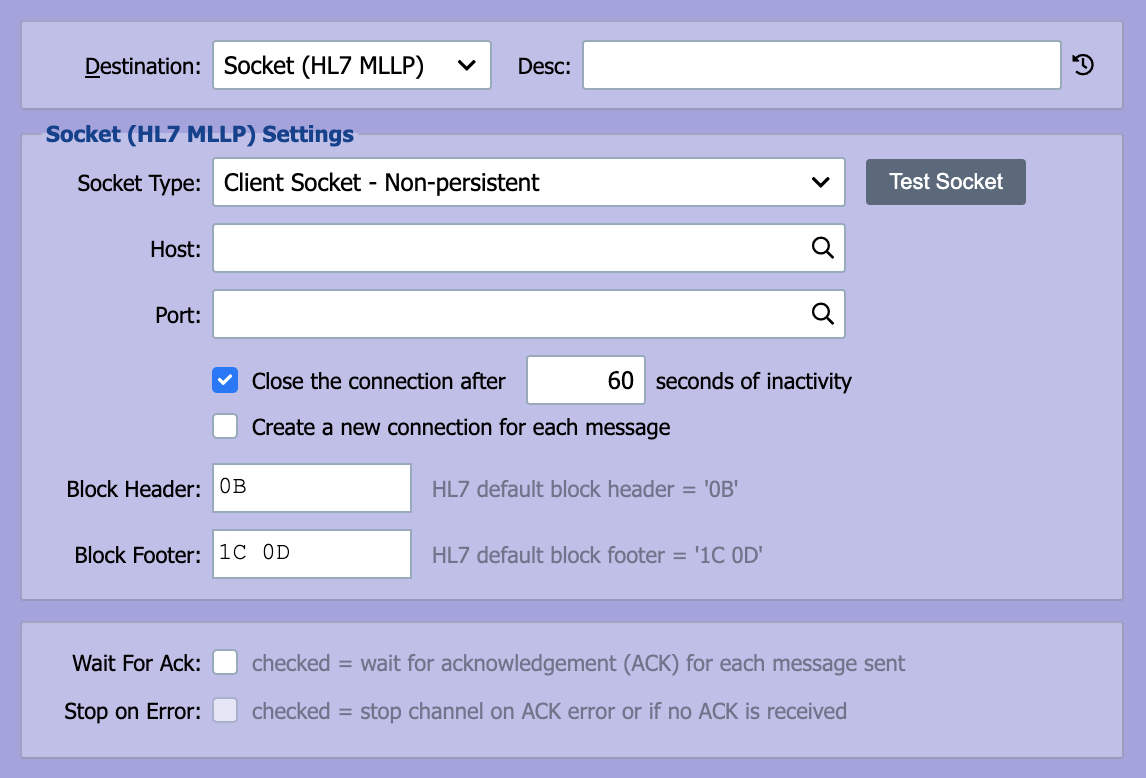
QIE can be configured to connect to another host using a TCP/IP socket on a specified port. The HL7 MLLP protocol utilizes TCP/IP sockets for transmitting HL7 messages.
Socket Type
QIE can either be configured to listen for connection requests from remote systems (Server Socket) or to establish a connection directly with a remote system (Client Socket). In most cases, the socket sender is configured as a Client Socket.
Host
If the socket type is set to Client Socket, the host that QIE is connecting to is entered here. The host should be entered as either a fully qualified domain name (FQDN) or an IP address.
The sender connects to one host. It has no backup or failover host, and a destination's Endpoint Id does not route messages. For automatic failover, place a load balancer or virtual IP address in front of the receiving systems and enter its address here. To switch hosts by hand, enter a system variable such as {v:LabHost} and change the variable's value. While the host is down, QIE keeps the message in the outbound queue and retries it until it sends. To move a message that keeps failing to the error queue instead, set Error message after 'XX' consecutive send errors.
Port
When acting as a Server Socket, QIE listens on the specified port. When acting as a Client Socket, QIE attempts to establish a connection with the Host on the specified port.
Note
In Client Socket mode, both the Host and Port fields accept node tags, including {v:VariableName} for system variables. QIE re-evaluates the tags for each outbound message, so the destination address can vary per message (for example, routed by patient or facility). In Server Socket mode the values are used literally, since QIE binds to the socket once at channel startup.
Block Header and Block Footer
When using a Socket Sender to send HL7 formatted messages, the HL7 MLLP specification requires that a block header value and a block footer value be sent to signify the beginning of the message and the end of the message respectively. The values are entered as hex pairs. QIE pre-populates the standard MLLP defaults:
| Field | Default value (hex) | Meaning |
|---|---|---|
| Block Header | 0B |
<VT> (vertical tab) |
| Block Footer | 1C 0D |
<FS><CR> (file separator + carriage return) |
The destination reads the ACK the receiving system returns with the same framing, and removes the block header and footer before the ack script sees it. When Block Footer is empty, an ACK ends once no more data is waiting on the connection. Any Block Header bytes at its start are still removed.
Additional Parameters
The following parameter checkboxes are displayed for the specified Socket Types.
Client Socket
- Close the connection after N seconds of inactivity: specify the number of seconds.
- Create a new connection for each message: closes the connection after each message.
Secure Server/Client Socket
- Trust Policy: Trust All Certificates, Trust Selected Certificates, or Use System Settings.
- Server Cert: Select the certificate QIE presents when acting as the server (Server Socket only). Required only if you are the server in this TLS connection.
- Client Auth: Check the box and select a certificate for QIE to present when the remote side requests client-authenticated (mutual) TLS.
Server certificate vs Client Auth certificate
The Server Cert is what QIE presents to prove its identity to the other side. The Client Auth certificate is what QIE presents only when the remote side requires mutual TLS. Both are public certificates with matching private keys held in QIE. Only the public certificate is ever exchanged. See Certificate Management for how to decide which you need and how to generate or import them.
Acknowledgement
MLLP destinations wait for an HL7 ACK from the receiver, the default ack script parses the response, matches MSA-2 against the outbound MSH-10, and treats MSA-1 ending in A (i.e. AA) as success. See Ack Scripts for the return-value contract, the default script in full, and how to customize it.
Routing between QIE channels
The purpose-built mechanism for routing a message from one QIE channel to another is the Channel Queue destination, which hands the message off in-process via a Queue ID and surfaces a clear error if the receiver is not running. Prefer it over an MLLP wire link whenever both endpoints live in the same engine.
When the two channels still need to talk over MLLP, for example, to match an existing external integration's protocol or to bridge across engines. Leave Wait for Ack enabled on this destination. MLLP has no other way to detect that the receiving channel has been stopped or restarted; without the ACK round-trip the sender continues to drain its outbound queue while the receiver silently drops the connection. Over REST/HTTP the response status code provides this signal automatically, but MLLP does not.
\"Read Timed Out\" on a Wait-for-Ack destination
java.net.SocketTimeoutException: Read Timed Out from an MLLP destination means QIE did not receive an ACK from the receiver within the Ack Timeout. Common causes:
- The receiving system is not configured to send an ACK (in HL7,
MSH-15set toNEtells the receiver not to acknowledge). - A firewall or proxy is closing the connection before the ACK gets back.
- The receiver is misconfigured and is not actually listening on the negotiated port.
- The receiver is overloaded and not responding within the timeout. Raising Ack Timeout is a quick way to confirm.