Mapping Function Targets
A mapping function target is where the function writes its result. A function can write to more than one target by inserting a row for each destination.
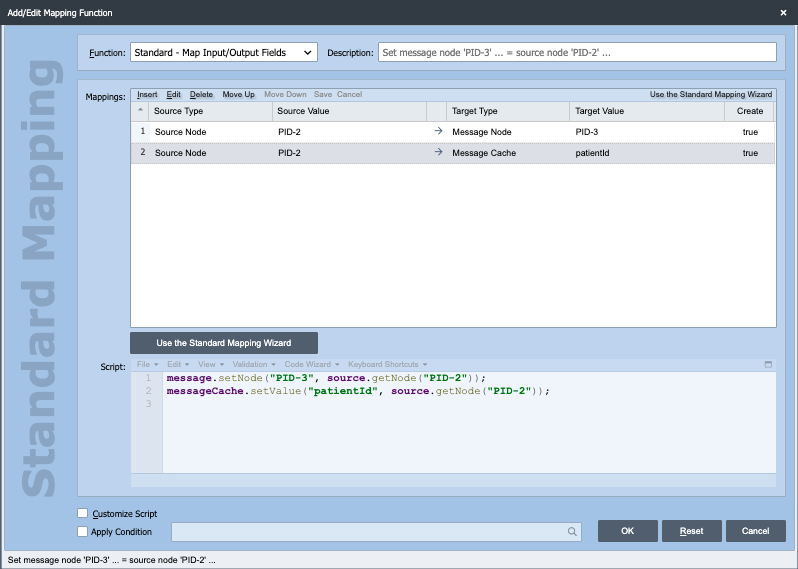
Targets are configured in the Mappings grid on the Add/Edit Mapping Function dialog. Each row pairs a source with a target. The Target Type and Target Value columns are described below.
Target types
| Target Type | Where the result is written | Lifetime |
|---|---|---|
| Message Node | A node in the output message, addressed by a node path. | The message |
| Message Cache | A named key in the message cache, read in scripts as messageCache. |
The message |
| Channel Cache | A named key in the channel cache, read in scripts as channelCache, shared by every message the channel processes. |
Until the channel stops |
| Script Variable | A script variable defined on the channel's Source tab, read in scripts as a bare identifier. | Set by the variable's own scope |
Channel Cache and Script Variable targets both outlive the message. See Channel Cache and Script Variables for the differences between them and for when a value is cleared.
Fields
| Field | Description |
|---|---|
| Target Type | Which of the four destinations above receives the result. |
| Target Value | Identifies the destination within that type. The field label changes with the target type: Node Path for a message node, Cache Key for either cache, and Script Variable for a script variable. |
| Set Equal To | Used by the Database Query Mapping Function. Set it to a column name returned by the query statement. |
| Create | Creates the message node or cache key if it does not already exist. QIE selects this automatically when you choose a target type that supports it. |
Create does not apply to script variables
A script variable has to already exist before a mapping function can write to it, so the Create flag is not available for a Script Variable target. Define the variable on the channel's Source tab first. Selecting Create on a Script Variable row displays 'Create' is not supported for Target Type 'Script Variable'. and clears the checkbox.
Script variable names
A Script Variable target value must be a valid JavaScript identifier, because the variable is bound into scripts by that name. It must begin with a letter, a dollar sign or an underscore, and can contain only letters, numbers, dollar signs and underscores after that. Names that QIE reserves for its own bindings are rejected.