Roles and Permissions
A role is a named set of permissions. Users are granted roles rather than individual permissions, so access is changed by editing a role once instead of editing every account that needs it.
Permissions are per zone: the same role can give a user edit access to one zone, view access to another, and no access at all to a third.
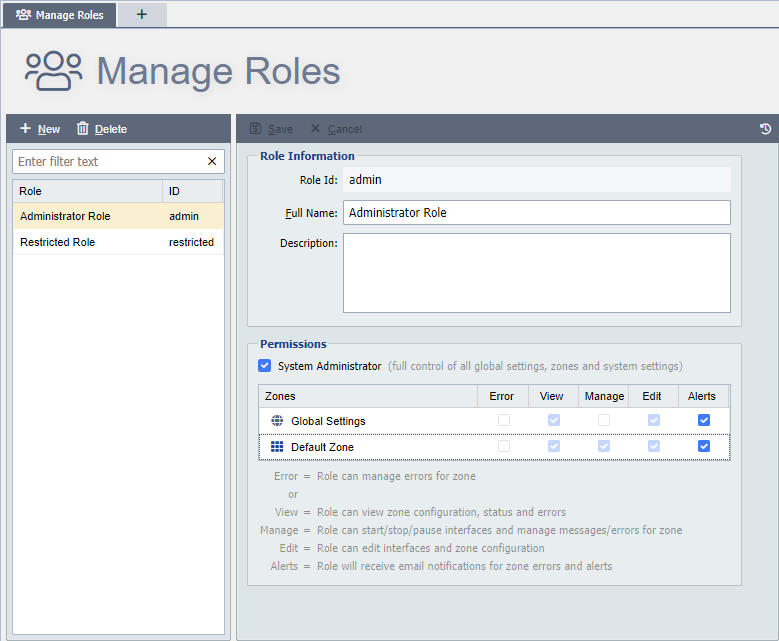
Manage Roles allows a system administrator to add, edit or delete roles. User permissions can be defined by a role.
New: This button adds a new empty role. The Role Id is required, the remaining fields can be left at default values.
Delete: A role can only be deleted if all user and LDAP mappings that reference this role have been changed or deleted.
Permissions set here are applied to all users who are using this role (see User Permissions for more information).
Site Access on a Hub
On a Remote Management Hub, a role has a Site Access section in place of the zone permissions. It gives everyone holding the role the Console, Jobs or MCP grant at the sites that carry the ticked tags. See Site Access Grants.
On a Hub, System Administrator gives full control of the Hub's settings, sites, tags, users and roles, but opens no site's console. Opening a site's console through the Hub needs the role's Console grant, for administrators too.
Each site's Role Map names Hub roles exactly, so on a Hub two roles cannot share a name, ignoring case. Saving a role with another role's name shows "A role named '
Permissions
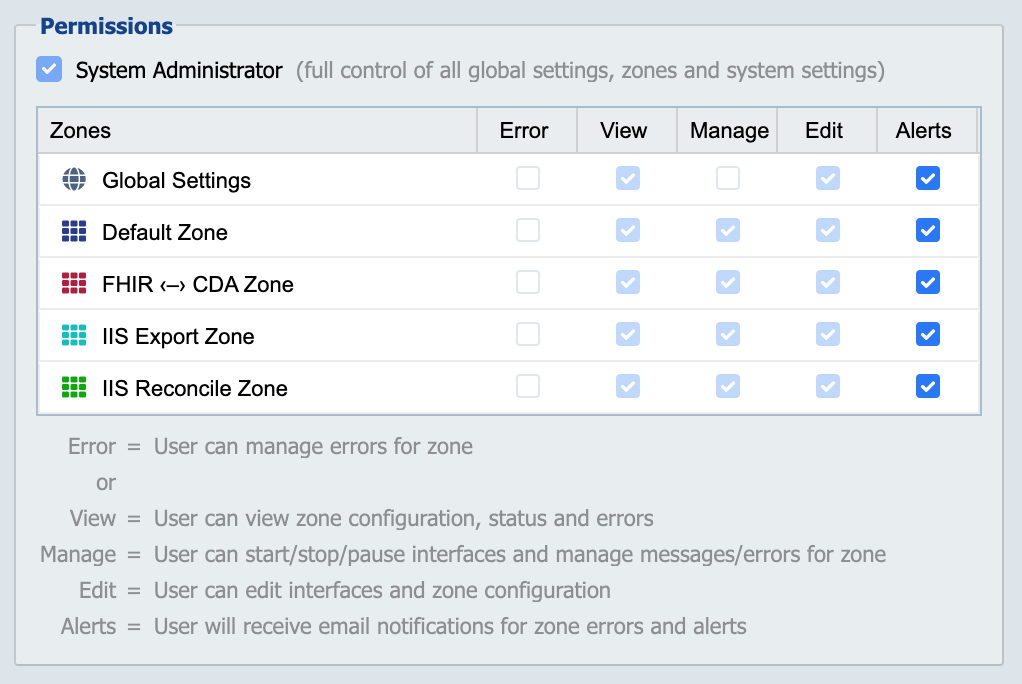
A system administrator can manage a user's access to all zones that exist in the system. For each zone, the user can be granted no access, error access, view access, manage access or edit access. In addition to access level, users can be configured to receive email alerts by zone.
No Permissions
If the Error, View, Manage and Edit checkboxes are unchecked for a given zone, the user is blocked from gaining access to that zone.
Error
A user with Error permissions is only allowed to manage errors for the specified zone.
View
A user with View permissions has read-only access to the zone and its related resources. The user can view all zone related resources, including channel status information but they cannot manage (start, stop, pause) or edit any of the resources.
Manage
A user with Manage permissions to a zone has all View privileges, plus the ability to start, pause or stop enabled channels.
Edit
A user with Edit permissions to a zone has all View and Manage privileges, plus the ability to add, edit and delete zone related resources.
Alerts
A user with the Alerts permissions who also has a valid email address receives email alerts whenever warning or error conditions occur on any channels associated with the zone. Email alerts can only be sent out if the SMTP server is configured.
System Administrator Permission
A user with System Administrator permissions has full access to all zones and all system administration settings. System Administrators require at least a medium strength password.