Channel Scheduled Scripts
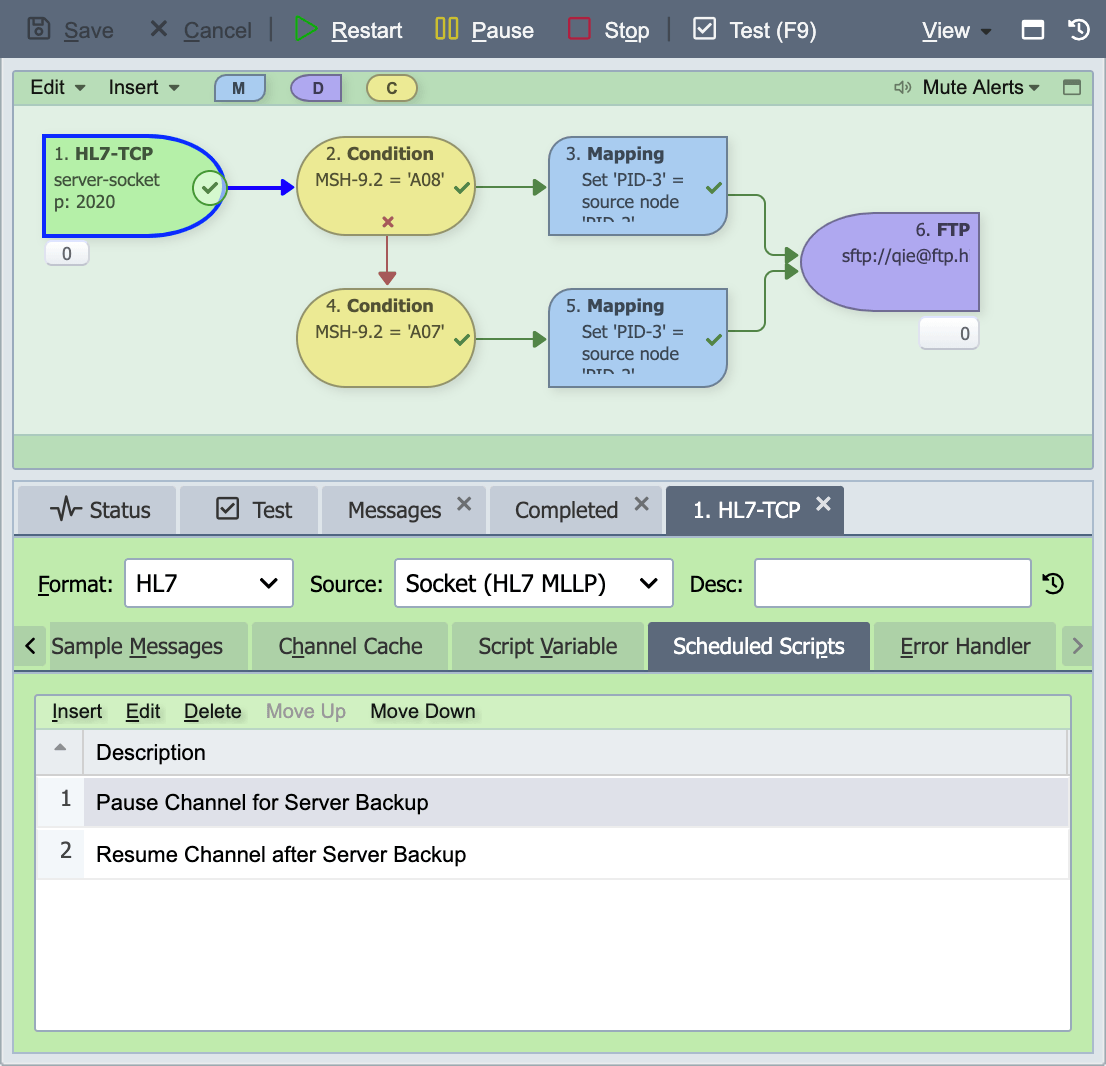
Channel scheduled scripts can be used to perform tasks related to a channel's operation but outside of the context of processing messages.
Scheduled scripts can be configured to run when the channel starts, when the channel stops, when a connection is established and/or according to a specified schedule.
Some examples of where scheduled scripts might be used are:
-
Pause/Resume a channel for scheduled backups.
-
Clean up or remove channel cache values when a channel is stopped or started.
-
Check the status of a remote system on a periodic basis and pause or stop the channel.
Channel Scheduled Script Dialog
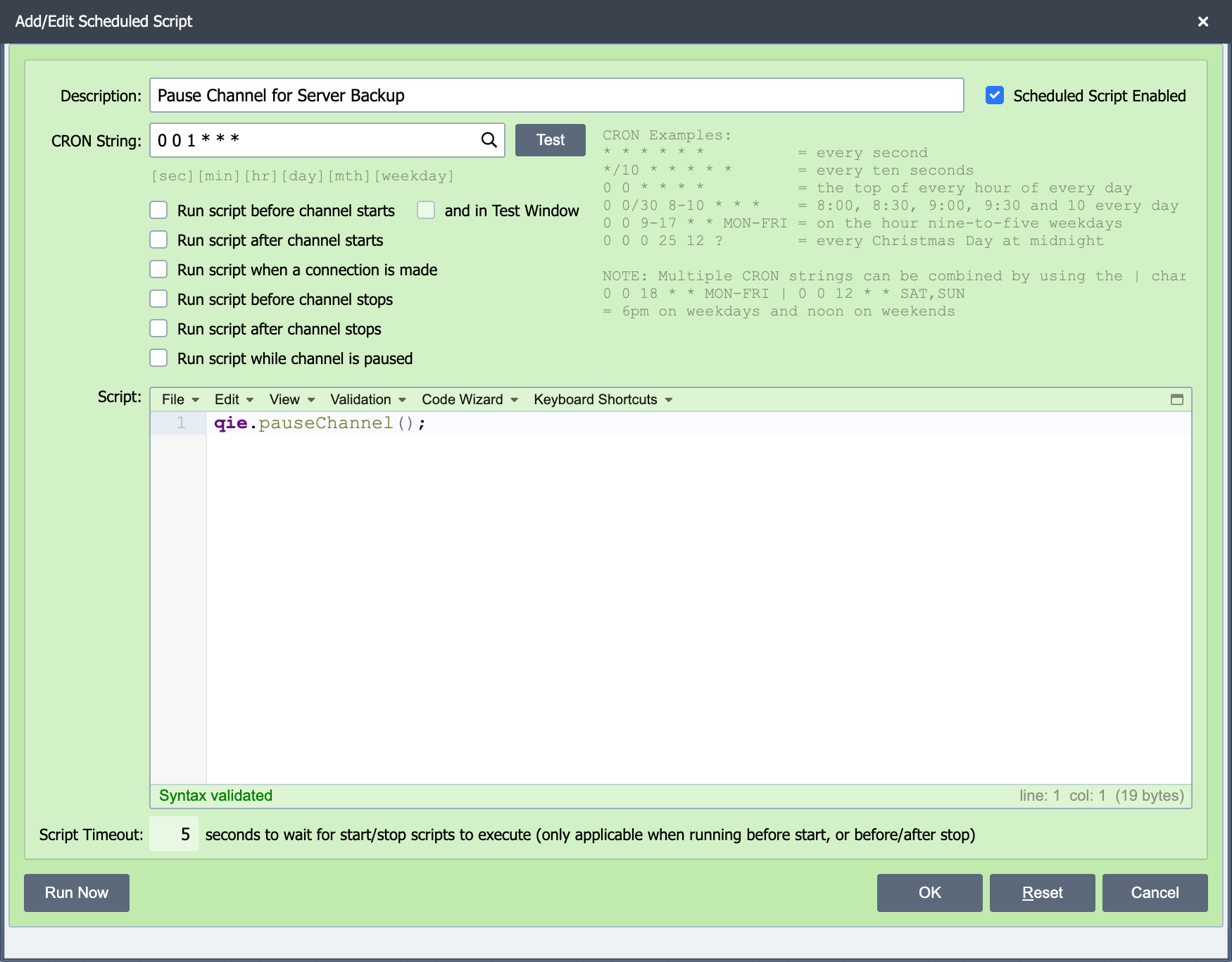
The channel scheduled script dialog is used to configure how/when a scheduled script runs as well as editing the scheduled script itself.
Description
The description associated with a scheduled script is displayed in the Scheduled Scripts tab where all scheduled scripts associated with a given channel are listed.
CRON String
The CRON String is used to specify the schedule for executing the script. If a CRON string is not specified, the script is not scheduled for execution. CRON string is not required to execute the script when the channel is started, stopped or a connection is made. See CRON String Format for the six-field syntax and examples.
Note
Multiple CRON strings can be combined by using the | character. To run a script at 6:00 PM weekdays and at noon on weekends: 0 0 18 * * MON-FRI | 0 0 12 * * SAT, SUN
CRON ranges are inclusive on both ends
A range like 8-10 in the hour field matches 8, 9, and 10. So 0 0 8-10 \* \* \* fires at 8:00, 9:00, and 10:00, which is three times. To run only at 8 and 9, use 8-9. The same inclusive rule applies to minute, day-of-month, month, and day-of-week ranges.
Daylight Saving Time transitions
CRON runs against the QIE server's local time. In time zones that observe Daylight Saving Time, jobs scheduled inside the transition window misbehaves: a job scheduled between 2:00 and 3:00 AM on the spring-forward day is skipped because that hour does not exist locally; a job scheduled between 1:00 and 2:00 AM on the fall-back day fires twice because that hour repeats. Avoid scheduling critical jobs in those windows. Pick a time outside the 1:00 AM to 3:00 AM range, or schedule the job to run manually (disable the CRON) on DST transition days.
CRON cannot express \"every other X\"
Standard CRON syntax does not support intervals that span more than one week (every other Friday, every third weekday, etc.). The CRON expression 0 0 17 * * FRI fires every Friday, not every other Friday. To run a script every other Friday, schedule it every Friday and gate the work inside the script by checking the current week-of-year against a parity rule:
CRON String Test Button
This returns the next execution time associated with the current CRON String.
Run script before channel starts
If this option is selected, the script is executed immediately before the channel is started. If the script fails, the channel does not start. The start names the failed script, and the script's error is in the channel log.
Run script after channel starts
If this option is selected, the script is executed immediately after the channel is started.
Run script when a connection is made
If this option is selected, the script is executed each time a new connection is made from a remote system to the channel's receiver. This option only applies to ISO 8583 Receivers and Socket Receivers.
Run script before channel stops
If this option is selected, the script is executed immediately before the channel is stopped.
Run script after channel stops
If this option is selected, the script is executed immediately after the channel is stopped.
Run script while channel is paused
If this option is selected, the script is executed according to the script's normal schedule even while the channel is paused. This is the only way to schedule a script that calls qie.resumeChannel(...) to bring the channel back online, without this option, the scheduler skips runs while the channel is paused, so the very script meant to resume it never fires.
Script Timeout
The Script Timeout field is editable only when one of the Run script before channel starts, Run script before channel stops, or Run script after channel stops triggers is checked. These are the points where QIE must wait for the script to finish before completing the lifecycle transition. For all other triggers (CRON-driven runs, Run script after channel starts, Run script when a connection is made, Run script while channel is paused), Script Timeout is read-only and shows the default; QIE lets the script run to completion without a deadline.
Script
The script to be executed is entered here (see Creating Custom Scripts).
Run Now
Runs the scheduled script immediately, on demand, and opens a dialog showing the log output the script produced. Use it to test a script or trigger a one-off run without waiting for its CRON schedule or a channel lifecycle event.
Run Now executes the saved version of the script, so save your changes first. If the editor contains unsaved edits, or the channel itself has not been saved, Run Now reports that and does nothing until you save. Because it runs a script with real side effects, Run Now requires edit access to the channel's zone.
Run Now is a real execution, not a dry run
Run Now executes with the same bindings and side effects as a scheduled run. channelCache changes are persisted to the database (and, if the channel is running, its in-memory cache is refreshed), and sharedCache writes take effect immediately, a script that increments a counter or updates a cache value advances that value each time you press Run Now. Because a scheduled script runs outside the context of a message, the message and messageCache bindings are not available. One difference from a scheduled run: the script's qie.debug/info/warn/error output is captured for the results dialog instead of the channel log, so a logged error does not raise a channel error alert.
After a Run Now, the channel's Channel Cache grid refreshes from the server automatically, so values a script changed are visible without reopening the channel.