Global Search
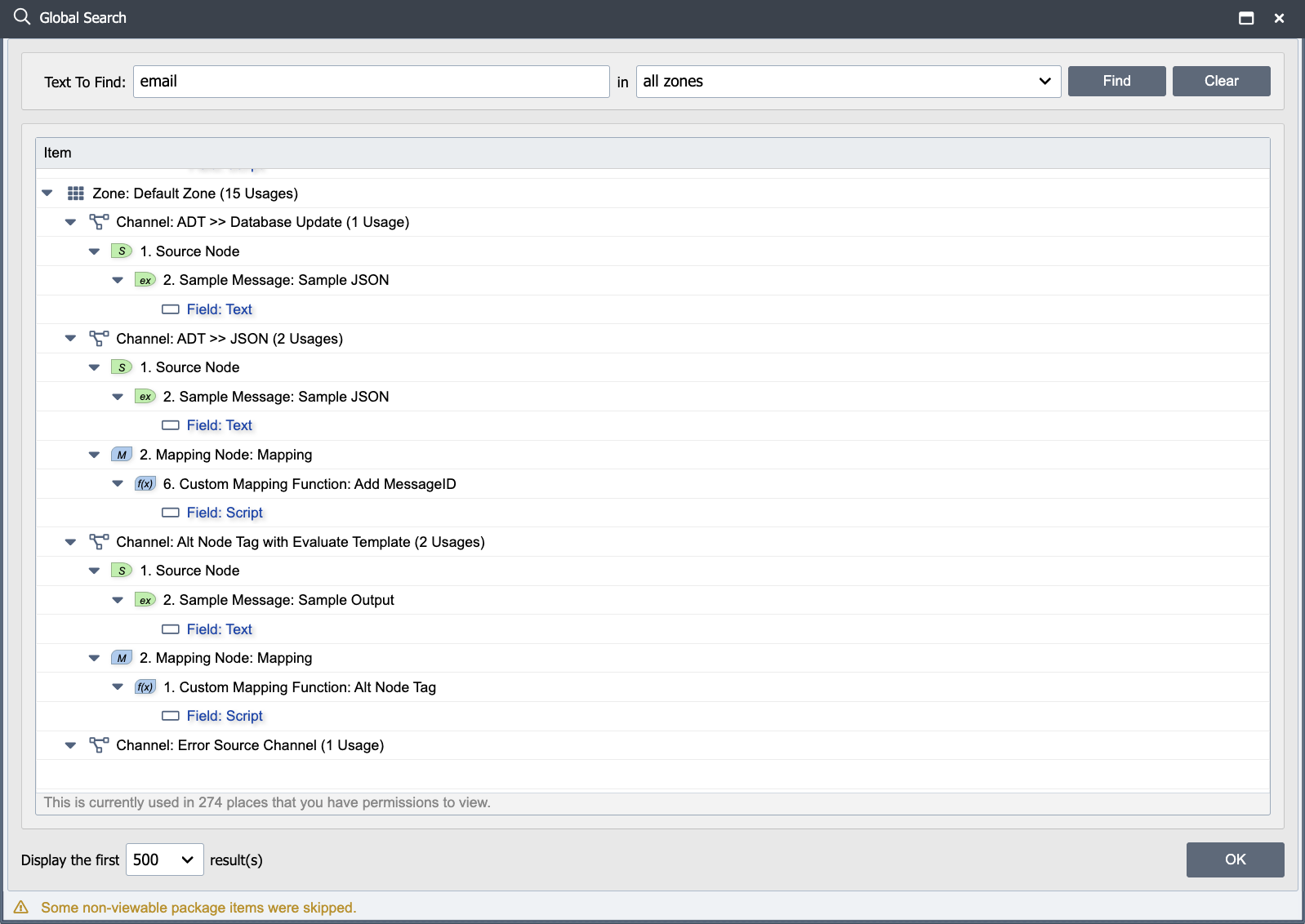
Global Search finds every place a literal text string appears in the QIE configuration, across channels, mapping/condition/source/destination nodes, system variables, connections, scheduled scripts, published functions, certificates, and zone settings. It is the right tool whenever the question is "where is X used?": which channels send email, where does the script call qie.callRESTWebService, which mappings reference a particular system variable by name, which connections point at a retired host. Open it from the header's View menu, or press Ctrl+Shift+F.
Searching configuration in the UI this way is reliable; exporting the config and grepping the file is not. The .qie export format is compressed regardless of any "plain text" export flag, so a text editor cannot read it. Use Global Search for audit-style questions.
Using the dialog
The dialog has three inputs:
Text To Find: the literal string to look for. Matching is case-insensitive and substring, so sendemail matches qie.sendEmail and SendEmailFrom. There is no regex or wildcard support; the string is matched as written. Empty or whitespace-only strings return no results.
Zone filter (the drop-down labeled in) limits the search to a single zone, or choose all zones to search every zone the current user has access to. Items in locked (non-viewable) packages are always skipped, even with all zones selected, so protected content cannot be discovered by typing a known fragment. When any are skipped, the dialog shows a footer warning: Some non-viewable package items were skipped.
Display the first N result(s): caps the result list so a common substring does not produce thousands of rows. Increase it when an initial search returns hits up to the cap and you need to see the rest.
Click Find to run the search. Results render as a usage tree grouped by zone, then channel, then node, then field where the match was found. Double-click a row to open that object directly.
Common audit examples
Most "find everything that does X" questions translate to searching for the function name, configuration value, or label that X uses. A few that come up routinely:
- Channels that send email: search for
qie.sendEmail, thenqie.queueEmail,qie.sendEmailFrom, andqie.queueEmailFromin turn. Hits include both mapping scripts and custom-sender destination scripts. - Channels that call a particular REST endpoint: search for the URL or hostname. Hits include the Web Service Connection's URL field and any script literal that mentions it.
- Channels that reference a system variable: search for the variable name. Hits include
qie.getVariable('Name')calls in scripts and any node tag like{v:Name}in template fields. - Channels using a deprecated function before upgrading: search for the function name to find every usage before removing or replacing it.
- Configuration objects that mention a retired host or credential: search for the hostname, port, or username. Connection definitions and any script literal appears.
For each audit, run separate searches for each name variant. qie.sendEmail and qie.queueEmail are different functions, and one search does not find the other.
Limitations
- Literal text only. No regex, no wildcards.
qie.sendEmail*matches the literal*character, not "any function starting with sendEmail." - Single string per search. To find multiple variants (e.g.
qie.sendEmailandqie.queueEmail), run one search per variant. - Static configuration only. The search inspects the saved configuration. It does not look at running channel state, message history, or log files. For runtime questions about messages, see Managing Queues and Managing Errors.
- Locked packages are invisible. Items inside a package the current user cannot view are skipped, and the dialog footer shows Some non-viewable package items were skipped. If an expected hit is missing, check package permissions.
Related tools
- Find Usages: on individual objects (web service connections, database connections, system variables, published functions, channel cache entries), the per-object Find Usages action lists everywhere that specific object is referenced. Faster than Global Search when you already know which object you care about and just need its consumers.
- View Endpoints: lists every source and destination endpoint across the installation, grouped by transport type. Use when the question is shaped by host/port/path rather than by a text fragment.
- Revision History: for "when did this change?" rather than "where is this used?".