Destination Nodes
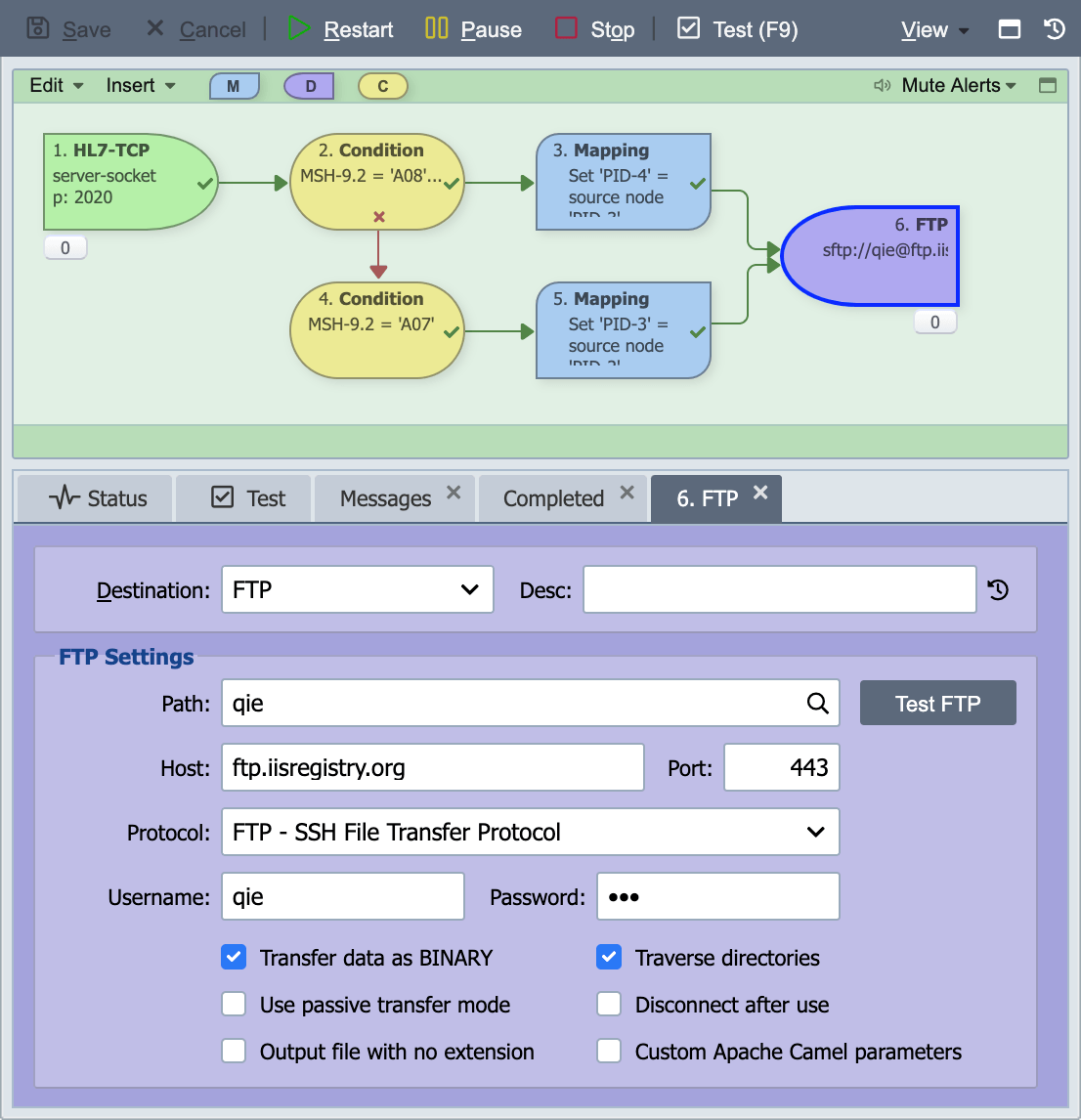
Destination nodes are used to define how and where messages are sent after being processed through the channel. A channel must contain 1 or more destination nodes. QIE supports several message destination types ranging from simply discarding the message to executing a database update or calling a web service.
Destination
Select the desired destination type from the drop-down list.
The table below lists the supported destination types. The details of each destination type are defined below.
| Destination Type | Description |
|---|---|
| Database Sender | QIE can be configured to write message data directly to one or more database tables. |
| DICOM Sender | Sends DICOM messages to a remote peer using the DIMSE protocol. Requires a configured DICOM Connection. |
| File Sender | QIE can be configured to write messages to files in network or local folders. |
| FTP Sender | File Transfer Protocol (FTP) is a standard TCP-based network protocol used to transfer files from one host to another. QIE can be configured to send messages to a remote host using FTP. |
| Network Share Sender | QIE can be configured to write messages to a network share. A username and password can be entered for access to the network share. |
| Socket (ASTM) Sender | A TCP/IP socket is an endpoint of an inter-process communication flow across a computer network. The ASTM protocol utilizes TCP/IP sockets for transmitting ASTM messages. QIE can be configured to send messages to a remote system using an ASTM socket connection. |
| Socket (HL7 MLLP) Sender | A TCP/IP socket is an endpoint of an inter-process communication flow across a computer network. The HL7 MLLP protocol utilizes TCP/IP sockets for transmitting HL7 messages. QIE can be configured to send messages to a remote system using an HL7 MLLP socket connection. |
| Web Service Sender | The web service sender is used to submit messages to a web service endpoint |
| Discard Sender | QIE can be configured to simply discard messages once they have been processed through the channel. |
Common Destination Fields
The following fields are common to most destination types. Per-destination exclusions are noted on individual fields below; the protocol-specific fields for each sender type are documented on that sender's reference page.
Description (Desc)
If specified, the description is displayed in the destination node on the visual channel editor.
Throttle this destination
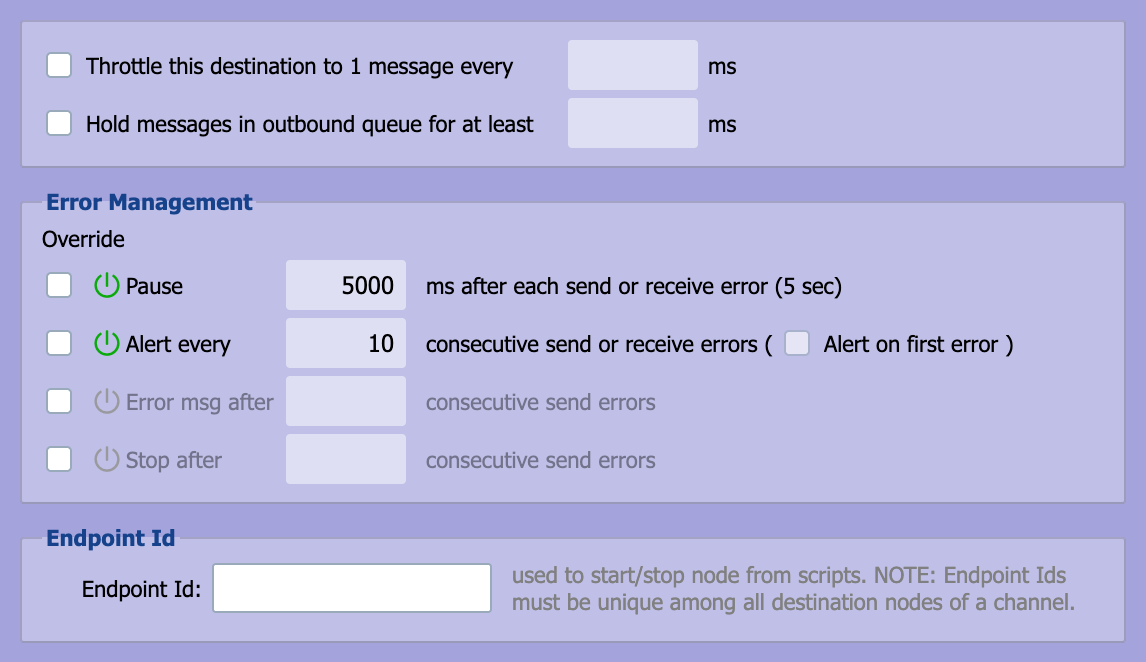
Destination nodes can be throttled to prevent the destination host from becoming overwhelmed by receiving too many messages too quickly. When selecting this option, the delay between messages is specified in milliseconds (1 sec = 1,000 milliseconds).
Not applicable to the Custom Script, Channel Queue, or Discard senders.
Hold Messages in Outbound Queue
Select this checkbox and enter the time in ms to hold the messages in the outbound queue before sending them to the endpoint.
Not applicable to the Custom Script, Channel Queue, or Discard senders.
Error Management
Error Management settings are used to manage how a destination behaves when an error occurs. By default these setting are inherited from the System Configuration (see System Configuration). These settings can be overridden at the channel level (see Channel Properties Dialog) or the destination node level. To override the behavior for a setting, select the check box in the 'Override' column. When the box is checked the value can be modified. For detailed information on these settings see Error Management.
Not applicable to the Discard sender.
Endpoint Id
An optional identifier that lets scripts refer to this destination node. Type the ID in the Endpoint Id field; there is no separate checkbox to enable it. Each ID must be unique among the destination nodes of the channel.
Scripts use the ID to control or monitor this one node:
qie.startDestinationNode,qie.stopDestinationNode, andqie.isDestinationNodeRunningstart, stop, or check the node. They are listed under Channel Functions in the Code Wizard.qie.getOutboundCountandqie.getInstanceOutboundCountcount only this node's outbound queue when given the ID. They are listed under Channel Status Functions.
The Management API message count response also reports each destination's endpointId.
The ID does not route messages. A mapping or script cannot send a message to a particular destination by its endpoint ID. Messages reach a destination only through the connections drawn in the channel editor.
Additional Parameters
Some types of endpoints send an acknowledgement message to notify the sender the message was received. The parameters below apply to socket and web service senders only.
Wait for Acknowledgement (Wait for Ack)
Select this option if the sender should wait for messages to be acknowledged by the destination host.
Stop on Error
If the sender is configured to wait for messages to be acknowledged, selecting this option stops the channel if the sender receives a negative acknowledgement (the message is rejected by the host), encounters an error processing the acknowledgement or does not receive an acknowledgement as expected.
Acknowledgement Script (Ack Script)
If the sender is configured to wait for messages to be acknowledged, the acknowledgement script is executed when the sender receives the ack message. The script returns true to indicate that the message was accepted and false to indicate that the message was rejected. If the message is rejected or the script throws an exception, the message is sent to the error queue.
See Ack Scripts for the full return-value contract, helper functions (qie.simulateSendError, qie.throwAckError, message.error), default scripts for HL7/DICOM/REST/SOAP destinations, and debugging tips.
Acknowledgement Timeout (Ack Timeout)
The length of time the sender waits for the acknowledgement before resending the message.
Max Resend
The maximum number of times a message is resent to the endpoint. The sender waits for the time specified in the Ack Timeout between each resend. If the message has not been acknowledged after the message has been resent the designated number of times it is sent to the error queue.
Send Multiple Messages Simultaneously (Limit to XX Concurrent Messages/Threads)
Available for Web Service connections only. Check this box if the endpoint allows sending of multiple messages and enter a limit.