Deidentifying DICOM Messages
This chapter walks step by step through configuring QIE to deidentify a DICOM message before it leaves the channel. Deidentification replaces patient-identifying values in the message with deterministic substitutes, while storing an encrypted copy of the original values so that the message can be re-identified later by an authorised party. After completing the steps in this chapter you should have a channel that forwards a DICOM message to its destination with all configured patient identifiers replaced.
Note
This chapter builds on the channel you created in Creating Your First DICOM Channel. If you have not yet completed that chapter, do so first.
How QIE Deidentifies DICOM
QIE deidentification has three pieces:
- A system variable table that lists the tags to deidentify, the action to perform on each tag, and (optionally) a custom replacement value. The default table ships with QIE and can be imported with one click.
- A certificate stored in QIE's Certificate Management page. The certificate's public key encrypts the original values; its private key decrypts them during re-identification.
- A call to
qie.deIdentifyMessage(...)in a mapping node, which reads the table, applies the configured actions to the message, and stores the encrypted originals in a node path you specify.
The next steps configure each piece in turn.
Step 1: Import the Default DICOM ID Fields table
Navigate to Global Settings (or the desired Zone) → Global System Variables (or System Variables).
Click New → Table to open the new-table dialog.
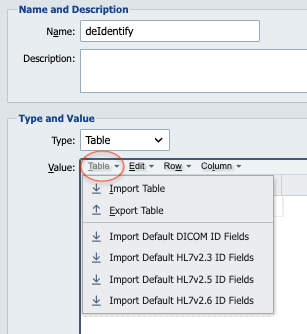
In the new-table dialog, select Import Default DICOM ID Fields from the Manage drop-down. QIE populates the table with the default set of DICOM tags that are typically deidentified, along with the recommended action for each.
Give the table a name (for example, dicomDeidentifyTags) and click OK to save it.
Step 2: Review the table columns
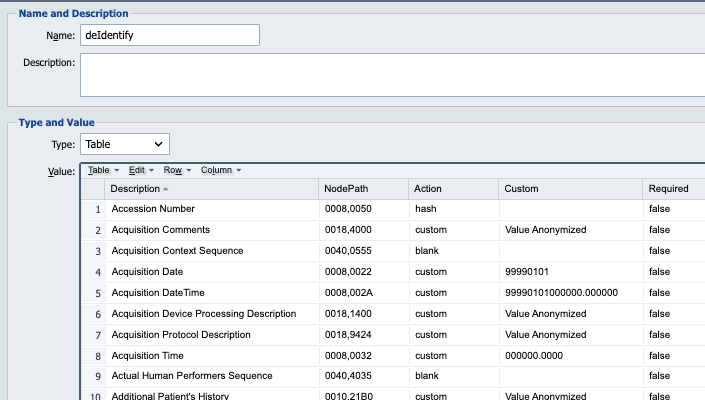
Open the table to review the columns. Each row has the following fields:
| Column | Description |
|---|---|
| Description | A human-readable label that explains what the row covers. The description is informational only and does not affect processing. |
| NodePath | The DICOM node path of the value to deidentify (for example, 0010,0010 for Patient's Name). |
| Action | What to do with the value. Supported actions are listed below. |
| Custom | Used when the action is set to custom. The literal value or node tag that should replace the original. |
| Required | If true, the deidentification call throws an exception when the node is not found in the message. If false (or blank), the node is skipped when not found. |
The supported Action values are:
| Action | Behavior |
|---|---|
| (blank) | The value is removed from the message. |
newuuid |
The value is replaced with a newly-generated UUID. |
newuid |
The value is replaced with a newly-generated DICOM UID. |
transformuid |
The existing UID is replaced with a SHA-1 hash of itself, converted to a big integer. The same input UID always produces the same output, so studies and series remain linked across deidentified messages. |
hash / hash-sha256 |
The value is replaced with its SHA-256 hash. |
hash-sha1 |
The value is replaced with its SHA-1 hash. |
hash-md5 |
The value is replaced with its MD5 hash. |
custom |
The value is replaced with the contents of the Custom column, which can be a literal string or a node tag evaluated at runtime. |
Edit any rows you want to change, then save the table.
Step 3: Upload a certificate
Navigate to the Certificate Management page. Either upload an existing certificate and private key that you intend to use for deidentification encryption, or click New to have QIE generate a self-signed certificate for you.
Give the certificate a recognisable name (for example, dicomDeidentifyCert). Make a note of the name. You reference it in the mapping script in Step 5.
Note
The certificate's public key is used to encrypt the original patient identifiers when qie.deIdentifyMessage(...) runs. The private key is required to call qie.reIdentifyMessage(...) later. Keep the private key secure, and back up both keys.
Step 4: Open the channel from the previous chapter
Return to the Channels page and open the DICOM Passthrough channel you created in Creating Your First DICOM Channel. Stop the channel if it is running.
Step 5: Add a mapping node and call qie.deIdentifyMessage(...)
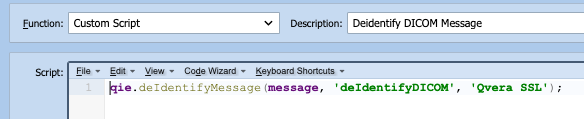
Drag a Mapping node onto the channel surface between the source and destination, then connect the source to the mapping node and the mapping node to the destination.
Click the mapping node to select it, then click the Custom Script mapping function in the function list. Open the script editor.
In the editor, enter the following script:
qie.deIdentifyMessage(
   message,
   'dicomDeidentifyTags',
   'dicomDeidentifyCert',
   '/encryptedPatientInfo'
);
The four arguments are:
message: the working message object. The deidentification call modifies it in place.'dicomDeidentifyTags': the name of the system variable table you imported in Step 1.'dicomDeidentifyCert': the name of the certificate you uploaded in Step 3.'/encryptedPatientInfo': the node path where QIE stores the encrypted copy of the original values. Pick any node path you like, but it must be writable on the message.
Click OK to save the script.
Step 6: Save the channel and test
Save the channel and start it.
Open the Test Window and click Test to feed the sample DICOM message through the channel. Inspect the output message and verify that the patient identifiers listed in the system variable table have been replaced according to the actions you configured.
You should see:
- The Patient Name, Patient ID, Birth Date, and other deidentified tags replaced or removed per the table.
- A new node at
/encryptedPatientInfo(or whatever node path you chose) containing the encrypted copy of the original values.
Re-identifying a Message
To re-identify a previously deidentified message, call qie.reIdentifyMessage(...) with the private key and the same node path:
QIE decrypts the stored values using the certificate's private key and restores them to their original locations in the message.
Note
Only a party with access to the private key can re-identify the message. Treat the private key with the same care as you would any production credential.
What You Should Have Now
- A system variable table of DICOM tags to deidentify.
- A certificate uploaded for deidentification encryption.
- A mapping node in the channel that calls
qie.deIdentifyMessage(...). - A channel that forwards DICOM messages with patient identifiers replaced.
The final chapter shows how to extract DICOM tag values into an HL7 result message.