FTP / SFTP Receiver
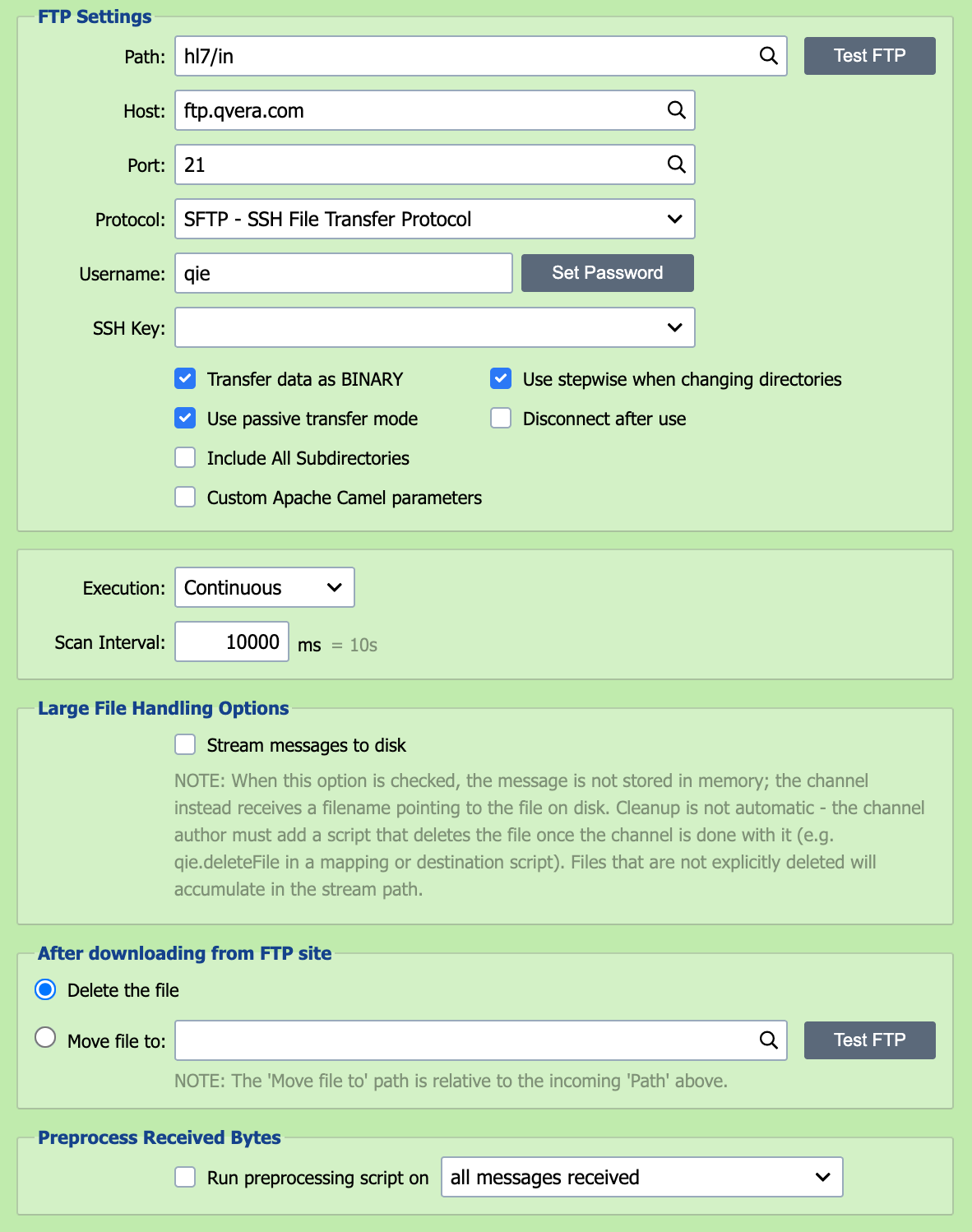
The FTP Receiver handles both FTP (File Transfer Protocol) and SFTP (SSH File Transfer Protocol). The two share the same configuration page; the Protocol field selects between them.
Testing and troubleshooting connections
Use the Test button to run a staged connection diagnostic that pinpoints exactly where a connection fails. See SFTP / FTPS Troubleshooting.
QIE is an FTP/SFTP client, not a server
The FTP Receiver connects out to an existing FTP/SFTP server to retrieve files. QIE has no built-in FTP/SFTP server and cannot act as a host that accepts incoming uploads. To receive files a partner can only push, have them deliver to an SFTP server QIE can poll, or to a folder a QIE File or Network Share receiver monitors.
Path
The path field contains the path to the folder on the FTP server and the filename pattern that QIE uses when checking for files to be processed. The filename pattern can contain wildcard characters such as asterisk (*) and question mark (?). Refer to the File Receiver Path table for a list of sample filename patterns that can be used. The path field accepts node tags, for example, {cc:FolderYear} substitutes a channel cache value into the path on each scan.
File modification timestamps are not exposed
The FTP/SFTP source does not surface the server-side file modification timestamp to channel scripts, mapping nodes, or source filters. While the underlying Camel layer provides the value, QIE does not extract it into the message metadata. If a channel needs to act on modification time, build the timestamp into the filename (so it is parseable from {s-meta:FILE_NAME}) or use a server-side script to filter files before QIE polls. The File source's Only Process Files Older Than… option is the closest in-product analog but only applies to local-filesystem sources.
Paths are relative to the FTP user's login home
The Path field resolves relative to the folder the FTP server drops the user into on login. Enter inbound/hl7/, not /inbound/hl7/. QIE builds the URL as ftp://<host>/<path>, so a leading slash yields a malformed //. In script calls such as qie.readFTPFile and qie.readSFTPFile it is rejected outright: "Absolute paths are not accepted when calling an FTP endpoint."
QIE cannot navigate above the login home from the Path field. To reach a folder above it, have the FTP administrator grant the QIE user access at that level.
Host
The FTP host should be set to the IP-address or the fully qualified domain name of the FTP server.
Port
The FTP protocol typically runs on port 21 but can be configured to run on another port. Enter the port number associated with the FTP server Host here.
Protocol
QIE supports the following FTP transfer protocols:
| FTP Transfer Protocol | Description |
|---|---|
| FTP: File Transfer Protocol | Data is transmitted using the standard FTP protocol |
| SFTP - SSH File Transfer Protocol | SSH File Transfer Protocol (SFTP) is not related to FTP except that it also transfers files and has a similar command set for users. Unlike standard FTP, it encrypts both commands and data, preventing passwords and sensitive information from being transmitted openly over the network. |
Encryption
When using the FTP: File Transfer Protocol, encryption can be configured to use one of the following options:
| Encryption Option | Description |
|---|---|
| Use plain FTP | Data is transmitted without encryption. |
| Require explicit FTP over TLS | In explicit mode (also known as FTPES), an FTPS client must "explicitly request" security from an FTPS server and then step-up to a mutually agreed encryption method. |
| Require implicit FTP over TLS | Negotiation is not allowed with implicit FTPS configurations. A client is immediately expected to challenge the FTPS server with a TLS/SSL ClientHello message. |
Certificates for FTPS
For both FTPS modes QIE is the client in the TLS connection, so QIE does not need its own server certificate. To trust a self-signed or private-CA-signed FTPS server, import the server's public certificate on the Certificate Management page. See Certificate Management. FTPS is unrelated to SFTP; SFTP uses SSH keys, not TLS certificates.
Username and Password
The username and password associated with the FTP connection should be entered here.
Passwords with special characters
If the password contains characters that Camel interprets when building the FTP URI, for example ?, @, &, +, %, #, or =, wrap the password value with RAW(...) so Camel treats it as a literal: RAW(se+re?t&23). Without the wrapper, those characters are URL-decoded before being sent to the server and authentication fails.
SSH Key
When Protocol is set to SFTP, the SSH Key field selects the private key QIE uses for key-based authentication. Keys are imported on the Certificate Management page. Leave the field blank to fall back to username/password authentication.
Supported key format
QIE's SFTP uses the JSch library, which only accepts OpenSSH-format private keys. PuTTY .ppk files (especially the v3 format that recent PuTTYGen releases produce by default) are not supported and fail with com.jcraft.jsch.JSchException: invalid privatekey. Convert the key in PuTTYGen via Conversions -> Import Key, then Conversions -> Export OpenSSH key, and import the OpenSSH file into the Certificate Management page.
Transfer Data as Binary
Check this box to transfer files in binary mode (byte-for-byte) instead of FTP's default ASCII/text mode. Enable it for any non-text file (XLSX, DOCX, PDF, ZIP, images, DICOM objects, and similar binary formats) where ASCII-mode line-ending translation would corrupt the file. Leave it unchecked for plain-text formats (HL7, CSV, XML, JSON) where FTP's line-ending translation between platforms is acceptable.
Passive Transfer
Passive FTP Transfer mode can be used to overcome firewall issues when dealing with FTP connections. Active FTP servers attempt to make connections to random high ports on the client. These connection requests can often be blocked by the client-side firewall. In Passive FTP Transfer mode, the FTP client (QIE) makes both connections to the server once the server communicates the port to use to the client. The FTP server must support passive mode in order for this feature to be used in QIE.
FTP server returns an unroutable passive-mode IP
Some FTP servers behind NAT respond to a PASV command with their internal IP address instead of the public one, leaving QIE unable to open the data connection. The symptom is a successful login followed by an empty file listing (or "no files found") even though files exist. Configure the FTP server to advertise its external IP for passive connections. In FileZilla Server, Settings -> Passive mode settings -> Use the following IP with the public IP, plus Do not use external IP for local connections for LAN clients. Other FTP servers expose the same setting under names like passive ports or external IP.
Traverse Directories
QIE can operate in two modes in terms of traversing directories (the checkbox is selected by default):
-
Traverse the directory structure, one directory at a time (using the CD command) until arriving at the directory to download files from or upload files to.
-
Attempt to discover and download files from the specified subdirectory without traversing the directory structure (e.g. list and download files from the "root" directory that QIE connects to by specifying the subdirectory in the list and retrieve commands).
Most FTP servers accept the default. Clear the checkbox if the server returns errors like 550 Failed to change directory or 550 Permission denied against a path you know is valid.
Disconnect After Use
This option controls whether QIE keeps the FTP connection open after scanning the directory for files, or closes the connection until the next scan is scheduled to be executed.
Include All Subdirectories
Selecting this checkbox instructs QIE to recursively scan subfolders beneath the configured FTP path for matching files. This is useful when inbound files are organized into nested directories on the remote server.
This option is different from Traverse Directories. Traverse Directories controls how QIE reaches the configured FTP folder, while Include All Subdirectories controls whether QIE continues scanning folders beneath that point. QIE preserves the source-relative folder as source metadata for use in archive paths, destination paths or templates.
A destination file name of *, or a blank file name, takes the source file's original name, and with this option enabled that name includes the source-relative folder. A destination path of /out/*.* therefore writes /out/orders/2026/file1.hl7, and the write fails when that folder does not exist. To write every file to the same folder, use {s-meta:FILE_NAME} as the destination file name. To recreate the source folders instead, have the destination create missing directories: check Create directory if it does not exist on a File or Network Share destination, or add autoCreate=true to Custom Apache Camel Parameters on an FTP destination.
Custom Apache Camel Parameters
QIE uses Apache Camel for FTP Connections. While most connections can be made using the standard connection settings, some servers may require more advanced FTP settings. Selecting this option allows additional Apache Camel Parameters to be set for the FTP connection. Apache Camel FTP documentation can be found here.
Permission-restricted FTP/SFTP accounts
By default, QIE uses Apache Camel's readLock=rename strategy, which marks a file as picked up by renaming it on the server. If the FTP/SFTP user account lacks rename or delete permission, the channel runs without errors but never pick up files. Set readLock=none (or another strategy from the Camel documentation, e.g. markerFile, changed) in Custom Apache Camel Parameters to override the default.
Filenames containing commas
Apache Camel treats commas in URI parameters as list separators, so a filename like foo,bar.txt breaks the FTP/SFTP URI parser and the file is not picked up. Either replace the comma with a wildcard in the path (e.g. foo*bar.txt) or wrap the filename in Camel's RAW(...) literal via an include filter (e.g. include=RAW(foo,bar\.txt)) in Custom Apache Camel Parameters. The same caveat applies when calling qie.readSFTPFile / qie.readFTPFile from a script, pass a wildcard in the path argument or use the ftpParameters argument to add include=RAW(...).
Improving FTP throughput
By default, the FTP source picks up one file per polling cycle. When many files arrive between polls, throughput can fall behind. Add maxMessagesPerPoll=N to Custom Apache Camel Parameters to download more files per cycle (for example, maxMessagesPerPoll=100). Higher values increase throughput but also memory use per poll.
Avoid picking up a file mid-upload
When a sender writes a file in place (an FTP upload, a slow scp, etc.), QIE may grab it before the write completes. Add readLock=changed to Custom Apache Camel Parameters to make Camel skip files whose size is still changing, paired with readLockCheckInterval=3000 (3000 ms = 3 seconds between size checks). Increase the interval for slow networks or very large files.
SFTP key-auth fails when QIE runs under a named service account
SFTP servers that prefer public-key authentication may reject the connection when QIE is running under a named Windows service account (after switching off Local System), because the named account presents its own keys that QIE does not control. Add preferredAuthentications=password to Custom Apache Camel Parameters to force password-only authentication and bypass the key handshake.
SFTP key authentication via filesystem path
The standard way to use key-based SFTP authentication is the SSH Key field above (which selects from Certificate Management). If you need to reference a key file directly on the QIE server's filesystem instead, leave SSH Key unset and add these Custom Apache Camel Parameters:
The key must be in OpenSSH format (see SSH Key for converting PuTTY .ppk keys). The privateKeyPassphrase value should be set if the key is encrypted; leave blank for an unencrypted key.
Execution
Execution defines the frequency and schedule associated with scanning the FTP server for matching files. The three available options are continuous, scheduled or manual.
If execution is set to Continuous, QIE scans again immediately while scans keep finding files. After a scan that finds none, it waits the 'Scan Interval' before scanning again.
If execution is set to Scheduled, the FTP server is scanned according to the schedule specified in the associated CRON String. Scans never overlap: if a scan is still running when the next CRON time arrives, QIE skips that time and scans at the first CRON time after the current scan finishes.
If execution is set to Manual, the FTP server is scanned only when a user selects the Run Now button.
run now
If execution is Scheduled or Manual, use the Run Now button for immediate execution.
Scan Interval
When using Continuous execution, the scan interval is used to set the 'timeout' or wait period between FTP server scans.
CRON String
When using Scheduled execution, the CRON String is used to specify the schedule to be used for FTP server scans. See CRON String Format for the six-field syntax and examples.
Large File Handling Options

When this option is checked, the message is not stored in memory; the channel instead receives a filename pointing to the file on disk. Cleanup is not automatic - the channel author must add a script that deletes the file once the channel is done with it (e.g. qie.deleteFile in a mapping or destination script). Files that are not explicitly deleted accumulate in the stream path. For the recommended mapping pattern and the FTP-only Enable resume download behavior, see Passing Through Large Files Without Loading Them Into Memory.
After downloading from FTP site
After processing files from the FTP server, QIE can be configured to either Delete the file from the FTP server or Move file to another folder on the FTP server.
When Include All Subdirectories is enabled and the archive path does not use source metadata, nested folder values are flattened into the archived filename. To preserve the original relative folder structure, include source metadata node tags such as {s-meta:FILE_DIRECTORY} in the archive path. If the archive folder is located beneath the source root, QIE skips that archive tree during recursive scans.
Do not point multiple consumers at the same folder
When more than one channel (or more than one QIE instance) polls the same FTP/SFTP folder, they race: one consumer can pick up or delete a file before another has processed it, causing missed or duplicated messages. This is especially problematic when each consumer is meant to handle only a subset of the files. Instead of sharing one folder, pre-sort files into a separate subdirectory per consumer (for example /incoming/prod and /incoming/test) and point each channel at its own subdirectory. The sorting step can run as a scheduled script or an external SFTP-capable process.