LDAP Authentication
Use LDAP
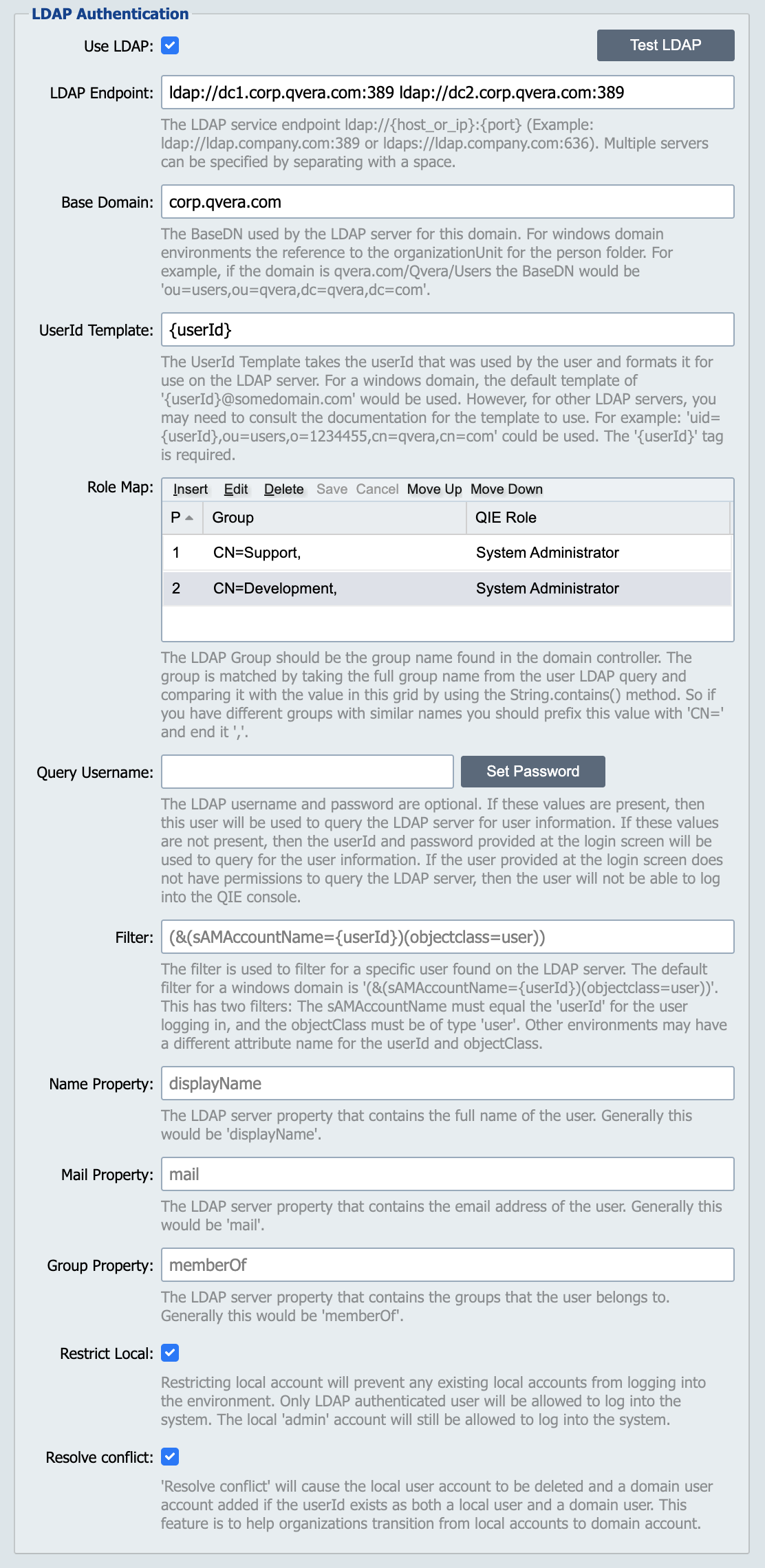
Enabling this option tells QIE to authenticate user logins using the configured LDAP server.
LDAP Endpoint
The list of servers that QIE uses to authenticate users using simple LDAP authentication calls. The format of the endpoint should be ldap://{serverNameOrIP}:{port} or for secure LDAP use ldaps://{serverNameOrIP}:{port}. The port is only required if the server is not using the standard ports (ldap=389, ldaps=636). Multiple servers can be specified by separating with a space.
Base Domain
When QIE queries the LDAP server it must specify a base domain as the domain being queried. This field holds the domain information to be queried in the LDAP annotation. For example, corp.example.com would be input as dc=corp,dc=example,dc=com. The base domain can also be input using the FQDN format (corp.example.com would be automatically translated to dc=corp,dc=example,dc=com).
Some LDAP services require that an OrgID be included in the base domain. In that case you would input o={org_id},dc=corp,dc=example,dc=com.
UserId Template
The userId that is used on the login must be changed to match the requirements of the LDAP server. In a Windows environment, the domain is appended to the userId using the @ symbol. For example, if my username is jdoe, then the template would be {userId}@example.com. In other environments, the template may need to be updated as per the requirements of the LDAP server. For example, it may need to be uid={userId},ou=users,o=1234,cn=example,cn=com. If you want the user to input the full name and domain like jdoe@example.com, then the UserID Template would be {userId}.
Role Map
To bridge the gap between the domain configuration and the QIE zone permissions, each domain user that logs in needs to be mapped to a Role inside of QIE. This map is used to assign the domain user permissions inside of QIE. The order of the mapping is the order in which QIE searches for users belonging to the group.
The LDAP Group is a string that is compared with the groups the user belongs to. QIE first loads the user's group list from the LDAP server, and then for each group, it checks if the Group string provided from the map is in that group using a contains command. If it matches, then the QIE Role is assigned as the role for the QIE application. Because it is just checking the contains, you do run the risk of having two groups in the domain with similar names, such as "Frontend Developer" and "Backend Developer". If the LDAP Group inside of QIE is set to "Developer", it would match both groups from the LDAP server. To prevent this, you can add CN= to the front of the group name and end with a , to ensure that only one group is used.
Example: Given the following 3 groups in the LDAP Server
-
CN=Development,OU=Groups,DC=test,DC=company,DC=com
-
CN=FrontEnd Development,OU=Groups,DC=test,DC=company,DC=com
-
CN=BackEnd Development,OU=Groups,DC=test,DC=company,DC=com
Using "LDAP Group" = "Development" would match all 3 groups. If you wanted to restrict it to just match the first group, you would use "LDAP Group" = CN=Development,.
Query Username
The query username and password are optional. When a user logs into the console using the LDAP server, QIE must query the LDAP server for the user's full name, email address, and what groups the user belongs to. If the user does not have permissions to query the LDAP server, then the login fails. Instead of giving all users read permissions on the LDAP server, a user that has permissions can be configured for these queries. If this setting is defined, then this user performs the query to get the information on the user logging into the console.
Filter
The filter is used as part of the LDAP query to get information on the user logging into the QIE console. This option can be left blank, and if so, it uses a standard Windows domain filter where it searches for the userid in the sAMAccountName attribute and ensures that only objectClass of user is returned. If connecting to a non-Windows LDAP server, this filter may need to be changed. For example, if the userId is stored in an attribute of uid and the object class is inetUser, then the filter would be changed to (&(uid={userId})(objectclass=inetUser).
Name Property
The name property defines the attribute that the user's full name is found in. By default, in most LDAP servers, this attribute name is displayName. If this value is not set, then displayName is used as the full name attribute in the LDAP server.
Mail Property
The mail property defines the attribute that the user's email address is found in. By default, in most LDAP servers, this attribute name is mail. If this value is not set, then mail is used as the email address attribute in the LDAP server.
Group Property
The group property defines the attribute that contains the groups that the user belongs to. By default, in most LDAP servers, this attribute name is memberOf. If this value is not set, then memberOf is used as the group attribute in the LDAP server.
Account Syncing
Every time a domain user logs in, QIE re-syncs the user account from the directory, treating the domain controller as the source of truth:
-
The full name is refreshed from the attribute configured by the Name Property.
-
The email address is refreshed from the attribute configured by the Mail Property. If the attribute has been removed from the directory account, the email address on the QIE user is cleared to match.
-
The role assignment is refreshed from the Role Map.
Changes made to these fields inside QIE are overwritten on the user's next login, so directory attributes should always be maintained on the domain controller.
Note
When a sync changes or clears the user's email address, the address is no longer considered verified. The user's email verification is reset and two-factor authentication is disabled for the account until the user re-verifies the new address on the User Profile dialog.
Restrict Local
Checking the restrict local checkbox prevents any local users from logging into the QIE console except for the built-in admin user. Only users found on the LDAP server can log into the console.
Resolve Conflict
The Resolve Conflict checkbox is mostly used when migrating from local accounts to domain accounts. Suppose the userId jdoe exists as both a local user in QIE and a domain user on the LDAP server. When the user logs into the console using the domain credentials, the local user account is replaced with a domain user account automatically. Otherwise, if this checkbox is not checked, the local user account is used if the restrict local checkbox is not checked.