Mapping Nodes
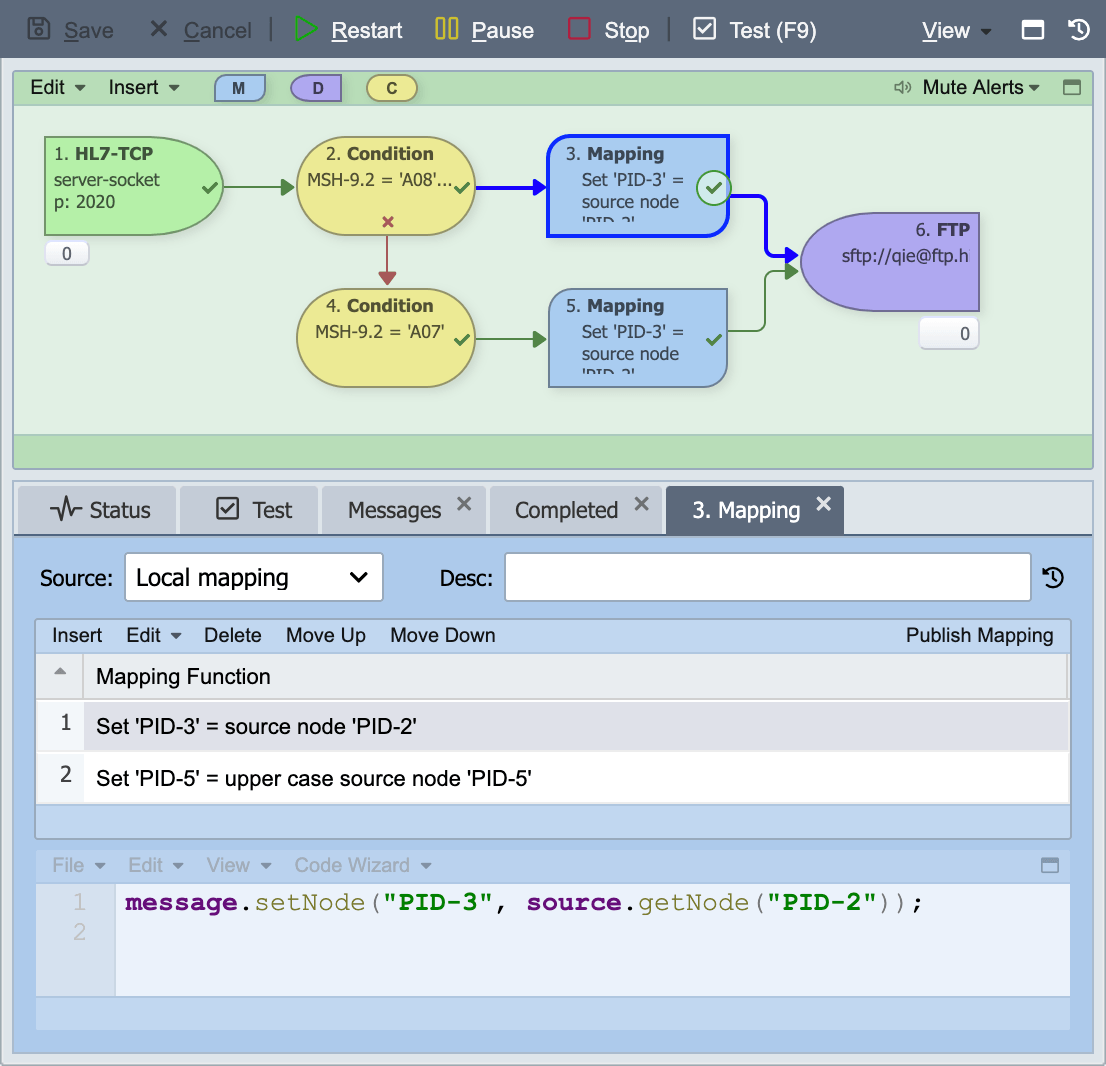
Mapping nodes are used to reformat and/or manipulate message data as messages are processed through the channel. A mapping node contains an ordered list of mapping functions which are applied to the message. Mapping functions range in complexity from simple data manipulations such as changing a string to upper or lower case, to more sophisticated functions involving table lookups, database queries, conditional logic, etc.
One mapping node vs. several. Pick by maintainability
QIE compiles the mapping functions across a channel's mapping nodes into a single execution unit at channel start. Splitting work into multiple mapping nodes does not add runtime overhead or memory cost compared to combining everything into one node, the underlying JavaScript engine sees the same total set of functions either way. Choose granularity for clarity (logically related transformations grouped together, branching conditions separated by what they decide), not for performance.
Source
The source of the mapping node can be set to one of the following supported values
| Mapping Source | Description |
|---|---|
| Local Mapping | The mapping is local to the channel configuration. This is the only choice for channels that do not have any published mappings defined. |
| Published Mapping | The mapping node references a published mapping (see Published Mappings and Mapping Functions for more information). |
| Copy from Published | Selecting this option creates a local copy of a published mapping which can then be edited and modified without affecting the published mapping. |
Mapping
If the mapping Source is set to Published Mapping or Copy From Published, the Mapping field is displayed with a drop-down list of the published mappings that are available for this channel.
Description
If the mapping Source is set to Local Mapping, this field is displayed and if set, is displayed in the mapping node on the visual channel editor.
Edit published mapping
If the mapping Source is set to Published Mapping, the 'Edit published mapping' checkbox is displayed in the mapping editor and if selected, allows a published mapping to be edited locally (see Editing Published Mappings for more information).
Reference pages
- Mapping Functions covers adding, editing, ordering, and copying the functions inside a mapping node.
- Mapping Function Targets, where a function writes its result.
- QIE Standard Mapping Functions, the built-in function catalog and the mapping wizard that configures it.
The standard mapping functions
| Function | Purpose |
|---|---|
| Change Case | Convert a value to upper, lower, or proper case. |
| Custom Script | Run JavaScript against the message. |
| Database Query | Query a database and use the result in the message. |
| Evaluate Template | Build an output message from a template. |
| Format Date/Time | Convert a date or time between formats. |
| Google Cloud Healthcare API | Submit to a Google Cloud Healthcare datastore. |
| New Output Message | Change the message format mid-channel. |
| REST Web Services | Call a REST endpoint. |
| REST Web Service (Content Encoded) | Call a REST endpoint with an encoded body. |
| REST Web Service (URL Encoded) | Call a REST endpoint with URL-encoded parameters. |
| Search & Replace | Find and replace within a value. |
| SOAP Web Service | Call a SOAP endpoint. |
| Stream to File | Write message content to disk without holding it in memory. |
| Substring | Take part of a value by position. |
| Table Lookup | Translate a value through a cross-reference table. |
| Web Services | The shared web-service fields used by the sender functions. |