Message Retention Policy
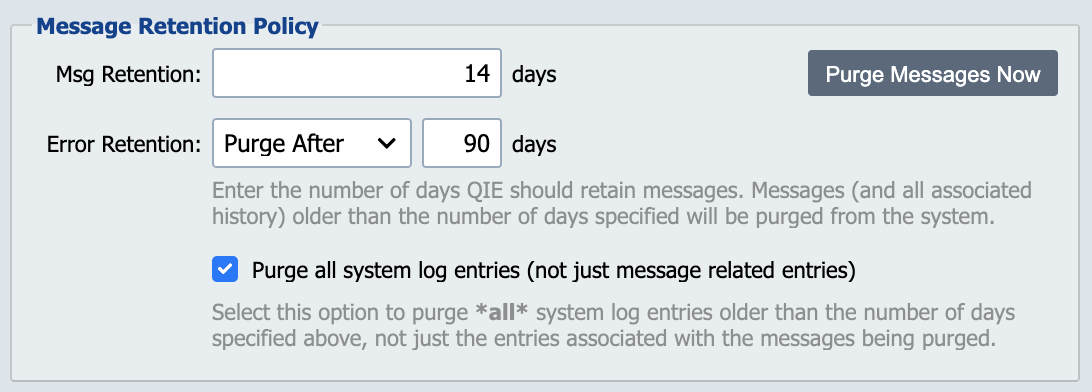
The message and error retention policies control how long QIE retains messages and errors and their related log entries in the QIE database.
Retain Msgs for 'XX' days
This setting controls how long messages are retained in the QIE database before being purged. Older messages are purged from the system on a nightly basis. Consideration should be given to the number of messages being processed on a daily basis, the average size of those messages and the available disk space when choosing a message retention policy.
Reclaiming disk space after large purges (MariaDB / MySQL)
InnoDB (the default table engine on MariaDB and MySQL) does not automatically return the disk pages of deleted rows to the operating system. The tablespace grows to accommodate peak volume and stays that size afterward. When a large purge (a retention-policy change, a one-time cleanup, or the first purge after a long retention window) frees a meaningful percentage of the database, the file-system usage does not drop until the table storage is rebuilt.
QIE stores each channel's message data in a set of per-channel tables (source_<channelId>, message_<channelId>, message_blob_<channelId>, message_cache_<channelId>, channel_log_<channelId>, channel_log_blob_<channelId>, and related tables). QIE creates and manages the exact list. To rebuild them and reclaim the freed space, stop the QIE service and run OPTIMIZE TABLE <name>; against each channel's tables from a database client, or use ALTER TABLE <name> ENGINE=InnoDB; for the same effect. Both operations rewrite the table on disk, so the file system must have free space at least equal to the current size of the largest table being rebuilt.
MSSQL manages tablespace reuse differently and does not require this maintenance.
SQL Server transaction-log growth
On a SQL Server running QIE in the Full recovery model, every insert and delete is written to the transaction log and retained until the next transaction-log backup truncates it. Nightly purges of the message tables can push the log to consume more disk than the data itself, and if the log volume fills the operation aborts with The transaction log for database '<name>' is full.
Two ways to keep the log under control:
- Take regular transaction-log backups (typical schedule: every 15 to 60 minutes). Each backup truncates the log's committed portion and returns space for reuse. Choose this option if the deployment needs point-in-time recovery.
- Switch the database to the Simple recovery model. In Simple mode SQL Server truncates the log automatically after each checkpoint, so the log stays small without scheduled backups. Choose this option if losing the last few minutes of message data is acceptable. Most QIE deployments already store messages in the QIE database itself and back them up as part of the QIE Nightly Backup.
The recovery model is set with ALTER DATABASE <name> SET RECOVERY SIMPLE; (or FULL) on the SQL Server. Coordinate the choice with whoever manages the SQL Server instance and the backup regime that goes with it.
Retain Errors for 'XX' days
This setting controls how long Errors are retained in the QIE database before being purged. Older Errors are purged from the system on a nightly basis. Consideration should be given to the number of errors, the kind of error and its value if it is not resolved in a timely manner. Errors should be examined regularly to ensure the interface is functioning properly. The default is to keep errors for 90 days.
Purge all system log entries
Log entries are retained based on the Retain Msgs for XX days setting and purged nightly. Different categories of log entries behave differently:
- Message-associated log entries are always purged with their messages.
- System-level entries that are not tied to a specific channel (login and authentication events, system startup, alerts, and similar) are always purged nightly per the Retain Msgs setting.
- Channel-level entries are those not tied to a specific message: channel start/stop events, schedule firings, and channel-level errors not associated with a single message. They are purged nightly per the Retain Msgs setting, but only if Purge all system log entries is selected. Otherwise they accumulate indefinitely.
Enable this option to keep channel-level operational logs from growing unbounded. Leave it disabled only if you have an audit or compliance reason to retain channel-level operational entries longer than the message retention window.
Purge Messages Now
The Purge Messages Now option allows system administrators to purge messages from the QIE database at any time rather than waiting for the nightly purge routine to run. This button opens the Purge Messages dialog.
Purge Messages Dialog
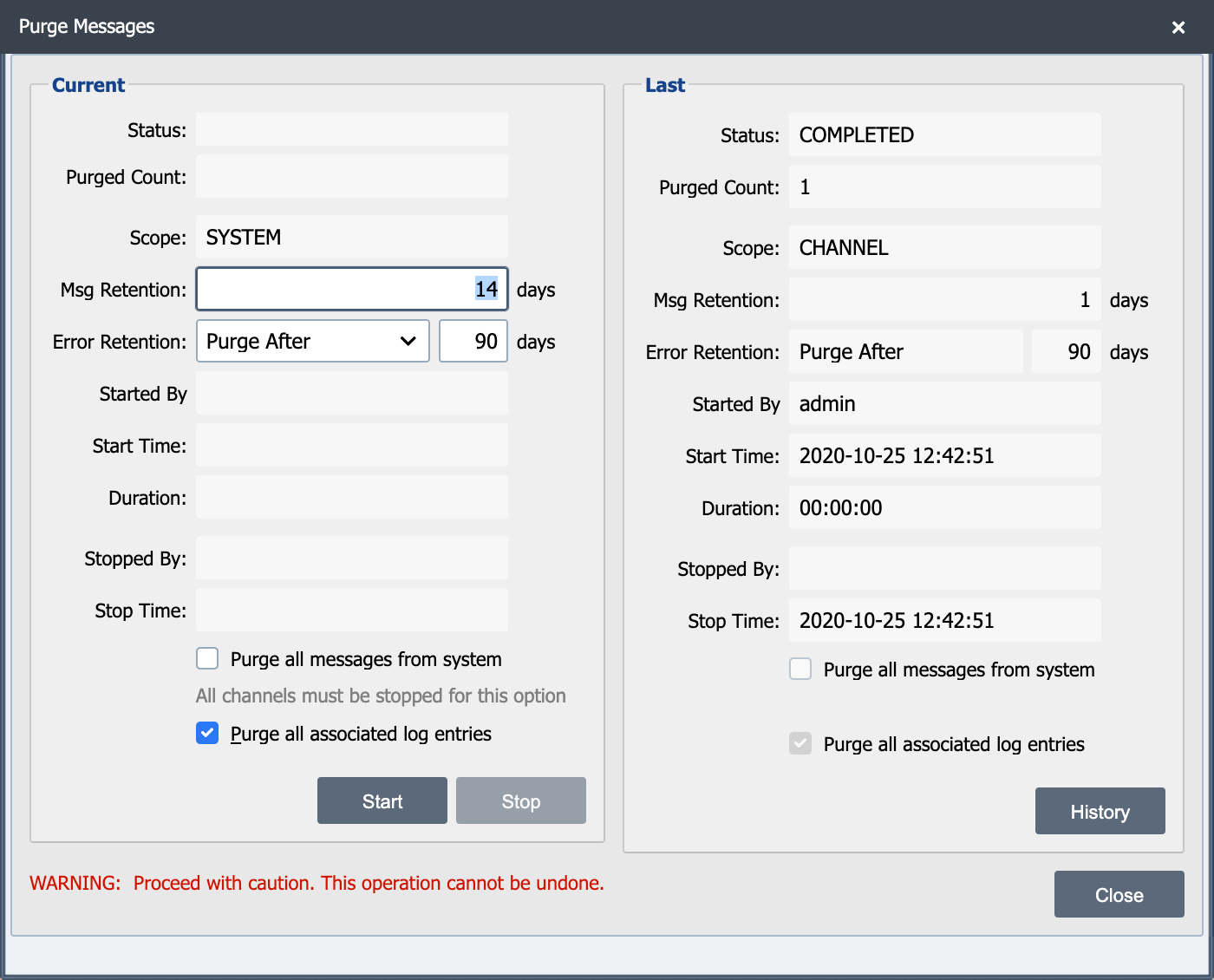
This dialog is used to manually purge messages from QIE. The scope of the purge is either SYSTEM (all channels) or CHANNEL. The scope is controlled by the location from which the dialog is opened.
The right side of the Purge Messages dialog displays the status of the current purge while it is active. The left side of the dialog displays the status from the last manual purge.
Status
Completed
The purge ran to completion.
Stopped
The purge was stopped and the details display below.
Purged Count
The total number of messages purged.
Scope
Channel
The dialog was opened from the channel properties dialog. Only messages for this channel are purged.
System
The dialog was opened from the System Configuration dialog or from the Status Panel Display. Messages from all channels are purged.
Msg Retention/Error Retention
The Msg Retention and Error Retention fields display the default settings from the system configuration (for Scope = SYSTEM) or the channel properties (for Scope = CHANNEL). These fields can be overridden prior to selecting the Start button. Enter 0 in the Msg Retention to purge all messages and associated history from the channel.
Started By
User ID of the person who initiated the manual purge.
Start Time
Date and timestamp when the purge was initiated.
Duration
How long the purge ran.
Stopped By
If the purge was stopped, the userID of the person who stopped the purge displays here.
Stop Time
Date and timestamp when the purge was stopped.
Purge all messages from system
This option purges all messages from the system.
Purge all associated log entries
Select this checkbox to purge the log entries associated with the messages that are purged.
History Button
Select this button to view the statistics for the last 50 manual purges.
Purge Errors
A purge that cannot delete a batch of messages retries it, skips it and moves on to the next one. The run still finishes with a status of Completed, so the skipped messages stay in the database without anything failing outright. Every purge counts the failed attempts it skipped past and writes the total to the system log when it finishes, broken down by channel. Each retry of a failing batch counts, so the total is a count of attempts and not a count of messages.
A nightly purge that reaches 100 failed attempts also raises an Administrator Alert and emails the administrators. The alert gives the count, the channels the failures came from and the last error reported. When failures come from more than ten channels, the alert names the ten worst and gives the number of remaining channels. The system log holds the individual errors: the message text there usually names the table or the constraint that blocked the delete. A missing index on a message table is a common cause.
The alert stays until a nightly purge finishes below the threshold, which clears it. Purging a single channel from the Purge Messages Now button writes its own count to the system log, but never raises or clears the alert, because it sees only one channel.
Change the threshold with the qie.purge.errorAlertThreshold Java option:
Set the option to 0 to turn the alert off entirely. The count is still written to the system log at the end of every purge.