Enabling the Management API
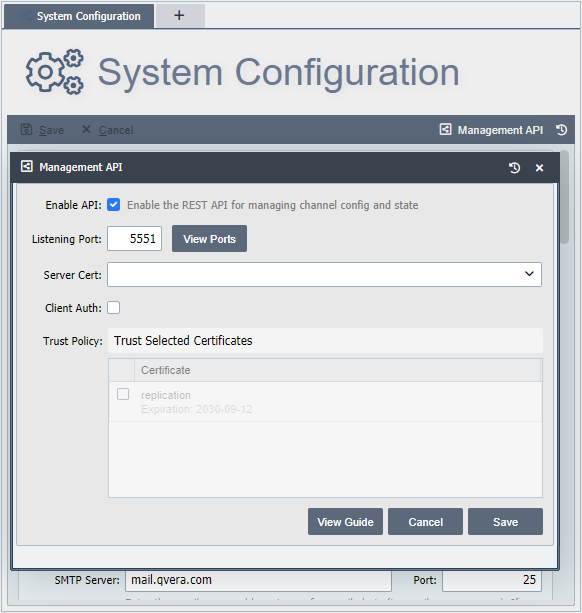
The Management API is only available on QIE Enterprise systems. To enable the service, log into the QIE service and navigate to the System Config page. Once on the page, select the Management API button on the top right side of the menu bar.
Behavior on developer licenses
Under a developer license, the Management API's start channel command is intentionally ignored. The request returns successfully with a /note field explaining that the command would have started the channel on a regular license, but no channel is actually started. Other Management API commands still work. This mirrors the broader developer-license policy that stops all channels each morning to keep developer installs from acting as production interfaces.
The following options can be set in the Management API dialog:
Enable API: Enables or disables the listening service. This must be checked to use the service.
Listening Port: Specifies the port that the Management API service accepts rest commands on. This port must be defined to enable the Management API service.
Server Cert: To enable HTTPS on the listening service, a private key must be specified. Any private keys installed in the Global Settings zone can be used for this service. If no key is specified, then the Management API service listens for rest requests using standard HTTP.
Client Auth: This allows a system to be setup to require a trusted certificate to be presented by the calling client on the Management API service. To enable this feature, a Server Cert must be specified. Once enabled, the trusted certificates can be selected in the Trust Policy.
Trust Policy: Select any certificates that are going to be trusted by the clients making the connection. The list of certificates is generated by the available certificates found in the Global Settings zone. To add a certificate to this list, import the certificate into the Global Settings zone.