DICOM Connections
Managing DICOM interfaces between radiology information systems, image storage systems, imaging devices and other health information systems is a critical part of healthcare interoperability. Because of this, QIE is designed to make DICOM connectivity and interoperability very easy and straight forward.
Scripts that call DICOM services from a channel
DICOM is asynchronous. A single request (C-FIND, C-MOVE, C-GET) can produce many responses over the course of a query, and C-MOVE in particular relies on a listener the originating peer is running to receive the pixel data as the responder pushes it back. QIE surfaces that model with the qie.postDICOMRequest script binding, which takes both a DICOM Connection (the destination the request is aimed at) and a DICOM Channel (the local listener that collects the responses):
// qie.postDICOMRequest(requestCommand, dicomConnectionName, dicomChannelName, callingAETitle)
qie.postDICOMRequest(request, 'PACS-Query', 'DICOM-Listener-Channel');
The channel argument identifies the QIE channel whose DICOM Listener source handles the incoming responses. If the argument is omitted, QIE defaults to the current channel. That only works when the mapping script is itself running inside a DICOM Listener channel; from any other channel type the call fails because there is no listener socket to route the responses through.
Two patterns cover this in practice:
- Same-channel: the script runs in a mapping node on a DICOM Listener channel. Omit the channel name and let the default fill it in. Suitable when the DICOM interaction is a follow-up to an incoming DICOM message (e.g. C-STORE that triggers a C-MOVE to grab related images).
- Cross-channel: the script runs on a non-DICOM channel (an HL7 trigger, a REST call from a partner) but needs to make DICOM requests. Configure a companion DICOM Listener channel elsewhere in the zone whose only job is to receive responses, and pass its name as the
dicomChannelNameargument.
Either way, the DICOM Listener channel referenced by postDICOMRequest must be running at the time of the call. A stopped listener has no open socket to receive the responder's callback, so the request completes with no results.
Managing DICOM Connections
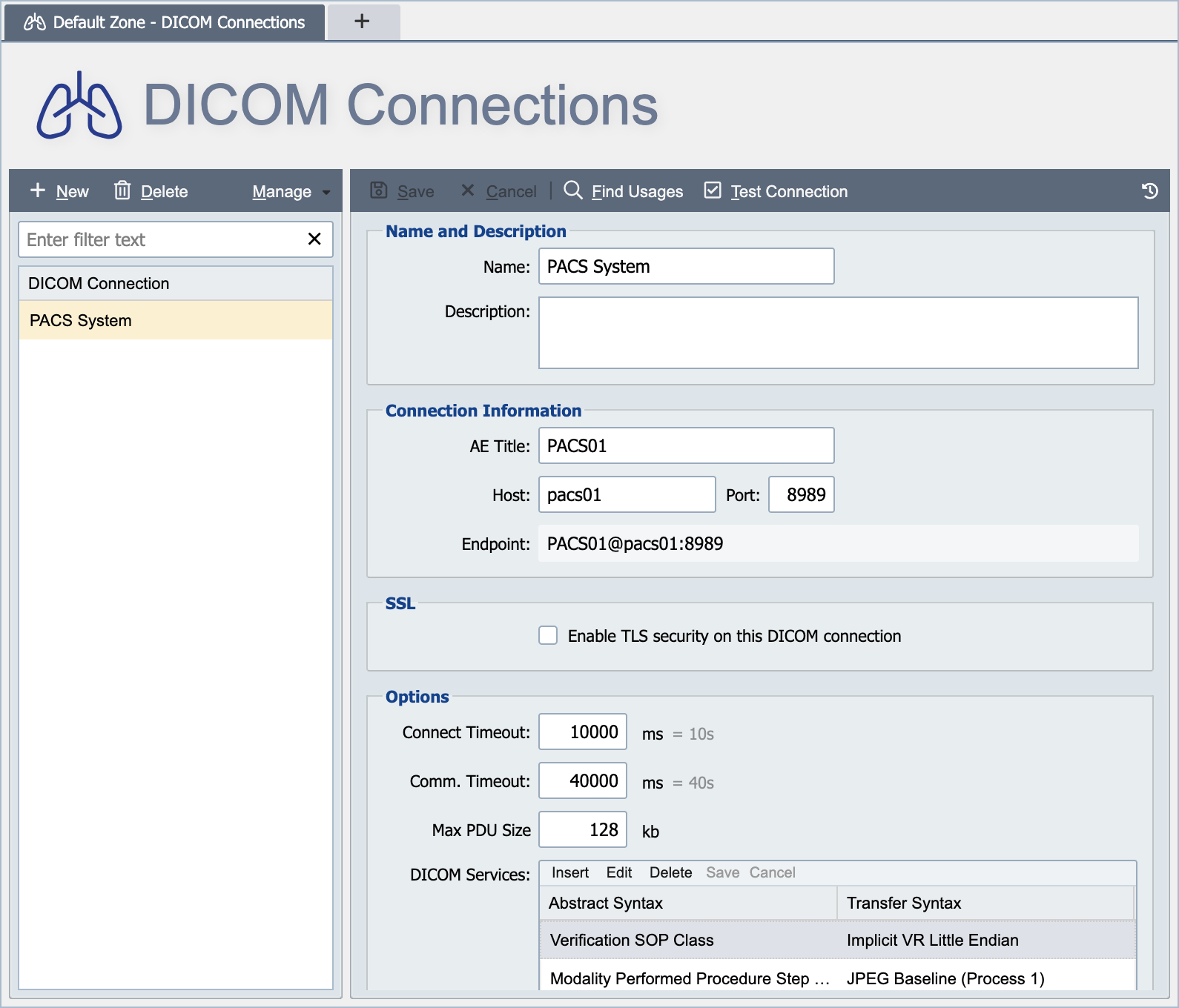
DICOM connections are created and managed from the DICOM Connections Page. DICOM connections are defined at either the global level or the zone level (see Global vs. Zone Scope for more information on scope).
Name
The name associated with the DICOM connection identifies the connection for use in mapping functions and other DICOM related activities. The name must be unique within the applicable scope. For example, a connection created at the global level, must have a globally unique name (unique within the global connections and across all zone level connections). A connection created at the zone level must have a locally unique name (unique within the applicable zone and all global connections).
Description
The description is only visible from the DICOM connections page and can be used to provide additional information about the connection and how it is used.
AE Title
Uniquely identifies a DICOM device or program. Typically labeled with numbers and uppercase characters only.
Host, Port
The host and port fields are used to pre-populate or build the Endpoint URL associated with a DICOM connection.
Enable TLS Security
When this option is enabled, QIE establishes the DICOM association over TLS using certificates from the QIE certificate store. A DICOM connection makes QIE the client of the remote DICOM peer, so QIE does not need its own server certificate unless the remote peer requires mutual TLS. To trust the remote peer, import its public certificate (or its CA's public certificate) on the Certificate Management page. See Certificate Management.
Connect Timeout
How long QIE waits to establish the TCP/IP socket connection to the remote DICOM peer before giving up. Enter the value in milliseconds, up to a maximum of 360000 (6 minutes); the dialog shows the equivalent in seconds beside the field. The default is 10000 (10 seconds).
If the connection cannot be established within this time, the attempt is aborted with a timeout exception and the resulting send or receive failure is counted toward the consecutive-error settings on the channel.
Communication (Comm) Timeout
How long QIE waits for any single DIMSE-level command to complete once the association has been established. Enter the value in milliseconds, up to a maximum of 360000 (6 minutes); the dialog shows the equivalent in seconds beside the field. The default is 40000 (40 seconds).
The same value is applied to each of the following commands, and is not a per-command setting:
| Command | Description |
|---|---|
| Request | Timeout for receiving A-ASSOCIATE-RQ |
| Accept | Timeout for receiving A-ASSOCIATE-AC |
| Release | Timeout for receiving A-RELEASE-RP |
| Send | Timeout for sending DIMSE requests (other than C-STORE requests) |
| Response | Timeout for receiving DIMSE responses (other than C-STORE and C-GET responses) |
| Store | Timeout for sending C-STORE requests |
| Retrieve | Timeout for receiving C-STORE and C-GET responses |
If any of these commands does not complete within the timeout, the operation throws a DICOM exception. The resulting send or receive failure is counted toward the consecutive-error settings on the channel.
Max PDU Size
The Max Protocol Data Unit (PDU) size specifies the maximum number of bytes that QIE is configured to receive or send in a single PDU transmission. When QIE negotiates a connection with an Association, it uses the minimum of QIE's Max PDU size or the Association's Max PDU size for both sending and receiving data.
DICOM Services
Defines the DICOM presentation context(s) that this DICOM association supports within the context of QIE.
Automatically add missing DICOM Services
Selecting this option allows QIE to dynamically add any missing presentation contexts that are presented to QIE by the association during the connection negotiation process.
Enabling DICOM Image Transcoding
QIE's DICOM messaging works with compressed and uncompressed DICOM transfer syntaxes out of the box. Re-encoding compressed image data requires the OpenCV native bridge library. One example is decoding a JPEG2000-encoded study so it can be re-encoded as Implicit VR Little Endian for a partner that does not accept compressed syntaxes. Without it, transcoding operations fail with an error referencing the missing org.dcm4che3.opencv.NativeImageReader class.
To enable transcoding:
- Open System Configuration -> Manage External Libraries.
- Add the
opencv_javalibrary bundle (the native OpenCV bridge for dcm4che; available from the dcm4che project). - Restart QIE.
QIE detects the OpenCV bridge by classpath scan at startup; no additional configuration is required.
Note
The Java 17 module flags that OpenCV imaging needs (--add-opens=java.base/java.lang=ALL-UNNAMED, --add-opens=java.base/java.util=ALL-UNNAMED) are injected automatically by the QIE Launcher on startup. You do not need to edit the service-manager JVM options manually.