File Receiver
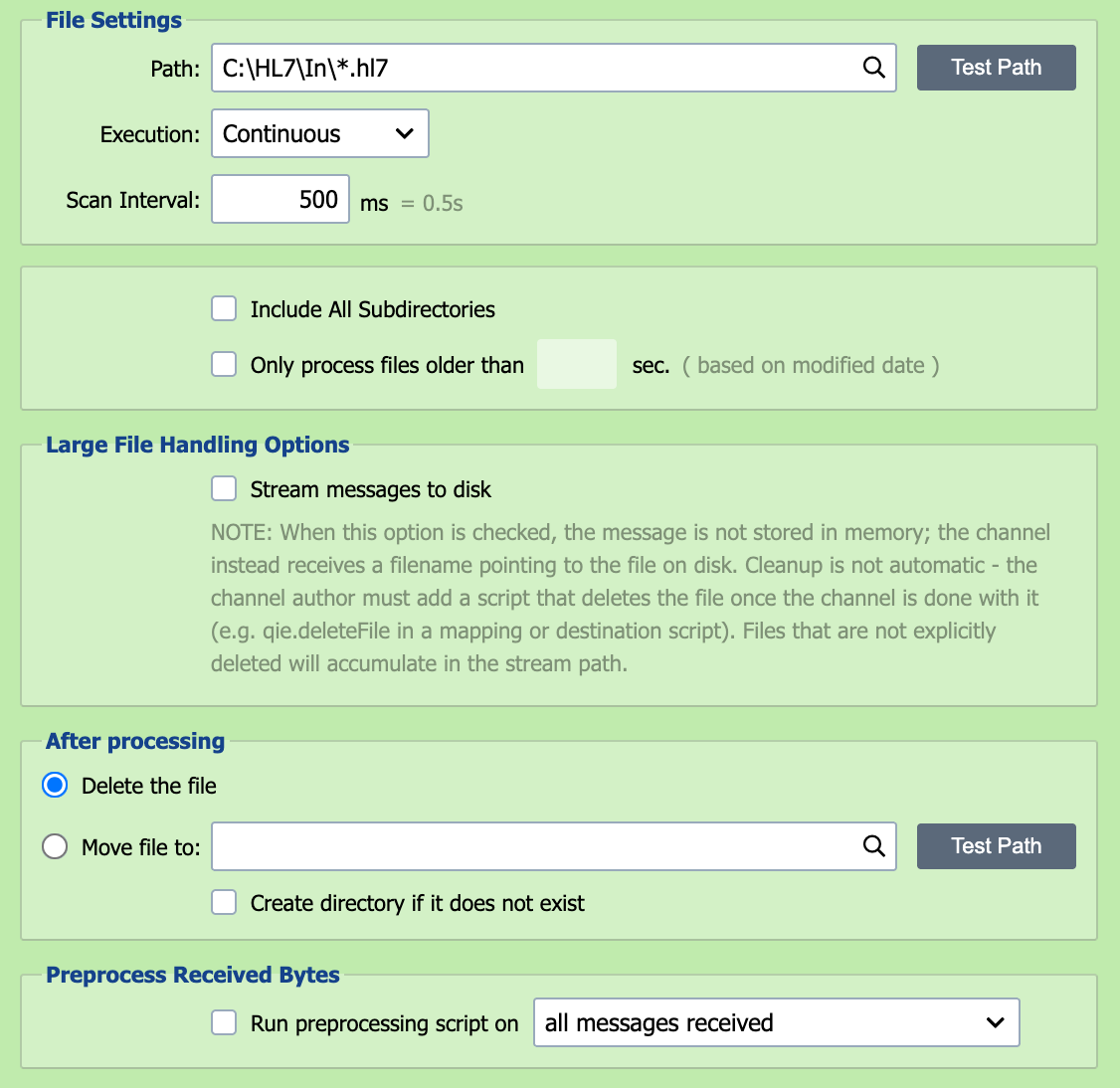
Messages can be saved to a directory which QIE is configured to monitor. Matching files contained within the directory are processed as messages through the channel.
Note
When the channel's message format is DICOM, the DICOM Format section of the source node includes the Enable storing DICOM Pixel Data in a separate folder option. Enable it on any channel that can receive large DICOM files so QIE never has to hold whole instances in memory.
Zero-byte files
Zero-byte files are skipped by the file receiver. QIE assumes they are still being written and retries them on later polls. A file that stays empty past the age controlled by the -Dqie.zeroByteFileMaxAge Java option (default 1 hour) is logged as Channel '<name>' found a zero byte file: <path>, this file has been deleted. and removed from the folder. Zero-byte files never enter the inbound queue.
Path
The path field contains the path to the folder and the filename pattern that QIE uses when checking for files to be processed. The filename pattern can contain wildcard characters such as asterisk (*) and question mark (?). The table below gives some examples of filename patterns.
| Filename Pattern | Matches |
|---|---|
| C:\Folder | All files in the 'C:\Folder' directory |
| C:\Folder\ | All files in the 'C:\Folder' directory |
| C:\Folder\*.tx | All files with an extension of '.tx' |
| C:\Folder\*.tx? | All files with an extension that starts with '.tx' and has 1 additional character (letter or number) |
| C:\Folder\*.tx* | All files with an extension that starts with '.tx' and has zero or more additional characters |
| C:\Folder\*suffix.txt | All files with a name that ends with 'suffix' and have an extension of '.txt' |
| C:\Folder\*text*.*xt | All files with a name that contains 'text' and have an extension that ends with 'xt' |
| C:\Folder\FixedName.txt | Only files with the fixed name and extension of 'FixedName.txt' |
| C:\Folder.Name\ | All files in the 'C:\Folder.Name' directory |
| C:\Folder.Name | All files in the 'C:\Folder.Name' directory, once that directory exists |
Folder names that contain a period
QIE reads the last element of the path as a file name when that element contains a period. A path of C:\Folder.Name is therefore treated as a file named Folder.Name inside C:\ until a folder of that name exists. While neither the file nor the folder exists, the channel waits without reporting an error, as it does for any missing file. Once the folder exists, QIE scans it as a folder: every file in it is picked up and the Include All Subdirectories setting applies. To name a folder before it exists, end the path with the same separator character the rest of the path uses (C:\Folder.Name\), or add a filename pattern (C:\Folder.Name\*). A trailing / on a path written with \ is not recognized. The same applies to a UNC path whose share name contains a period, such as \\server\share.name\.
The path field also accepts node tags. Channel cache values can be substituted with {cc:VariableName}, system variables with {v:VariableName}, and system date components with {SYSTEM_DATE[yyyy]} (or any standard date pattern), which is useful for routing files into per-year, per-customer, or per-environment subfolders. QIE resolves the tags on each scan.
Mapped drive letters
Windows-mapped drive letters (e.g. Z:\...) belong to the user session that created them and are not visible to services running as a different account. For a network share, enter the UNC path (\\server\share\...) directly here, or use a Network Share (SMB) node instead of the File node.
Test Path
The Test Path button resolves any node tags in the path against the current channel-cache and system-variable values, then verifies that QIE can access the resolved path. If the path does not exist, the channel status displays file receiver errors as soon as the channel is started.
Test Path reports the effective test path that QIE probed alongside the path as entered, on both success and failure. When the last element of the path contains a period and exists as a folder, Test Path tests that folder, as the channel scans it.
Execution
Execution defines the frequency and schedule associated with scanning the folder for matching files. The three available options are continuous, scheduled or manual.
If execution is set to Continuous, QIE scans again immediately while scans keep finding files. After a scan that finds none, it waits the 'Scan Interval' before scanning again.
If execution is set to Scheduled, the folder is scanned according to the schedule specified in the associated CRON String. Scans never overlap: if a scan is still running when the next CRON time arrives, QIE skips that time and scans at the first CRON time after the current scan finishes.
If execution is set to Manual, the folder is scanned only when a user selects the Run Now button.
Run Now
If execution is Scheduled or Manual, use the Run Now button for immediate execution.
Scan Interval
When using Continuous execution, the scan interval is used to set the 'timeout' or wait period between folder scans.
CRON String
When using Scheduled execution, the CRON String is used to specify the schedule to be used for folder scans. See CRON String Format for the six-field syntax and examples.
Include All Subdirectories
Selecting this checkbox instructs QIE to scan matching files in subfolders beneath the configured Path. This is useful when inbound files are organized into date-based, customer-based or location-based folders beneath a common root. The Test Path button includes matching files found in subfolders when this option is enabled.
When this option is enabled, QIE preserves the source-relative folder as source metadata. That metadata can be referenced in archive paths, destination paths or templates using Source Metadata node tags such as {s-meta:FILE_DIRECTORY} or the source.getFileDirectory() function.
A destination file name of *, or a blank file name, takes the source file's original name, and with this option enabled that name includes the source-relative folder. A destination path of /out/*.* therefore writes /out/orders/2026/file1.hl7, and the write fails when that folder does not exist. To write every file to the same folder, use {s-meta:FILE_NAME} as the destination file name. To recreate the source folders instead, have the destination create missing directories: check Create directory if it does not exist on a File or Network Share destination, or add autoCreate=true to Custom Apache Camel Parameters on an FTP destination.
Only Process Files Older Than…
Checking this box delays processing a file until it has been in the folder the specified number of seconds. This can help to prevent file locks.
After Processing
When QIE reads an inbound file, it can either Delete the file or Move file to an archive location. QIE does this as soon as the file's content has been placed in the inbound queue, before any mapping, condition or destination node runs. Downstream nodes should work with the message content, not the original file path, because the file has already been moved or deleted by the time they run.
Check Create directory if it does not exist to have QIE create a missing archive folder. When this option is unchecked and the archive folder does not exist, QIE stops the channel with an error before the file enters the inbound queue.
When Include All Subdirectories is enabled and the archive path does not use source metadata, nested folder values are flattened into the archived filename. To preserve the original relative folder structure, include source metadata node tags such as {s-meta:FILE_DIRECTORY} in the archive path. If the archive folder is located beneath the source root, QIE skips that archive tree during recursive scans.
Large File Handling Options

When this option is checked, the message is not stored in memory but passed to the channel as a filename which points to the file on disk. The channel must dispose of the file once it is finished using it. For the recommended mapping pattern, see Passing Through Large Files Without Loading Them Into Memory.
Preprocess Received Bytes
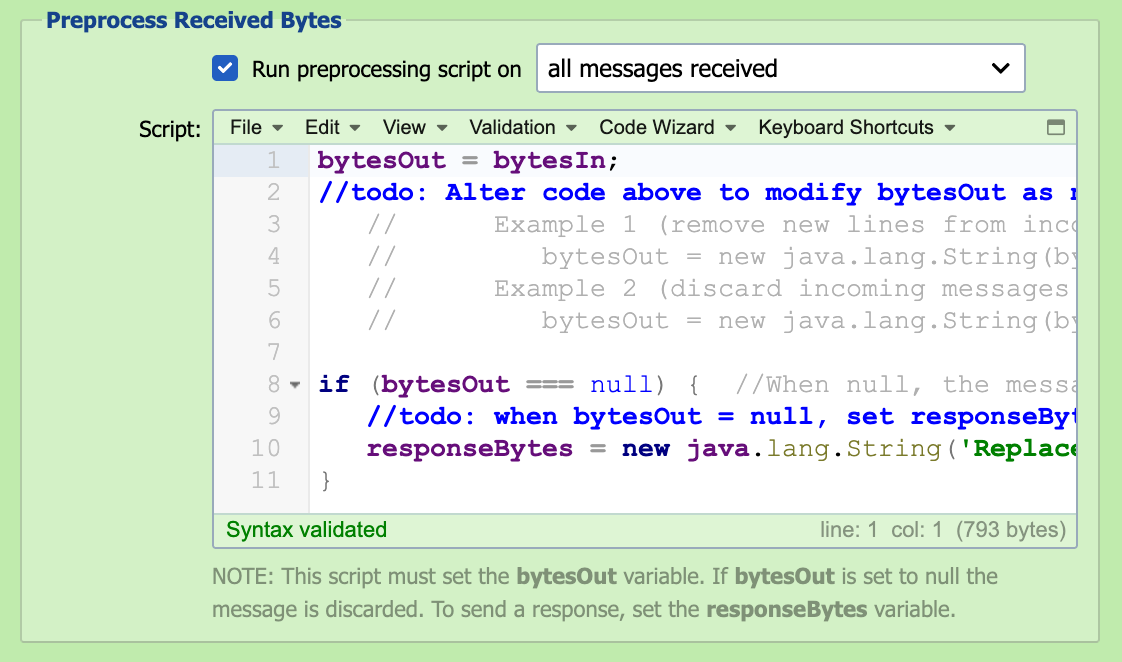
In some cases, it may be necessary to pre-process the received bytes to correct malformed messages before submitting them to the inbound queue. Configuring a preprocessor script allows the bytes to be manipulated and/or discarded before processing the message through the channel.
Run Preprocessing Script On
The preprocessing script can be run against all messages received or only on messages that fail to parse.
Script
The received bytes are available to the script as the bytesIn byte-array. To inspect or edit the content as text, convert it to a String using the channel's configured encoding, which qie.getChannelEncoding() returns. The preprocessing script must set the bytesOut variable as a byte-array. If bytesOut is set to null, the message is discarded and not submitted to the inbound queue. The preprocessing script can also be used to post a message response. To send a response, set the responseBytes variable as a byte-array. Changing the preprocessing script does not change messages QIE has already received. The preprocessing script runs only when the receiver first receives the bytes, and resolving or resubmitting a message from the channel's message history does not run it again. To correct a message that is already in the error queue, select Edit source message in the Message Detail dialog before resolving it. A message that fails in the preprocessing script never enters the channel, so it has no stored source content. Resolving or resubmitting it without an edit is refused. Copy its content from the Message Detail dialog into the Test window to debug the script, then either edit the source message and resolve it, or discard it. To test a change to the script, send the source a new copy of the message.
For example, to discard files that are empty or contain only whitespace:
var content = new String(bytesIn, qie.getChannelEncoding());
if (StringUtils.isBlank(content)) {
    bytesOut = null;     // halt processing; nothing enters the inbound queue
} else {
    bytesOut = bytesIn;  // pass through unchanged
}
When the preprocessing script fails
The file is still moved or deleted as usual. Without Move file to set, the erred message holds the only copy of the file's content.
Troubleshooting Unable to move file
When Move file to is configured and QIE cannot complete the move, the channel logs:
QIE moves the file with a filesystem rename, which reports only success or failure. No operating-system reason is available, so the exception never says whether the cause was a denied permission, a held lock, or something else. There is no nested exception to look for.
Three facts narrow the search.
QIE already retried. The first failure is followed by four more attempts, spaced one, two, three and four seconds apart. Each one writes a warning to the channel log:
Attempt 2 to move file 'D:\Inbound\roster.csv' to 'D:\Inbound\Sent\roster.csv' failed. Will try again in 2 seconds.
The exception is raised only after all five attempts fail across roughly ten seconds. A lock that clears quickly is already ruled out by the time the error appears.
An existing file in the archive folder is not the cause. QIE never overwrites an archived file. When the target name is taken it appends a counter and writes roster_2.csv, roster_3.csv, and so on.
The channel stops. A failed move is treated as a critical error, so the receiver shuts the channel down and logs Critical error encountered. Shutting down channel. Restarting the channel without fixing the cause produces the same failure on the next file.
What remains is a sustained hold on the file or a rights problem:
- The account running QIE lacks delete or modify rights. A rename needs more than the create right that lets QIE build the archive folder. Check the effective rights on the inbound folder, the archive folder and the file itself, as the account the QIE service logs on as rather than as your interactive account.
- Another process holds the file open. Antivirus, endpoint protection, a backup agent, an indexing service, or the application that writes the file can all hold it past the ten-second retry window. Enable Only Process Files Older Than so QIE waits before picking the file up.
- Security software blocks the rename itself. Ransomware protection, controlled folder access and data-loss-prevention agents commonly allow a folder to be created but block a rename. Review their logs at the time of the failure.
- The move crosses a volume or a network boundary. A rename that is not within one filesystem can fail where a copy would succeed.
Note
The same message with fileInstance in place of file comes from the shared file utility rather than the File Receiver. The causes are the same.