QIE Update Settings
The QIE update settings parameters let the administrator determine how new updates to QIE are applied to their environment. When the option to automatically download and install updates is selected, QIE sends an email letting the system administrator know that the update is about to take place. QIE then installs the update and restarts QIE and all channels to their prior state (if Auto Startup is checked). After the update is completed QIE sends another email to the system administrator with a successful update message.
Release Type
Specifies what type of release is desired for download. The available release types are Alpha, Beta and Production.
An Alpha release is a build with new features and/or bug fixes. A Beta release is a previous Alpha release that has proven to be stable but with limited exposure. A Production release is a proven and stable build that is ready for wide distribution.
The three options to control the auto updates are:
-
Do not automatically download and do not automatically install.
If none of the check box options are selected, QIE does not automatically download new updates or install them.
-
Automatically download available updates.
If this is the only check box checked, the system automatically downloads the update and sends out an email notification that the update is downloaded and ready to install. The system administrator determines when to install the update.
-
Automatically install available updates.
If this option is selected along with the automatically download available updates, QIE downloads and installs the update based on the schedule specified in the CRON String setting.
CRON String
The CRON string is a time-based job scheduler. The CRON string enables users to schedule when to check for and/or install any available updates based on the above options. Clicking on the icon displays the format detail as well as a Test button to validate the CRON string.
See CRON String Format for the syntax and examples.
QIE Update Status
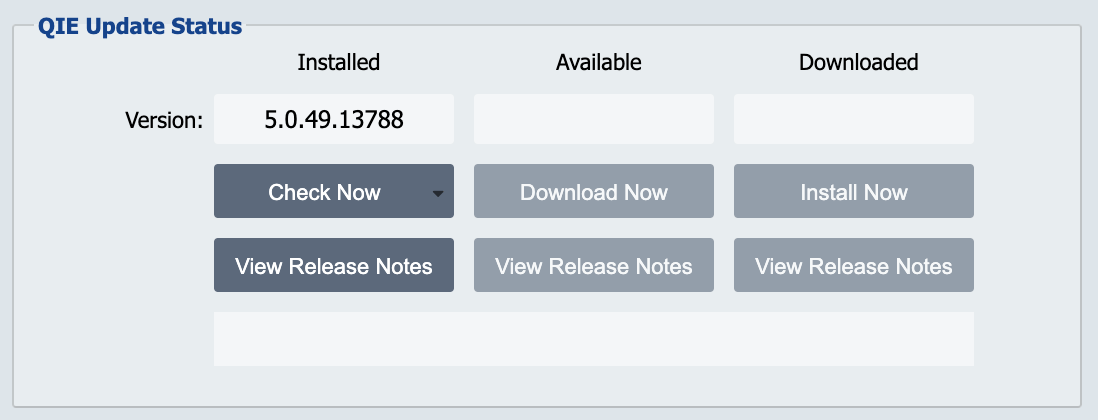
The QIE update status section displays the current version and allows the administrator to check for a newer version of any Release Type. Use the Check Now drop-down list to select the Release Type. The View Release Notes button can be used to view the Release Notes of the Installed, Available or Downloaded Build. The update can be downloaded or downloaded and installed. The current version of QIE is displayed on the login screen as well as the About QIE dialog accessed from the Help Menu.