FTP Sender
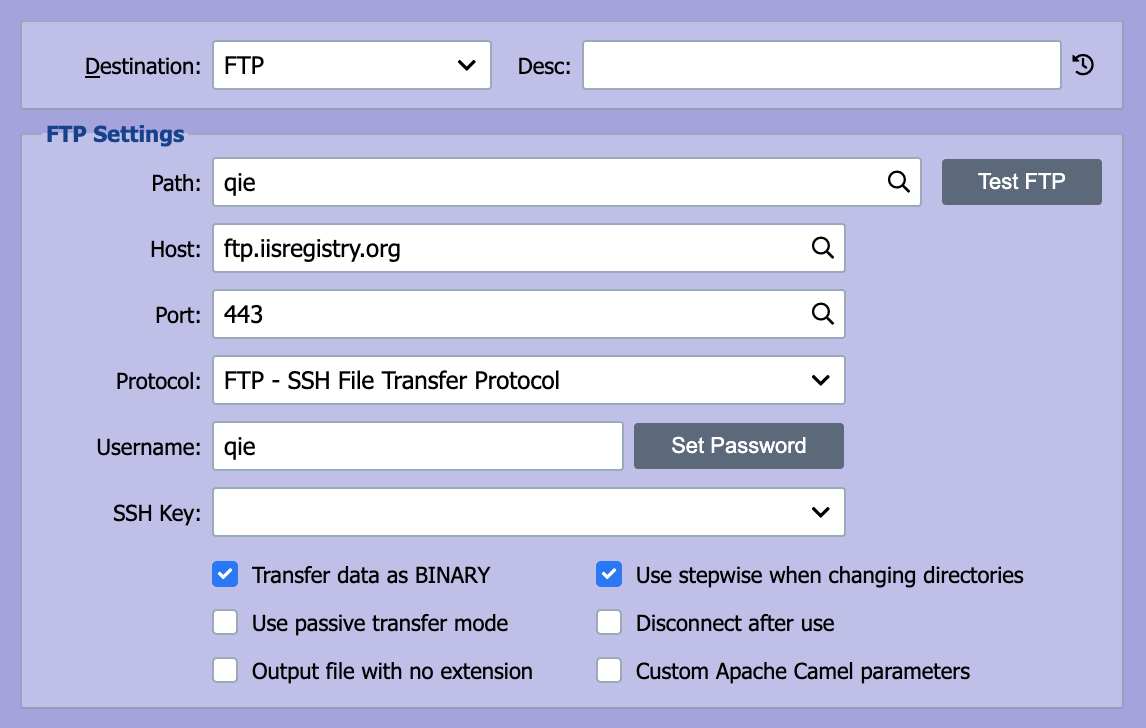
File Transfer Protocol (FTP) is a standard TCP-based network protocol used to transfer files from one host to another. QIE can be configured to send messages to a remote host using FTP.
Testing and troubleshooting connections
Use the Test button to run a staged connection diagnostic (with an opt-in write test) that pinpoints exactly where a connection fails. See SFTP / FTPS Troubleshooting.
Host
The FTP host should be set to the IP-address or the fully qualified domain name of the FTP server.
Port
The FTP protocol typically runs on port 21 but can be configured to run on another port. Enter the port number associated with the FTP server Host here.
Protocol
QIE supports the following FTP transfer protocols:
| FTP Transfer Protocol | Description |
|---|---|
| FTP: File Transfer Protocol | Data is transmitted using the standard FTP protocol |
| SFTP: SSH File Transfer Protocol | SSH File Transfer Protocol (SFTP) is not related to FTP except that it also transfers files and has a similar command set for users. Unlike standard FTP, it encrypts both commands and data, preventing passwords and sensitive information from being transmitted openly over the network. |
Encryption
When using the FTP: File Transfer Protocol, encryption can be configured to use one of the following options:
| Encryption Option | Description |
|---|---|
| Use plain FTP | Data is transmitted without encryption |
| Require explicit FTP over TLS | In explicit mode (also known as FTPES), an FTPS client must "explicitly request" security from an FTPS server and then step-up to a mutually agreed encryption method. |
| Require implicit FTP over TLS | Negotiation is not allowed with implicit FTPS configurations. A client is immediately expected to challenge the FTPS server with a TLS/SSL ClientHello message. |
Certificates for FTPS
For both FTPS modes QIE is the client in the TLS connection, so QIE does not need its own server certificate. To trust a self-signed or private-CA-signed FTPS server, import the server's public certificate on the Certificate Management page. See Certificate Management. FTPS is unrelated to SFTP; SFTP uses SSH keys, not TLS certificates.
Username and Password
The username and password associated with the FTP connection should be entered here.
Passwords with special characters
If the password contains characters that Camel interprets when building the FTP URI, for example ?, @, &, +, %, #, or =, wrap the password value with RAW(...) so Camel treats it as a literal: RAW(se+re?t&23). Without the wrapper, those characters are URL-decoded before being sent to the server and authentication fails.
SSH Key
When Protocol is set to SFTP, the SSH Key field selects the private key QIE uses for key-based authentication. Keys are imported on the Certificate Management page. Leave the field blank to fall back to username/password authentication.
Supported key format
QIE's SFTP uses the JSch library, which only accepts OpenSSH-format private keys. PuTTY .ppk files (especially the v3 format that recent PuTTYGen releases produce by default) are not supported and fail with com.jcraft.jsch.JSchException: invalid privatekey. Convert the key in PuTTYGen via Conversions -> Import Key, then Conversions -> Export OpenSSH key, and import the OpenSSH file into the Certificate Management page.
SFTP key authentication via filesystem path
The standard way to use key-based SFTP authentication is the SSH Key field above, which selects a key from Certificate Management. If you need to reference a key file on the QIE server's filesystem instead, leave SSH Key unset, check Custom Apache Camel Parameters, and add:
The key must be in OpenSSH format (see the note above). Set privateKeyPassphrase only if the key is encrypted; leave it blank for an unencrypted key.
Path
The path field contains the path to the folder on the FTP server and the filename pattern that QIE uses when creating a file. The path and filename pattern can contain embedded node tags (see Node Paths and Node Tags for more information). The filename pattern can also contain the asterisk (*) wildcard character. Refer to the File Sender Path field above for a list of sample filename patterns that can be used.
To write to a file without an extension, use the placeholder .{no-extension} at the end of the path, for example, /dropbox/test*.{no-extension} writes a file named test<wildcard> with no extension. The same placeholder works in the qie.writeFTPFile* and qie.writeSFTPFile script functions.
Transfer Data as Binary
Check this box to transfer files in binary mode (byte-for-byte) instead of FTP's default ASCII/text mode. Enable it for any non-text file (XLSX, DOCX, PDF, ZIP, images, DICOM objects, and similar binary formats) where ASCII-mode line-ending translation would corrupt the file. Leave it unchecked for plain-text formats (HL7, CSV, XML, JSON) where FTP's line-ending translation between platforms is acceptable.
Passive Transfer
Passive FTP Transfer mode can be used to overcome firewall issues when dealing with FTP connections. Active FTP servers attempt to make connections to random high ports on the client. These connection requests can often be blocked by the client-side firewall. In Passive FTP Transfer mode, the FTP client (QIE) makes both connections to the server. The FTP server must support passive mode in order to enable this feature in QIE.
Disconnect After Use
This option controls whether QIE keeps the FTP connection open after sending a file or closes the connection until the next file needs to be sent.
Use stepwise when changing directories
QIE has two modes (the checkbox is selected by default):
-
Traverse the directory structure, one directory at a time using the CD command, until arriving at the specified upload directory path.
-
Attempt to discover and upload to the specified subdirectory without traversing the directory structure. QIE connects by specifying the subdirectory in the put command.
Most FTP servers accept the default. Clear the checkbox if:
- The server returns errors like
550 Failed to change directoryor550 Permission deniedagainst a path you know is valid. - The server is write-only (the upload account has no list/read permission) and the destination fails with
Cannot list directory: .. Stepwise traversal callslson each parent directory; clearing the checkbox uploads directly with the full path and skips thels.
Custom Apache Camel Parameters
QIE uses Apache Camel for FTP destinations. Most configurations work with the fields above, but some scenarios require parameters not exposed by the standard UI. Check this option and enter additional parameters as key=value pairs. See the Apache Camel FTP component for the full parameter list.
Handling existing files
By default, the FTP destination appends a numeric suffix to the file name when a file with the same name already exists on the remote server. To change that behavior, add fileExist=<Strategy> to Custom Apache Camel Parameters:
fileExist=Overrideoverwrites the existing file.fileExist=Append. Append the new message to the existing file. To keep concatenated messages separated by a known delimiter, prepend a delimiter to the message content in a mapping node before the destination (for example,qie.createTextMessage('\r\r' + originalContent)).
See the Apache Camel FTP component for the full set of fileExist strategies.
Create dated/dynamic folders on the server
The path field accepts node tags including {SYSTEM_DATE[yyyy-MM-dd]}, so a path like /inbox/{SYSTEM_DATE[yyyy-MM-dd]}/{s-meta:FILE_NAME} routes each day's files into a date-named subfolder. By default, the FTP destination fails if the target subfolder does not already exist. Add autoCreate=true to Custom Apache Camel Parameters to have QIE create the directory on the server. For non-Windows servers, also set separator=UNIX so the path separators match.