Securing the QIE Web Console (HTTPS)
By default the QIE web admin console is served over plain HTTP on the
port configured by -Djetty.port (default 80). To require HTTPS for the
admin console, add the three Java options below and switch jetty.port
to a non-HTTP port (the launcher refuses to start if
qie.secureConsole=true and jetty.port is 80 or 8080, so pick another
port such as 443 or 8443).
| Option | Syntax | Description |
|---|---|---|
| Enable Secure Console | -Dqie.secureConsole=true |
Switches the QIE web admin console from HTTP to HTTPS. When set, qie.consoleKeyStore and qie.consoleKeyStorePass are also required. |
| Console Key Store | -Dqie.consoleKeyStore=C:\ProgramData\QIE\ssl\console_keystore.jks |
Absolute path to the keystore file containing the server certificate and private key that the admin console presents to browsers. JKS format is the documented baseline; PKCS12 also works. |
| Console Key Store Password | -Dqie.consoleKeyStorePass=changeit |
Password for the keystore file specified above. |
| Console Port | -Djetty.port=443 |
Must be set to a port other than 80 or 8080 when secureConsole is enabled. Use 443 to remove the port from the browser URL, or 8443 to keep the admin console on a non-privileged port. |
| Allow Weak Ciphers | -Dqie.enableWeakCiphers=true |
Optional, default false. When secureConsole is enabled, the launcher excludes a list of legacy DHE cipher suites by default; setting this option re-enables them. Only use if a legacy browser or client requires them. |
QIE forces TLSv1.2 for the admin console when qie.secureConsole=true;
older TLS protocols are not negotiated even if the keystore supports them.
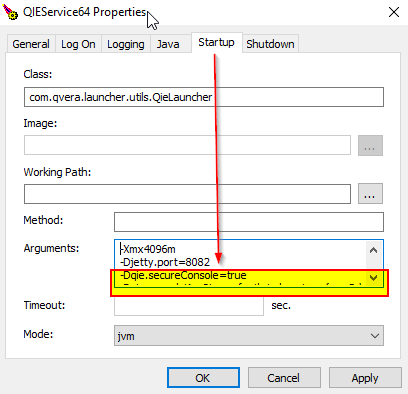
On Windows, the options are added to the Arguments field on the Startup tab of the QIE Service Manager:
Creating the keystore
The keystore must contain the server's private key, the matching server certificate, and any intermediate CA certificates the server cert chains through. Typical creation paths:
-
From an existing PEM private key + certificate (e.g. a wildcard cert issued by a public CA):
# Combine key + cert + chain into a PKCS12 bundle, then convert to JKS openssl pkcs12 -export \ -in server.crt -inkey server.key -certfile chain.crt \ -out console.p12 -name qie-console keytool -importkeystore \ -srckeystore console.p12 -srcstoretype PKCS12 \ -destkeystore console_keystore.jks -deststoretype JKS \ -alias qie-console -
From a fresh self-signed key for lab / pilot use:
Place the resulting .jks file at the path you specify in
qie.consoleKeyStore; the file must be readable by the user the QIE
service runs as.
On Linux installations using a java -jar invocation, make sure the
-D options appear after the -jar <war> segment of the command
line, because Java treats anything before -jar as arguments to itself,
arguments after -jar as program arguments, and QIE's launcher
expects them as JVM arguments.