File Sender
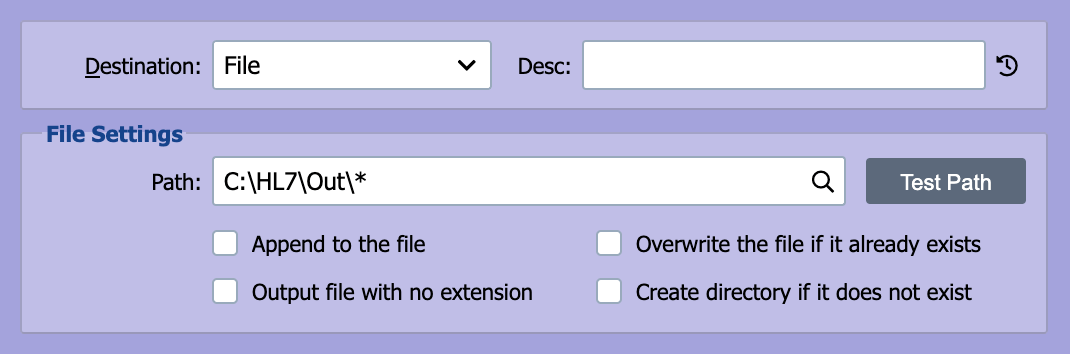
QIE can be configured to write messages to files in network or local folders.
Path
The path field contains the path to the folder and the filename pattern that QIE uses when creating, overwriting or appending to a file. The path and filename pattern can contain embedded node tags (see Node Paths and Node Tags for more information). The filename pattern can also contain the asterisk (*) wildcard character. The table below gives some examples of patterns that can be used and their resulting output.
Unique output filenames
For per-message uniqueness, the simplest approach is the {UUID} (or {UUID-NO-DASHES}) node tag, shown in the examples below. To produce sequential numbered files (e.g. out_00001.txt, out_00002.txt), maintain a counter in the channel cache and reference it from the path:
// In a mapping node before the destination
var next = (parseInt(channelCache.getValue('fileNumber')) || 0) + 1;
channelCache.setValue('fileNumber', next.toString());
messageCache.setValue('fileNumber', ('00000' + next).slice(-5));
Then reference it in the destination Path as out_{mc:fileNumber}.txt. The channel cache is not thread-safe, so enable Process messages in order received on the channel's Properties dialog to prevent concurrent threads from racing on the counter.
| Path pattern | Source | Filename | Sample output filename (including path) |
|---|---|---|---|
C:\outor C:\out\*or C:\out\*.* |
File or FTP other |
message.hl7n/a |
C:\out\message.hl7C:\out\38e6f6a749944312aa2d3a70145788a8 |
C:\out\{UUID}.new |
File or FTP other |
message.hl7n/a |
C:\out\38e6f6a7-4994-4312-aa2d-3a70145788a8.newC:\out\38e6f6a7-4994-4312-aa2d-3a70145788a8.new |
C:\out\{UUID-NO-DASHES}.* |
File or FTP other |
message.xmln/a |
C:\out\38e6f6a749944312aa2d3a70145788a8.xmlC:\out\38e6f6a749944312aa2d3a70145788a8 |
\\svr\share\*.tx |
File or FTP other |
message.txtn/a |
\\svr\share\message.tx\\svr\share\38e6f6a749944312aa2d3a70145788a8.tx |
C:\out\*.pre_* |
File or FTP other |
message.x12n/a |
C:\out\message.pre_x12C:\out\38e6f6a749944312aa2d3a70145788a8.pre_ |
C:\out\*_suffix.* |
File or FTP other |
message.csvn/a |
C:\out\message_suffix.csvC:\out\_suffix |
C:\out\{PID-3}.hl7(where PID-3= MR242) |
File or FTP other |
message.hl7n/a |
C:\out\MR242.hl7C:\out\MR242.hl7 |
C:\out\{PID-3}\*.*(where PID-3= MR242) |
File or FTP other |
message.hl7n/a |
C:\out\MR242\message.hl7C:\out\MR242\38e6f6a749944312aa2d3a70145788a8 |
C:\out\prefix_*.txt |
File or FTP other |
message.jsonn/a |
C:\out\prefix_message.txtC:\out\prefix_.txt |
C:\out\FixedName.txt |
File or FTP other |
message.xmln/a |
C:\out\FixedName.txtC:\out\FixedName.txt |
The two lines in each row show behavior when the source is File or FTP (retains the original filename where the pattern allows) versus other source types (uses a UUID because there is no source filename).
Note
QIE uses a Universal Unique Identifier (UUID) as the output filename if the source filename does not exist (the source type is not File or FTP)
Mapped drive letters
Windows-mapped drive letters (e.g. Z:\...) belong to the user session that created them and are not visible to services running as a different account. For a network share, enter the UNC path (\\server\share\...) directly here, or use a Network Share (SMB) node instead of the File node.
Append to the file
Output messages should be appended to existing files that match the Path pattern.
CSV files with a header row
When the message is CSV and the CSV format has First Row Is Header enabled, QIE writes the header row when creating the file and skips the header on subsequent appends, so the growing file ends up with a single header line at the top. No scripting needed.
Append + High Availability
When QIE is running in HA mode, multiple nodes fight for the file lock if more than one tries to append to the same file at the same time, producing errors like "the file is being used by another process." Enable Limit this node to sending messages on only one HA instance on this destination node, and set the channel's persistence level to 2 or higher (see Disable HA validation for the validation that catches this configuration).
Output file with no extension
Select this option to output the file without an extension
Overwrite the file if it already exists
Output messages should replace existing files that match the Path pattern.
Create directory if it does not exist
The directory should be created for the full path. This requires the QIE user to have privileges to create the directory.
HL7 trailing carriage return
When QIE serializes an HL7 message for a File destination, the HL7 model appends an end-of-line character after every segment, including the last. If the downstream consumer rejects the trailing carriage return, use a mapping node to grab the message body with message.getNode('/') (which joins segments without a trailing terminator) and write it directly with qie.writeFile, then route the channel to a Discard destination: