Parameterized Database Queries
When a script reads or writes a database, the safe way to pass message values into the SQL is a parameterized query, the statement is sent to the database with :name placeholders, and each value is bound separately rather than concatenated into the SQL text. This avoids broken statements when a value contains a quote and closes off SQL injection. Prefer this approach over building SQL strings by hand or interpolating node tags into the query.
A parameterized query is created with qie.getParameterizedQuery, populated with one set* call per placeholder, and then executed against a named database connection.
This recipe shows the scripted form, written in a mapping or custom script. If you would rather not script it, QIE can build the same parameterized query through a dialog. See Build the query without scripting.
Bind values with named parameters
Write each parameter in the SQL as :name, then bind a value to it by calling a set* method on the query object. In the example below, the :mrn placeholder in the query string is bound to a value by the pQuery.setString('mrn', ...) call beneath it:
var pQuery = qie.getParameterizedQuery(
   'SELECT mrn, last_name, first_name ' +
   'FROM patient ' +
   'WHERE mrn = :mrn');
pQuery.setString('mrn', source.getNode('PID-3.1'));
Every binder call takes the same two arguments:
- the parameter name, the placeholder from the SQL, without the leading colon (
'mrn'binds:mrn) - the value to bind
Which binder you call selects the SQL type. The example uses setString because the column is text; swap in the binder that matches your column's type:
| Call | Binds the value as |
|---|---|
pQuery.setBigDecimal(name, value) |
big decimal |
pQuery.setByte(name, value) |
byte |
pQuery.setDate(name, value) |
date |
pQuery.setDouble(name, value) |
double |
pQuery.setFloat(name, value) |
float |
pQuery.setInt(name, value) |
integer (4 byte) |
pQuery.setLong(name, value) |
long (8 byte) |
pQuery.setShort(name, value) |
short (2 byte) |
pQuery.setString(name, value) |
string |
pQuery.setTime(name, value) |
time |
pQuery.setTimestamp(name, value) |
timestamp |
Additional binders are available for less common cases: setBoolean, setBytes, setNull, and setObject (driver-inferred type), plus streaming binders.
The same placeholder can be referenced more than once in the statement; bind it once.
Read a result set
doSelectQuery(connectionName) runs the statement and returns the rows as a CSV message object, so the columns are addressed by name and the rows by instance. When no rows match it returns null, so check the result before reading it.
doQuery(connectionName) returns a CSV message for a SELECT, holding the column header row alone when no rows match, so its row count is 0 rather than null. It returns null for a statement that produces no result set at all, such as an UPDATE.
var pQuery = qie.getParameterizedQuery(
   'SELECT emr_id, clinic ' +
   'FROM provider_xref ' +
   'WHERE npi = :npi');
pQuery.setString('npi', source.getNode('OBR-16.1'));

var result = pQuery.doSelectQuery('ProviderDb');

if (result != null) {
   for (var i = 1; i <= result.getRowCount(); i++) {
      var emrId  = result.getNode('emr_id', i);
      var clinic = result.getNode('clinic', i);
      // ...use the row values...
   }
}
Test for existence of a single value
When you only need one value (or just need to know whether a row exists) doConditionQuery(connectionName) returns the first column of the first row, or null when nothing matches. That makes it the natural fit for an existence check.
var pQuery = qie.getParameterizedQuery(
   'SELECT 1 FROM no_match_helper ' +
   'WHERE external_mrn = :mrn ' +
   '  AND no_match_date >= :cutoff');
pQuery.setString('mrn', source.getNode('PID-3.1'));
pQuery.setDate('cutoff', qie.deduceDate(qie.getSystemDate()));

if (pQuery.doConditionQuery('LookupDb') != null) {
   // a matching row exists
}
Insert or update
doUpdateQuery(connectionName) runs an INSERT, UPDATE, or DELETE and returns the number of rows affected.
var pQuery = qie.getParameterizedQuery(
   'UPDATE patient ' +
   '   SET last_seen = :seen ' +
   ' WHERE mrn = :mrn');
pQuery.setTimestamp('seen', qie.deduceDate(qie.getSystemDate()));
pQuery.setString('mrn', source.getNode('PID-3.1'));

var rowsAffected = pQuery.doUpdateQuery('PatientDb');
Reusing a query across rows
Bind, execute, re-bind, execute. The same query object can be driven once per source row. Binding a parameter again replaces the previous value.
var pQuery = qie.getParameterizedQuery(
   'INSERT INTO visit_log (mrn, visit_id) VALUES (:mrn, :visitId)');

for (var i = 1; i <= source.getRowCount(); i++) {
   pQuery.setString('mrn',     source.getNode('mrn', i));
   pQuery.setString('visitId', source.getNode('visit_id', i));
   pQuery.doUpdateQuery('VisitDb');
}
Batching inserts
Running one INSERT per row is a round-trip per row. When the row count is high, build a single multi-row statement instead. See Batching SQL INSERTs for Performance.
A failed query throws. It does not return null
A bad connection name, SQL error, or driver failure raises an exception that errors the message. A null return from doConditionQuery or doSelectQuery means no matching row, and a null return from doQuery means the statement produced no result set. None of them ever means the query failed. Wrap the call in try/catch only when you intend to handle the failure yourself rather than letting the message go to the error queue.
Build the query without scripting
The Database mapping function builds a parameterized query through its dialog, with no script. The same parameter grid also appears on database source and destination query nodes.
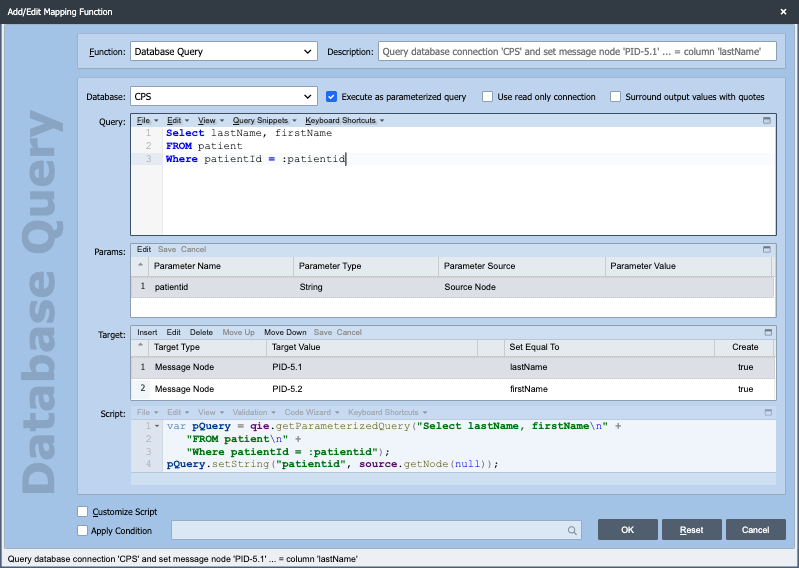
-
Select the Connection (the database) from the drop-down.
-
Turn on the parameterized-query option (the Execute as parameterized query checkbox).
-
Type the SQL in the Query field, marking each parameter with a leading colon, as in
:mrnand:cutoff. A leading@(@mrn) is also recognized. -
Tab out of the Query field (or click the next field). QIE scans the query and fills the Params grid with one row per placeholder it found.
-
For each parameter row, set its Type (the default is String. Change it to Date, Int, Timestamp, etc. to match the column) and its Source, where the value is bound from: a message or source node path, a node tag, channel or message cache, a system variable, the system date/time, or a constant string.
Mark each parameter with a colon
QIE only detects a parameter when it is prefixed with : (or @) in the Query field. Without the prefix, the Params grid stays empty and the value is treated as literal SQL text. This is the most common reason the grid does not populate when you tab out.