Node Tags
A Node Tag is used to embed nodes or data elements in QIE templates. The node tag identifies both the data source (source, message, message cache, variable, etc.) and the associated Node Path. QIE templates are used in mapping functions, database queries, file and FTP paths, etc. The qie.evaluateTemplate() function must be called when using node tags, except when using the qie.doQuery() and qie.doConditionQuery() functions. The QIE node tag syntax conforms to the following pattern:
| { Source Indicator [ Format Indicator ] : Node Path } | ||
|---|---|---|
| Element | Required | Description |
| Source Indicator | Optional | The source indicator identifies the data source associated with the node path. If the source indicator is omitted, the data source is assumed to be the Source object. |
| Format Indicator | Optional | The format indicator is used to specify the desired format of the data returned by the node path. Note format indicators are optional. When used, one or more indicators can be specified. |
| Node path | Required | The node path, value name, or variable name to use when querying the specified data source for the associated node tag value |
The following Source Indicators are defined:
| Source Indicator | Object | Description |
|---|---|---|
| no indicator | Source | When no indicator is specified, the node tag returns the value of the node in the source object which matches the specified node path. For example, {MRN} is identical to {s:MRN}. |
| cc | Channel Cache | The node tag returns the value of a channel cache entry with a name that matches the specified node path |
| mc | Message Cache | The node tag returns the value of a message cache entry with a name that matches the specified node path |
| sc | Shared Cache | The node tag returns the value of a shared cache entry with a key that matches the specified node path. The optional [ns=...] and [g=...] format indicators select the namespace and global scope. Available in QIE 26.2.1 and later. |
| m | Message | The node tag returns the value of the node in the message object which matches the specified node path |
| p | Parameter | The node tag returns the value of a parameter with a name that matches the specified node path |
| s | Source | The node tag returns the value of the node in the source object which matches the specified node path |
| v | Variable | The node tag returns the value of a system variable with a name that matches the specified node path |
| v-user | Variable | The node tag returns the value of the username of the system variable with a name that matches the specified node path. This is only for System Variables of type "Credentials". |
| v-pass | Variable | The node tag returns the value of the password of the system variable with a name that matches the specified node path. |
| ws-pass | Web Service | The node tag returns the value of the "Password" field of the web service connection with a name that matches the specified node path. |
| ws-user | Web Service | The node tag returns the value of the "Username" field of the web service connection with a name that matches the specified node path. |
| alt, alt-1 ... alt-N | Object | The {alt:nodePath} tag in a template accesses data from an alternate Message Model (such as HL7, JSON, or CSV) that is passed as the final argument to qie.evaluateTemplate(). When more than one alternate Message Model is passed, reference each by the position it was supplied in: {alt-1:nodePath} is the first (the same as {alt:nodePath}), {alt-2:nodePath} is the second, and so on. |
| s-meta | Source Context | The node tag returns file-related metadata for the current source context such as the source-relative directory, file name, file extension, or remote IP address. |
Reading the original source vs the modified message
{s:...} always returns the original unmodified source message, what the channel received from the source node. {m:...} returns the current state of the message as mapping nodes have modified it. If a destination template uses {s:...} for a field that an earlier mapping node changed, the destination sends the original (pre-mapping) value instead of the modified one. Use {m:...} to read the modified message, and {s:...} only when you specifically want the original.
Iterating against an alternate message
When a template is evaluated with an alternate Message Model passed as the final argument to qie.evaluateTemplate(...), only {alt:...} tags resolve against that alternate. {s:...} tags still resolve against the channel's source message, not the iteration argument. A common symptom is a loop that emits the same segment's values for every iteration. To fix, change {s:RXC-...} (or wherever you used s:) to {alt:...} inside the template.
Outside of templates, scripts can read a system variable directly via qie.getVariable('myVar') (or qie.getVariableString('myVar') for an explicit string conversion).
The following Format Indicators are defined:
| Format Indicator | Syntax | Description |
|---|---|---|
| Base64 encode | [base64] | When the base64 format indicator is used, the data returned by the node tag is Base64-encoded before being added to the template. Optionally, an encoding type can be added e.g. {s[base64-UTF-8]:/}. The default available encodings are UTF-8, ISO-8859-1, and windows-1252. |
| Base64 decode | [base64-decode] | When the base64-decode format indicator is used, the data returned by the node tag is Base64-decoded before being added to the template. Optionally, an encoding type can be added e.g. {s[base64-decode-UTF-8]:/}. The default available encodings are UTF-8, ISO-8859-1, and windows-1252. |
| Date/time format string | [yyyy-MM-dd] | When using the SYSTEM_DATE or UTC_DATE System Node Tag, the desired date/time format must be specified e.g. {SYSTEM_DATE[yyyy-MM-dd]} (see Date/Time Mapping Function for more information). |
| No escape | [no-escape] | Selecting this option prevents the value from being escaped for message encoding such as XML or JSON. [raw] is an accepted alias. |
| Required | [required] | Making a node tag required sends the message to the error queue if the referenced value is null or empty. |
| JSON node tag | /* */ | When working with JSON format, this option wraps the node tag in these characters to protect the node from being incorrectly interpreted by the JSON parser. |
| Parse as | [format@node_path] | When using the "Parse as" format indicator, the data returned by the node tag is parsed as the specified content type and the data found at the "parse as" node tag is added to the template. The format is one of XML, JSON, CSV, HL7, DICOM, ASTM, X12, or EDIFACT, for example {mc[JSON@/patient/id]:apiResponse}. |
| Shared cache namespace | [ns=namespace] | Selects the namespace used when reading a shared cache value. Applies only to the sc source indicator and is ignored for all others. [namespace=...] is an accepted alias. |
| Shared cache global scope | [g=true|false] | Selects the global flag used when reading a shared cache value. Applies only to the sc source indicator and is ignored for all others. [global=...] is an accepted alias. |
Unknown brace tokens become empty strings
When qie.evaluateTemplate() encounters a brace token whose source indicator is not one of the values listed above, for example, a placeholder like {my.custom.token} you intend to fill in later. It is treated as an unknown node tag and substituted with an empty string. The literal token text does not survive into the output. If the same token is also marked [required], the message is sent to the error queue with Required node tag not found or is blank: {my.custom.token} instead.
For deferred placeholders that need to outlive qie.evaluateTemplate() and be replaced later in script with .replace(...), use a syntax that does not use braces, for example %%MY_TOKEN%%. That way the node-tag parser leaves it alone.
System Node Tags
QIE also defines a set of system node tags that embed data not derived from the message or channel: the current system or UTC date, a generated UUID, and the QIE-assigned source and message IDs. These take no source indicator and no node path. See System Node Tags.
Source Metadata Node Tags
Source Metadata Node Tags expose file-related metadata for the current source context. They can be used wherever QIE evaluates node tags: archive paths, destination paths and file names, evaluated templates, and scripts or expressions. The following node paths are available:
| Source Metadata Node Path | Syntax | Description |
|---|---|---|
| FILE_DIRECTORY | {s-meta:FILE_DIRECTORY} | Returns the source-relative directory path using / as the separator. The value is blank when the file is in the root of the configured source path. |
| FILE_NAME | {s-meta:FILE_NAME} | Returns the file name including the extension. |
| FILE_NAME_WITHOUT_EXT | {s-meta:FILE_NAME_WITHOUT_EXT} | Returns the file name without the extension. |
| FILE_EXT | {s-meta:FILE_EXT} | Returns the file extension only. |
| REMOTE_IP_ADDRESS | {s-meta:REMOTE_IP_ADDRESS} | Returns the remote IP address of the connecting system. Populated only for socket (HL7/ASTM) and DICOM sources; blank for file, FTP, and network-share sources. |
For example, using the following as an archive path preserves the source's subfolder structure under the archive root:
Note
Source Metadata values are available in templates only when a current source file or connection context exists. During path tests that do not have a live source, source metadata portions of the template cannot be fully resolved.
Escaping Literal Curly Braces
The { and } characters are reserved as node tag delimiters wherever QIE evaluates a template, including qie.evaluateTemplate, qie.doQuery, qie.doConditionQuery, qie.doSelectQuery, qie.doUpdateQuery, and pQuery.callStoredProcedure. A literal brace that is not part of a node tag (for example, in a JSON snippet you want to embed without templating, or in the JDBC { CALL ... } escape syntax for stored procedures) must be written as its HTML entity:
| Literal | Escape |
|---|---|
{ |
{ |
} |
} |
For example, the stored-procedure CALL string { CALL dbo.MyProc(:p) } must be typed as { CALL dbo.MyProc(:p) } in a mapping script. QIE replaces the entities with the literal braces after the template engine has decided which {...} runs are node tags. Parameterized queries avoid the problem entirely by separating values from the SQL/template text.
Node Tag Lookup Dialog
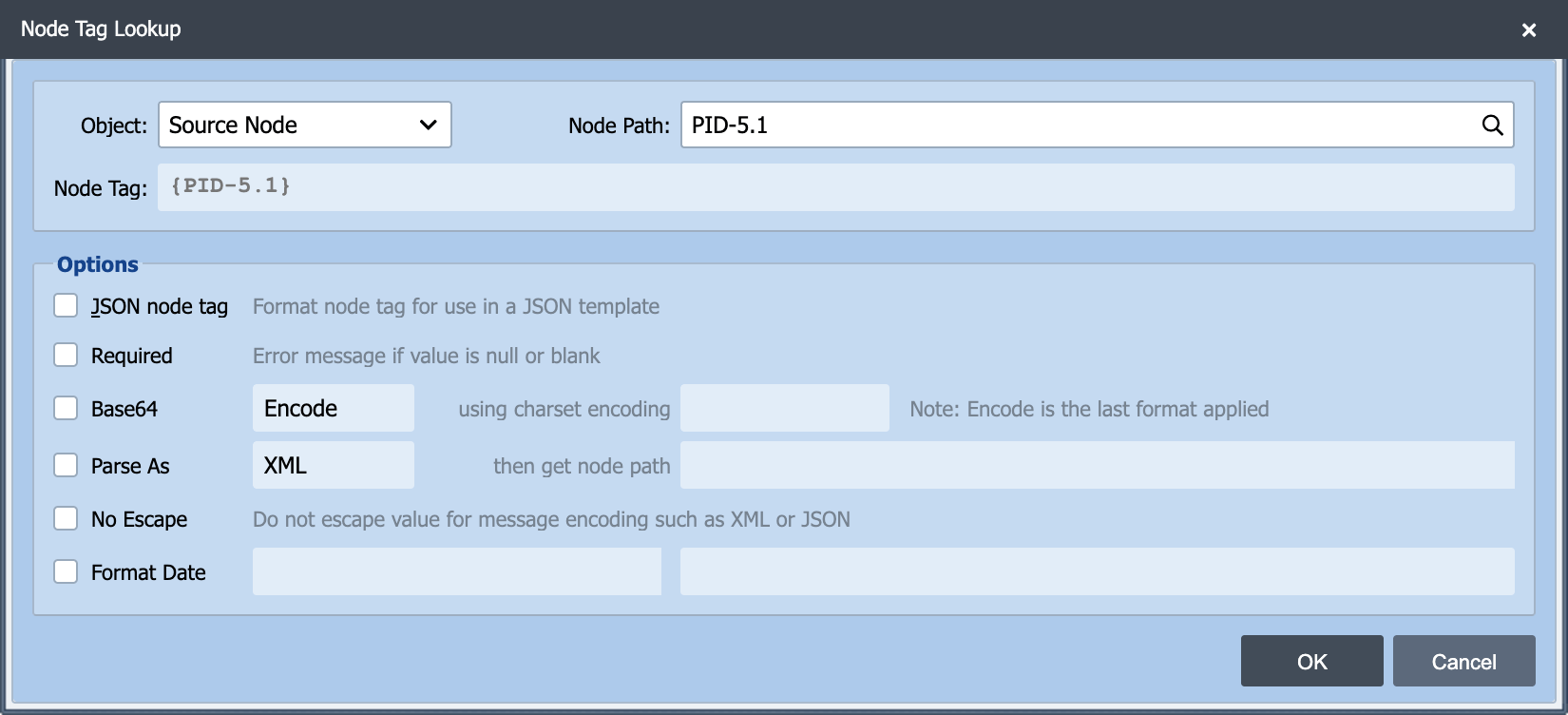
Node Tags can either be entered manually or entered using the Node Tag Lookup Dialog. The Node Tag Lookup Dialog can be accessed from the View menu of any associated editor or by using the hot key (Shft+F2).
Source
This field identifies the data source associated with the node tag. Select the desired data source from the drop-down list.
Node Path
This field identifies the node path associated with the desired data element or node. The node path can either be entered manually or entered using the Node Path Lookup Dialog by selecting the Lookup button or using the hot key (F2).
JSON node tag
Select this option if the node tag is used in a JSON formatted message.
Required
Making a node tag required sends the message to the error queue if the referenced value is null or empty.
Base64 Encode/Decode
Selecting this option base64-encodes or decodes the referenced value.
Parse As
Selecting this option allows the referenced value to be parsed into a message model object and a discreet node within that message model object to be retrieved as the return value.
No Escape
Selecting this option prevents the value from being escaped for message encoding such as XML or JSON.
Format Date
Selecting this option applies the desired date format to the referenced value.