Email Alerts
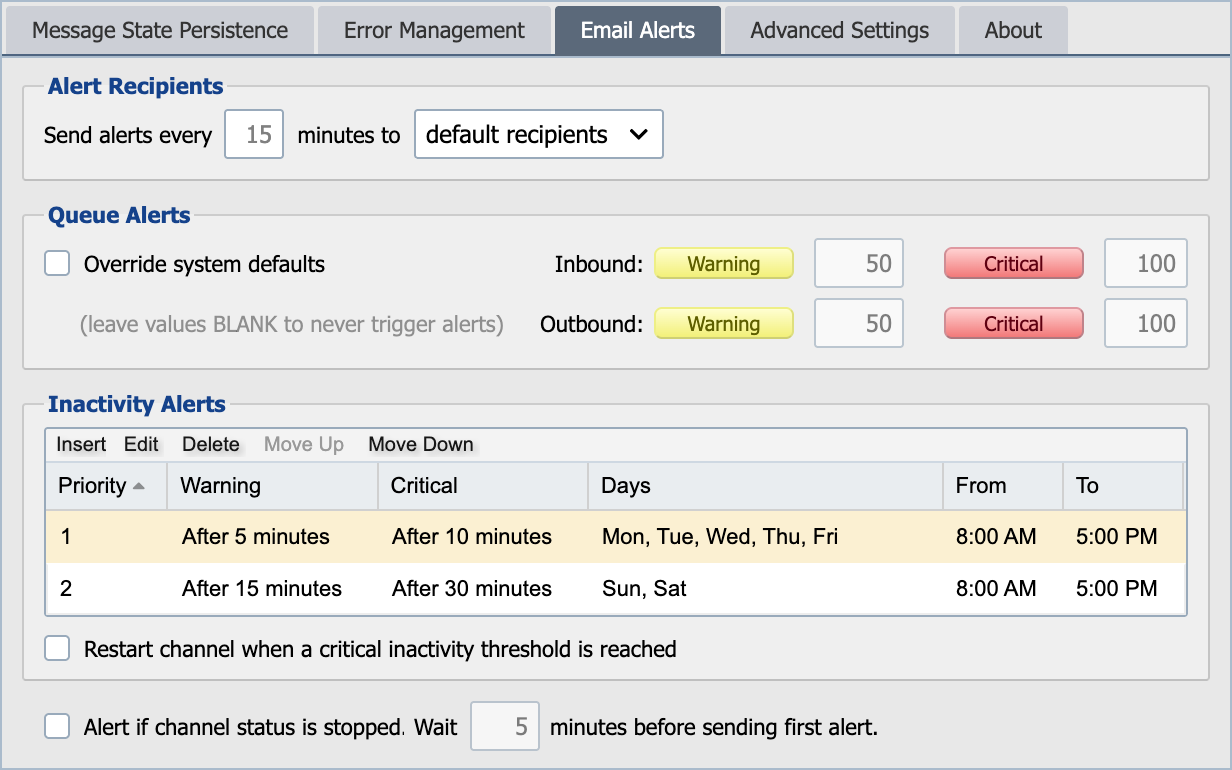
Alert Recipients
Select the email alert recipients for the channel:
Default Recipients
Email alerts are sent to any QIE user who is configured to receive alerts for the given zone.
Default Plus These
Email alerts are sent to the default recipients plus the specified list of email addresses.
Only These
Email alerts are sent only to the specified list of email addresses. Alerts are NOT sent to the default recipients.
Do not Send Alerts
Email alerts are NOT sent for this channel.
Queue Alerts
The system default queue alert thresholds are inherited from the System Configuration settings and can be overridden for each channel. The queue alert thresholds specify the number of messages that can exist in a channel's inbound or outbound queue before an alert email is sent out from QIE to end users. To modify these setting select the Override System Defaults checkbox. For more information, please see Queue Alert Defaults from the System Configuration.
Inactivity
These settings can be used to specify the times and days of the week when alerts are emailed for inactivity. Selecting the Restart channel when critical threshold is reached automatically stops and starts the channel for no activity.
When an inactivity alert fires, the channel's Received count on the status views turns red, a quick visual indicator that the channel has not received messages within the configured threshold.
Error Alert Flood Protection
QIE limits how many error alert emails a channel sends while it is failing repeatedly. A channel sends up to 10 error alerts within any 10-minute period. The next error inside that period puts the channel into alert overflow mode. QIE sends an "Entering Alert Overflow Mode!" email in place of that error's alert.
While a channel is in alert overflow mode, QIE sends at most one error alert every 5 minutes, however many errors occur. The first of these arrives 5 minutes after the "Entering Alert Overflow Mode!" email, and it is the same alert the error would normally produce. QIE withholds every other error alert. Only the email is withheld: the error itself is handled exactly as it would be otherwise.
Alert overflow mode ends once 10 minutes pass with no error alert from the channel, or as soon as the channel is stopped. Withheld alerts count: while errors keep occurring less than 10 minutes apart, the channel stays in alert overflow mode. When it ends, QIE sends an "Exiting Alert Overflow Mode" email that reports how many alerts were suppressed, and normal alerting resumes.
These limits apply to each channel separately, so one failing channel does not hold back alerts from any other channel.