Secrets Manager
Create a new secret to pass the username and password over to the ECS task so that QIE is able to connect to the database correctly.
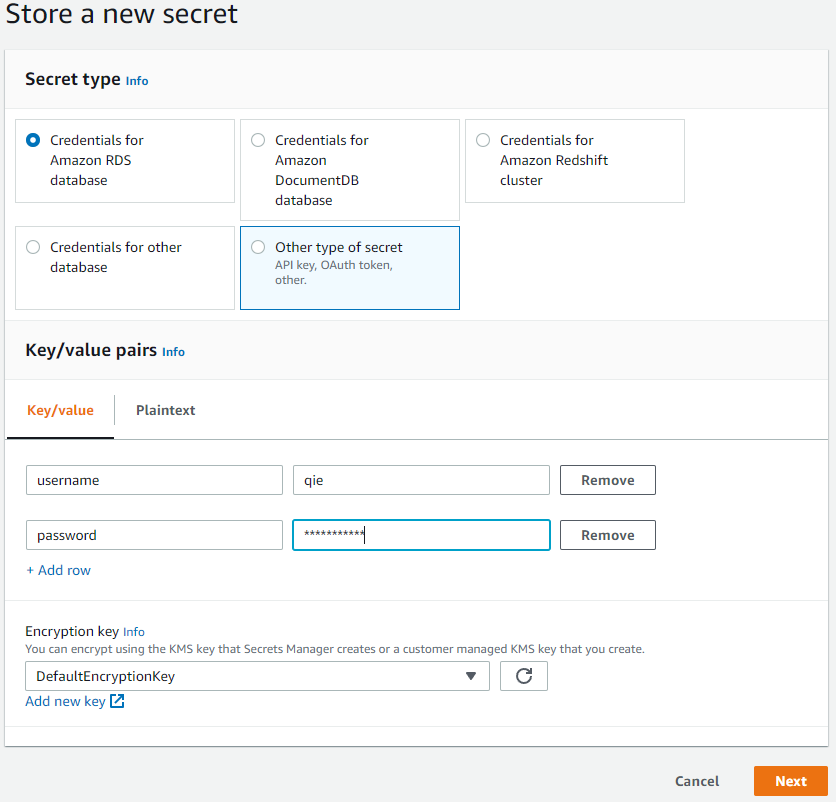
Create New Secret
Navigate to the Secrets Manager management page and click on the 'Store a new secret' button at the top of the page. Select 'Other type of secret' from the 'Secret type' options.
Type in 'username' as the key for the first row, and 'qie' as the value. If you used a different username when setting up the database, then use the username defined.
Click on '+ Add row' and type in 'password' as the key for the second row. Now type in the password for the account setup on the database.
Click on 'Next' at the bottom of the page, and give you secret a name and a description. In this example I gave the name of 'qie-ecs-db-secret' and a description of 'Credentials for connecting to the RDS'. Click on 'Next' at the bottom of the page.
In this configuration leave the 'Secret rotation' disabled. Click on 'Next' at the bottom of the page. You can now review your secret, then click on 'Store' at the bottom of the page.
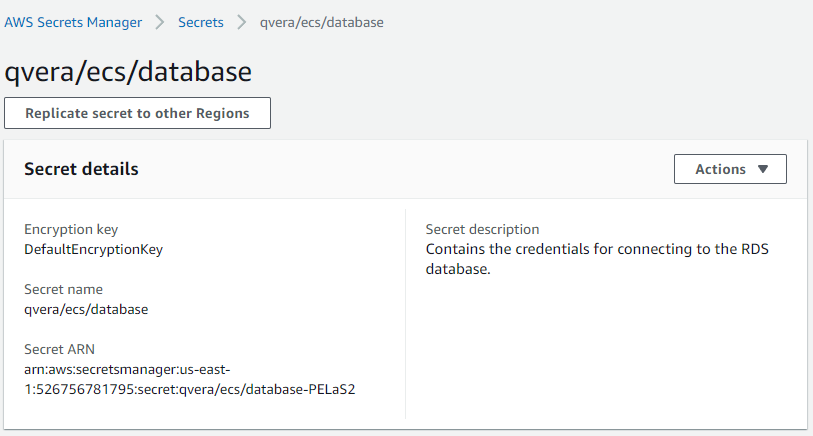
Record the Secret ARN
The 'Secret ARN' is needed when defining the ECS task, so click on the newly created secret, and from the secret details page record the 'Secret ARN'.