DICOM Listener
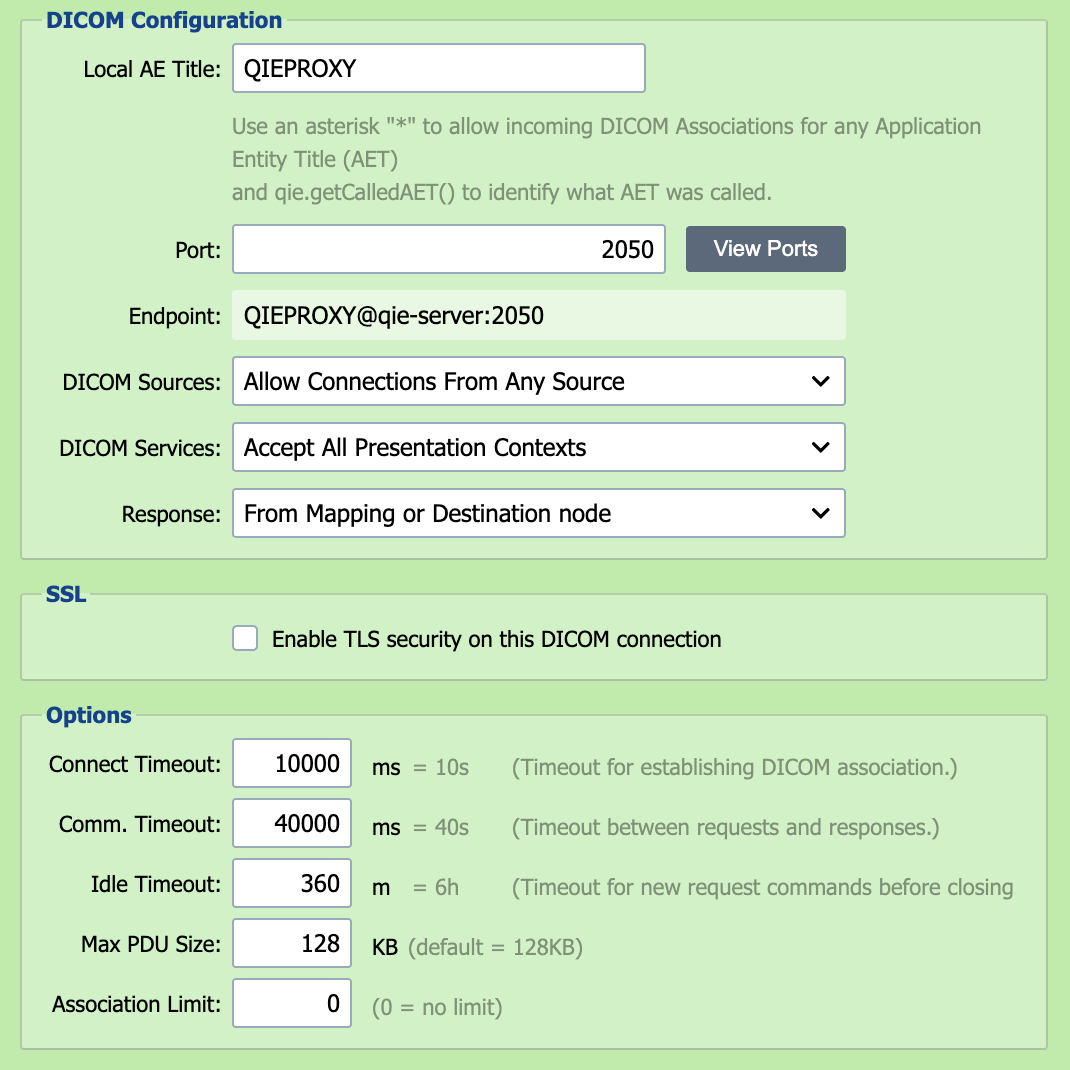
The DICOM Listener implements the DICOM network communication protocols and allows QIE to connect to and communicate with any modality or system which supports DICOM network communications.
Large images: store pixel data in a separate folder
Selecting a DICOM Listener source sets the channel's message format to DICOM. The DICOM Format section of the source node includes the Enable storing DICOM Pixel Data in a separate folder option, which should be enabled on any channel that can receive large images so QIE never has to hold whole instances in memory.
Local AE Title
Uniquely identifies a DICOM device or program. Typically labeled with numbers and uppercase characters only.
Port
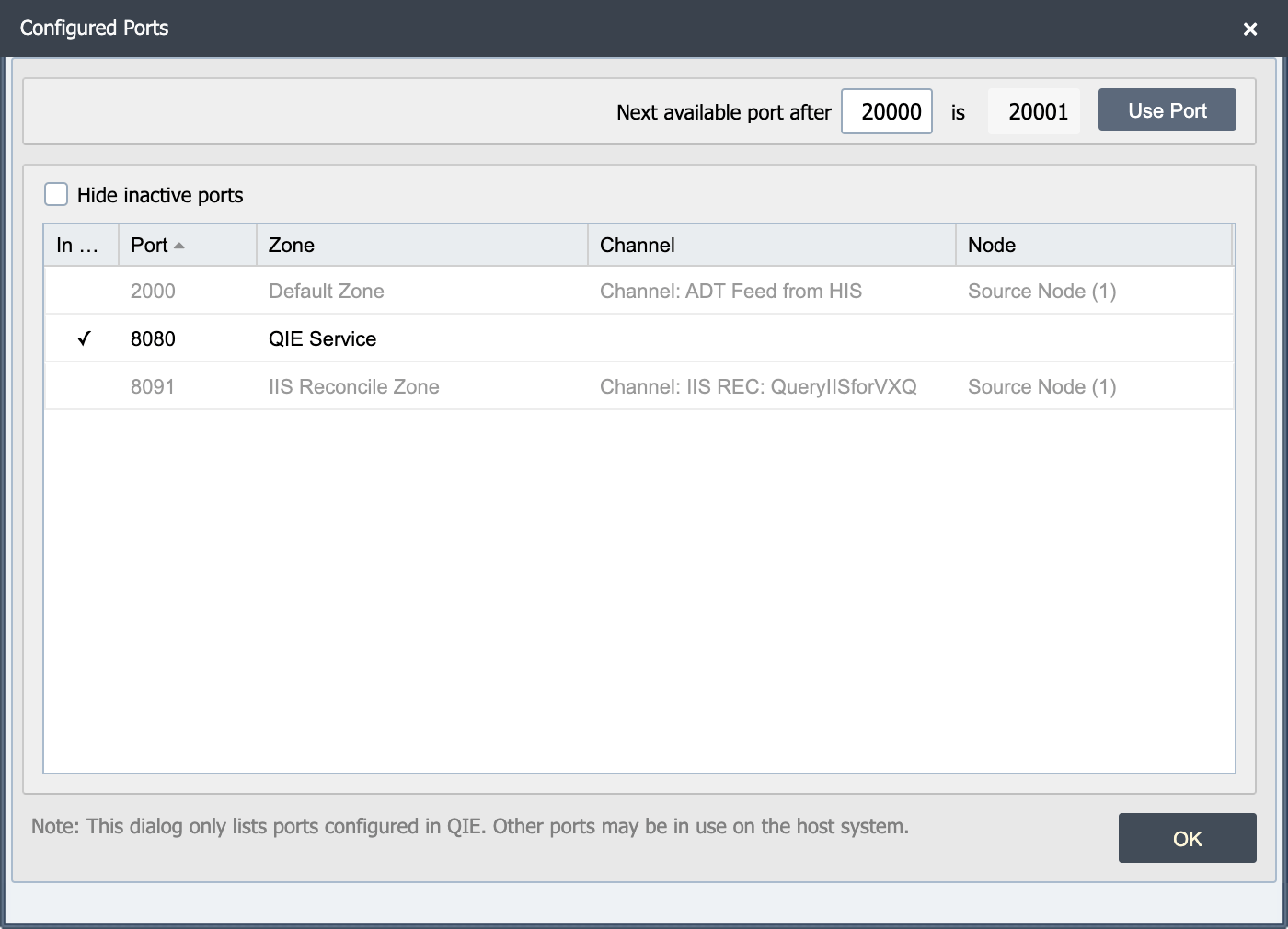
The DICOM listener must be published to an available port on the QIE server.
View Ports
The view ports button displays a list of ports in use on the QIE server. This dialog highlights the active ports and a checkbox allows the user to hide the inactive ports from the list.
Note
This dialog only lists the ports configured in QIE. Other ports may be in use on the host system.
Note
When publishing a DICOM Listener, be sure to open the selected port on the local and/or network firewall. Otherwise, remote clients may be unable to connect.
Endpoint
The endpoint URL that other systems and modalities use to connect to the DICOM listener
DICOM Sources
A DICOM listener can be configured to accept connections from any DICOM source or can be bound to a specified list of DICOM sources, defined as DICOM Connections in QIE.
DICOM Services
A DICOM listener can be configured to accept any DICOM presentation context or can be bound to a specified list of DICOM presentation contexts.
Response
When processing inbound requests, the client sending the request often require a response. QIE supports the following response options:
| Response Option | Description |
|---|---|
| From Mapping or Destination node | QIE holds the request open while the message is processed through the channel and waits for a response to be posted by one of the channel nodes (by calling the qie.postDICOMResponse() function). |
| From Response Script | The response is generated using the Response Script and posted back to the client prior to the message being processed through the channel. |
Response Script
When the Response option above is configured to post a response From Response Script, the response script is executed in order to generate and post the desired response back to the client prior to processing the message through the channel (see Creating Custom Scripts for more information).
The default Response Script for a new DICOM Listener simply echoes a Success response back to the calling system:
Replace it with response logic appropriate for the DICOM services your channel accepts.
Responding to DICOM Requests
DICOM responses are posted with qie.postDICOMResponse(...) and built with qie.createDICOMResponseFromRequest(request, status), which copies the required command headers (including Message ID Being Responded To) from the inbound request. The most common status values are:
| Status | Meaning |
|---|---|
0x0000 |
Success. Final response, completes the request |
0xFF00 |
Pending. Matches continuing, used for each C-FIND or Modality Worklist match before the final Success |
0xFF01 |
Pending with warning. Same as 0xFF00 but signals that one or more optional keys were not supported |
A C-ECHO Verification response is a single Success:
A C-FIND or Modality Worklist response sends one Pending response per matching item, then a final Success:
// For each match found in your query result:
var pending = qie.createDICOMResponseFromRequest(source, 0xFF00);
pending.mergeDICOM(matchDicom);  // matchDicom is a DICOM message built from the row
qie.postDICOMResponse(pending);

// After all matches:
qie.postDICOMResponse(qie.createDICOMResponseFromRequest(source, 0x0000));
Warning
Do not use qie.postMessageResponse() or qie.cancelMessageResponse() on a DICOM Listener. Both calls log "Unable to cancel message responses for DICOM messages" because DICOM responses can only be posted (and cannot be canceled) through the DICOM-specific functions above.
Enable TLS Security
When this option is enabled, the DICOM Listener is secured using TLS certificates, including the ability to require client authentication. The DICOM listener makes QIE the server, so QIE needs its own server certificate; sending peers only need QIE's public certificate to trust the connection. Enable client authentication only when you also want to require the sending peer to present its own certificate to QIE (mutual TLS). See Certificate Management.
Connect Timeout
The connect timeout specifies how long QIE waits to establish a connection at the TCP/IP socket level before raising a timeout exception and aborting the connection attempt.
Communication (Comm) Timeout
The communication timeout specifies how long QIE waits to compete any of the following communication commands:
| Command | Description |
|---|---|
| Request | Timeout for receiving A-ASSOCIATE-RQ |
| Accept | Timeout for receiving A-ASSOCIATE-AC |
| Release | Timeout for receiving A-RELEASE-RP |
| Send | Timeout for sending DIMSE requests (other than C-STORE requests) |
| Response | Timeout for receiving DIMSE responses (other than C-STORE and C-GET responses) |
| Store | Timeout for sending C-STORE requests |
| Retrieve | Timeout for receiving C-STORE and C-GET responses |
Idle Timeout
The idle timeout specifies how long QIE waits before terminating an idle connection.
Max PDU Size
The Max Protocol Data Unit (PDU) size specifies the maximum number of bytes that QIE is configured to receive or send in a single PDU transmission. When QIE negotiates a connection with an Association, it uses the minimum of QIE's Max PDU size or the Association's Max PDU size for both sending and receiving data.
Association Limit
The association limit specifies how many associations/devices can connect to this listener at the same time.