System Configuration Nightly Backup
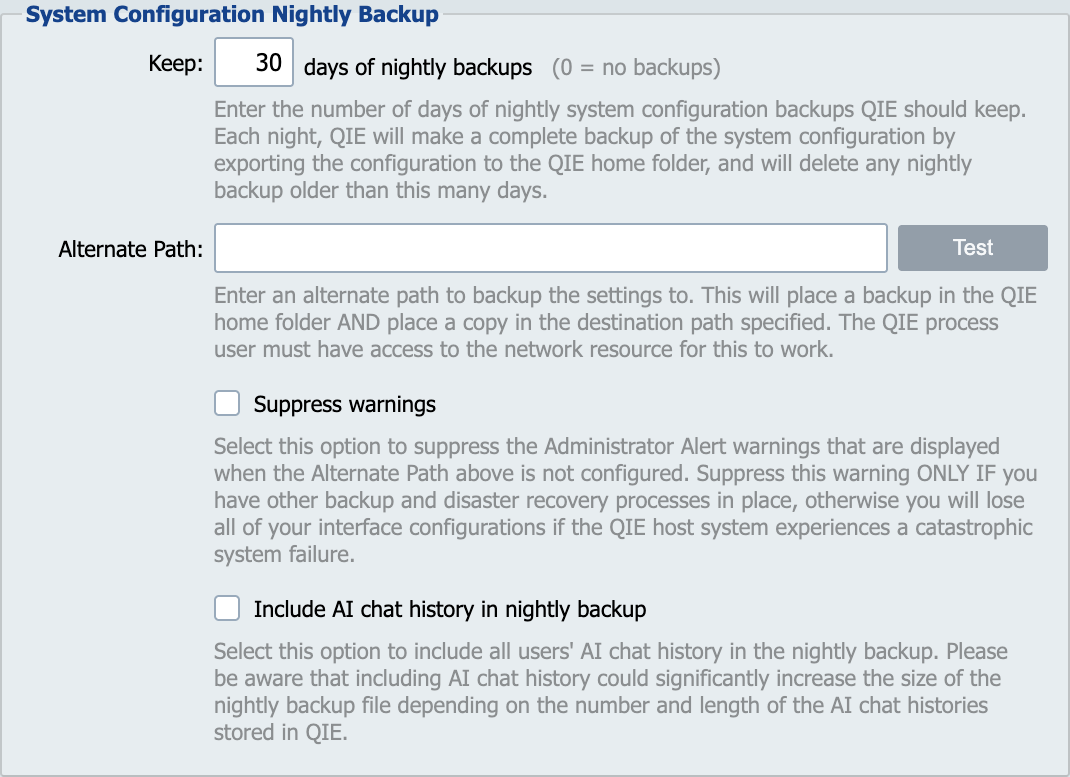
Each night, QIE makes a complete backup of the system configuration by exporting the configuration to the backup folder located in the QIE home folder. The backup folder also contains a monthly and yearly folder. On the last day of the month the backup file is also copied to the monthly folder. The yearly folder is populated with the first backup file. Annually, on the anniversary of the first backup, a new backup file is placed in this folder.
Keep 'XX' days of nightly backups
How many days of nightly configuration backups to retain in the backup folder. Each night's backup is dated; backups older than this many days are deleted on the next nightly run. Default: 30 days.
The monthly and yearly retention windows are hard-coded and not user-configurable:
- Monthly backups (the last backup of each month, copied into the
monthlyfolder) are kept for 18 months and then deleted automatically. - Yearly backups (placed in the
yearlyfolder on the anniversary of the first backup) are never deleted automatically.
Set this value to 0 to disable nightly backups entirely.
Alternate Path
If a second backup is required enter an alternate path here. Backups placed in this path are never deleted by QIE. These files will need to be managed by someone in your organization to ensure the disk does not fill up.
Suppress Warnings
Selecting this option turns off the Administrator Alert warning which is displayed when the alternate path is not set.