HL7 Format
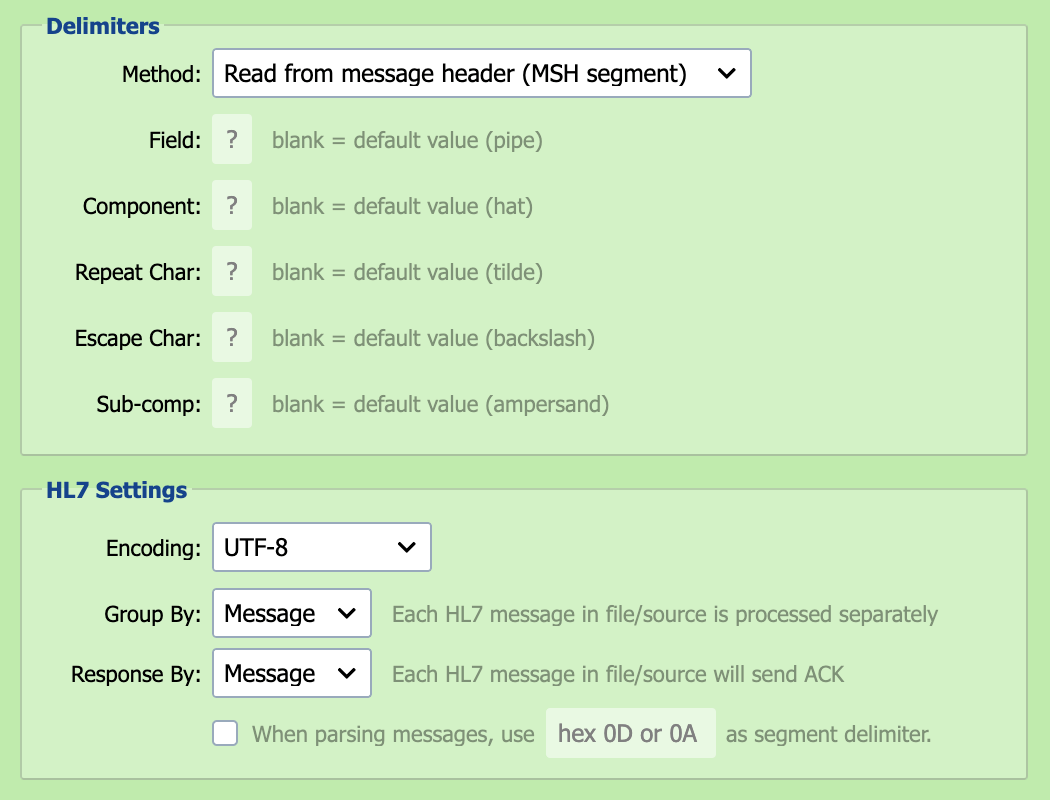
HL7 is a messaging standard adopted by the healthcare industry for exchanging clinical and financial information between various healthcare IT systems.
Delimiter Method
The delimiter method defines how QIE determines the delimiters to use when parsing HL7 messages.
| Delimiter Method | Description |
|---|---|
| Read from message header (default) |
The HL7 specification indicates that the message delimiters are defined in the message, batch or file header segment. When this option is selected, QIE determines the message delimiters to use by reading each HL7 message header segment. |
| Use the default HL7 delimiters | The HL7 specification includes recommended delimiters to be used with HL7 formatted messages. When this option is selected, QIE uses the default HL7 delimiters when parsing messages. |
| Define custom delimiters | When this option is selected, QIE uses the specified custom HL7 delimiters when parsing messages. |
Field Delimiter
The field delimiter is used to separate fields in an HL7 segment. The default delimiter is a pipe (|) character.
Component Delimiter
An HL7 field can have multiple components. The component delimiter is used to separate field components. The default delimiter is a hat (^) character.
Repeat Character
An HL7 field can repeat (have multiple values). The repeat character is used to separate multiple instances of a field value. The default repeat character is the tilde (~) character.
Escape Character
The escape character defines how delimiter characters are escaped when used in field or component values. The default escape character is the backslash (\ character.
Sub-Component Delimiter
An HL7 field component can have sub-components. The sub-component delimiter is used to separate field sub-components. The default delimiter is an ampersand (&) character.
Encoding
HL7 supports several encodings including UTF-8, ISO-8859-1 and windows-1252.
Group By
HL7 supports transmitting messages individually or in batches (multiple messages per file). When processing HL7 batch files, QIE can be configured to process the entire batch as a single message (file) or to process each individual HL7 message within the batch as a separate message (message).
Response By
- Message: An ACK is sent for each individual HL7 message.
- File/Batch: A single ACK is sent for the first message in file/source.