Configuration Endpoints
Configuration endpoints import and export QIE zone configurations. Only zones and zone objects can be imported or exported - system configuration, users, and licenses are not transferred through these endpoints.
Import Configuration
Configuration files can be imported into a QIE instance using the Management API. However, only zones and the zone objects can be imported and updated. Every zone and zone object found in the config file is imported into the QIE instance using this command. If a config file contains system config, users, or licenses, these items are ignored.
Because of the processing that is required to import a configuration, this call can take longer than the channel status calls. Qvera recommends that you set your timeout to at least 2 minutes when making import calls.
To import a QIE config file call the URI http(s)://<qie_server>:<management_api_port>/config/import with the following payload:
{
   "configFile": "<base64 encoded config file>",
   "overwriteEndpoints": true | false,
   "importSampleMessages": true | false,
   "overwriteEditablePackageComponents": true | false,
   "overwriteConnAndVarNames": true | false,
   "updateChannelCacheOnly": true | false,
   "overrideExistingChannelCacheValues": true | false,
   "keyPass": "<private_key_password>",
   "skipKeysWithInvalidPasswords": true | false,
   "formatOutput": true | false,
   "zoneOverride": [
      {
         "sourceZone": "<importFileZoneName1>",
         "destZone": "<qieZoneName1>",
         "createZone": true | false
      },
      ….
   ]
}
Base JSON Payload Definition
| Node | Description |
|---|---|
| configFile | REQUIRED: The BASE64 encoded config file to import. |
| overwriteEndpoints | True if the imported channels should overwrite the source/destination nodes of the existing channel (default=false). |
| importSampleMessages | True if the sample messages in the config file should be imported into this QIE instance (default=false). |
| overwriteEditablePackageComponents | This option only applies if the imported config file contains packages. True if the editable package components should be replaced with the configuration found in the import config file (default=false). |
| overwriteConnAndVarNames | True if an existing database, web service or DICOM connection, HTML form or system variable that the import updates should take the name it has in the config file. When false, it keeps its existing name (default=true, as on the Import Configuration dialog). |
| updateChannelCacheOnly | Only update the channel cache on the channel instead of importing and updating the whole channel (default=false). |
| overrideExistingChannelCacheValues | When true the values for channel caches are replaced by the values in the config file. When false the values for existing channel caches are preserved (default=false). Descriptions and missing channel caches are still updated/inserted regardless. |
| keyPass | This option only applies if the imported config file contains private keys. This is the password to be used to decrypt the private key for import. All private keys in the config file must be configured with the same password. If the passwords do not match, then the whole import fails with an error message. |
| skipKeysWithInvalidPasswords | This option skips importing any keys where the 'keyPass' is not valid for the private key. This can be used if all the private keys in the export file do not have the same password. The import succeeds and no error is reported for private keys that were not imported (default=false). |
| formatOutput | True if the response JSON should be formatted as human readable (default=false). |
| zoneOverride | An array of zone translations to import a zone found in the config file to a different zone in QIE. |
| sourceZone | Name of the zone found in the QIE import file. This zone is imported into the destZone found in the QIE environment. |
| destZone | Name of the zone found in the QIE environment. The sourceZone from the config file is imported into this zone. |
| createZone | If the destZone is not found in the QIE environment, should a new zone be created (default=false). |
The following response is received when the import was successful:
HTTP Status: 200
| Node | Description |
|---|---|
| message | This message indicates whether the import was successful. |
If there is an error importing the config file, then the following response is received:
HTTP Status: 400
Name uniqueness on import
Zone object names must be unique within a zone (and against the global zone), compared case-insensitively and ignoring surrounding whitespace. An imported object is matched to an existing object by reference id, or by an exact name match. If an imported object's name differs from a different existing object's name only by letter case or surrounding whitespace, the import is rejected with a duplicate-name error rather than silently overwriting that object. The same rule is enforced when creating or editing an object in the web console. The returned error names both the existing (database) and imported (configuration-file) values and identifies the case/whitespace difference; to overwrite the existing object instead, import it under that object's exact name.
Example curl command:
Export Configuration
Configuration files can be exported from a QIE instance using the Management API. However, only zones and the zone objects can be exported. System config, users, and licenses cannot be exported.
Because of the processing that is required to export a configuration, this call can take longer than the channel status calls. Qvera recommends that you set your timeout to at least 2 minutes when making export calls.
To export a QIE config file call the URI http(s)://<qie_server>:<management_api_port>/config/export with the following payload:
{
   "exportSampleMessages": true | false,
   "useLegacyPlainTextFormat": true | false,
   "zones": [
      {
         "zoneName": "<zone name>",
         "exportAllObjects": true | false,
         "channels": [
            "<channel name1>",
            "<channel name2>",
            ….
         ],
         "dbConnections": [
            "<db connection name1>",
            "<db connection name2>",
            ….
         ],
         "dicomConnections": [
            "<dicom connection name1>",
            "<dicom connection name2>",
            ….
         ],
         "mappings": [
            "<published mapping name1>",
            "<published mapping name2>",
            ….
         ],
         "packages": [
            "<package name1>",
            "<package name2>",
            ….
         ],
         "publishedFunctions": [
            "<published function name1>",
            "<published function name2>",
            ….
         ],
         "variables": [
            "<system variable name1>",
            "<system variable name2>",
            ….
         ],
         "wsConnections": [
            "<ws connection name1>",
            "<ws connection name2>",
            ….
         ],
         "sslCertificates": [
            "<certificate name1>",
            "<certificate name2>",
            ….
         ],
         "sslKeys": [
            "<key name1>",
            "<key name2>",
            ….
         ],
         "forms": [
            "<form name1>",
            "<form name2>",
            ….
         ]
      },
      ….
   ],
   "formatOutput": true | false
}
Base JSON Payload Definition
| Node | Description |
|---|---|
| exportSampleMessages | True if sample messages should be exported with the channels (default=false). |
| useLegacyPlainTextFormat | True if the export file should be exported as a plain text XML file instead of the QIE config file (default = false). |
| Zones | REQUIRED: Array of one or more zones to export. Definition in next table. |
| formatOutput | True if the response JSON should be formatted as human readable (default=false). |
Zone JSON Object Definition
| Node | Description |
|---|---|
| zoneName | REQUIRED: Name of zone being exported. |
| exportAllObjects | True if all objects in the zone should be exported. If this option is set to true, other options in the zone are ignored (default = false). |
| Channels | Array of channel names to export from this zone. |
| dbConnections | Array of database connection names to export from this zone. |
| dicomConnections | Array of DICOM connection names to export from this zone. |
| Mappings | Array of publish mapping names to export from this zone. |
| Packages | Array of package names to export from this zone. |
| publishedFunctions | Array of published function names to export from this zone. |
| Variables | Array of system variable names to export from this zone. |
| wsConnections | Array of web service connections to export from this zone. |
| sslCertificates | Array of ssl certificate names to export from this zone. |
| sslKeys | Array of ssl private key names to export from this zone. |
| Forms | Array of HTML form names to export from this zone. |
The following response is received when the export was successful:
HTTP Status: 200
| Node | Description |
|---|---|
| exportFile | Base64 encoded export file. |
| Message | This message indicates whether the import was successful. |
If there is an error exporting the config file, then the following response is received:
HTTP Status: 400
Example curl command:
Generate Export Config Payload
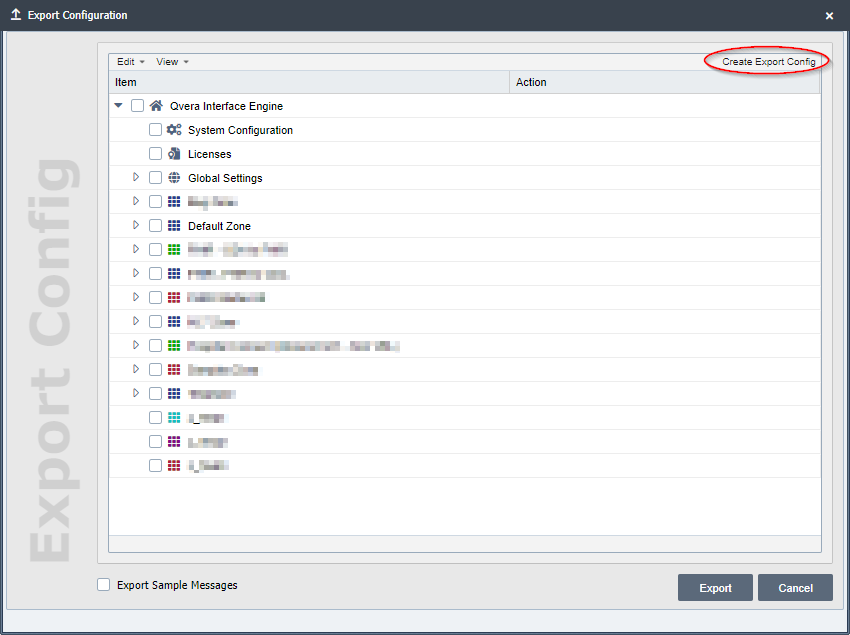
To make it easier to generate an export configuration, the export dialog has a Create Export Config button. Instead of exporting the selected options in a QIE config file, this button takes any selected objects from the dialog and create the JSON payload used in the export command.
Once the desired objects have been selected for the export configuration, select the Create Export Config button.
The export_config_def.json file is downloaded for use with the export command in the Management API.