System Variables
System variables are used to store static values that can be referenced and used by mapping functions, conditions, custom scripts, etc. This eliminates the need to duplicate static values in multiple channels, scripts and zones. The value can exist in one place and be referenced by multiple configurations.
QIE tracks the revision history of changes made to system variables. Click the history icon on the panel menu bar to view who changed what and when. See Revision History for details.
Supported System Variable Types
QIE supports the following system variable data types.
| Variable Type | Description |
|---|---|
| Boolean | The Boolean data type stores a value of either 'True' or 'False' |
| Credentials | The Credentials data type stores a username and password pair. The password is never returned to the browser in plaintext. |
| Date | The Date data type stores a date value |
| Decimal | The Decimal data type stores a numeric value in decimal format |
| Integer | The Integer data type stores a number value (whole numbers only) |
| String | The String data type stores text values |
| Table | The Table data type stores a table of values (rows and columns). Table values are used most commonly by the Table Lookup mapping function. |
Managing System Variables
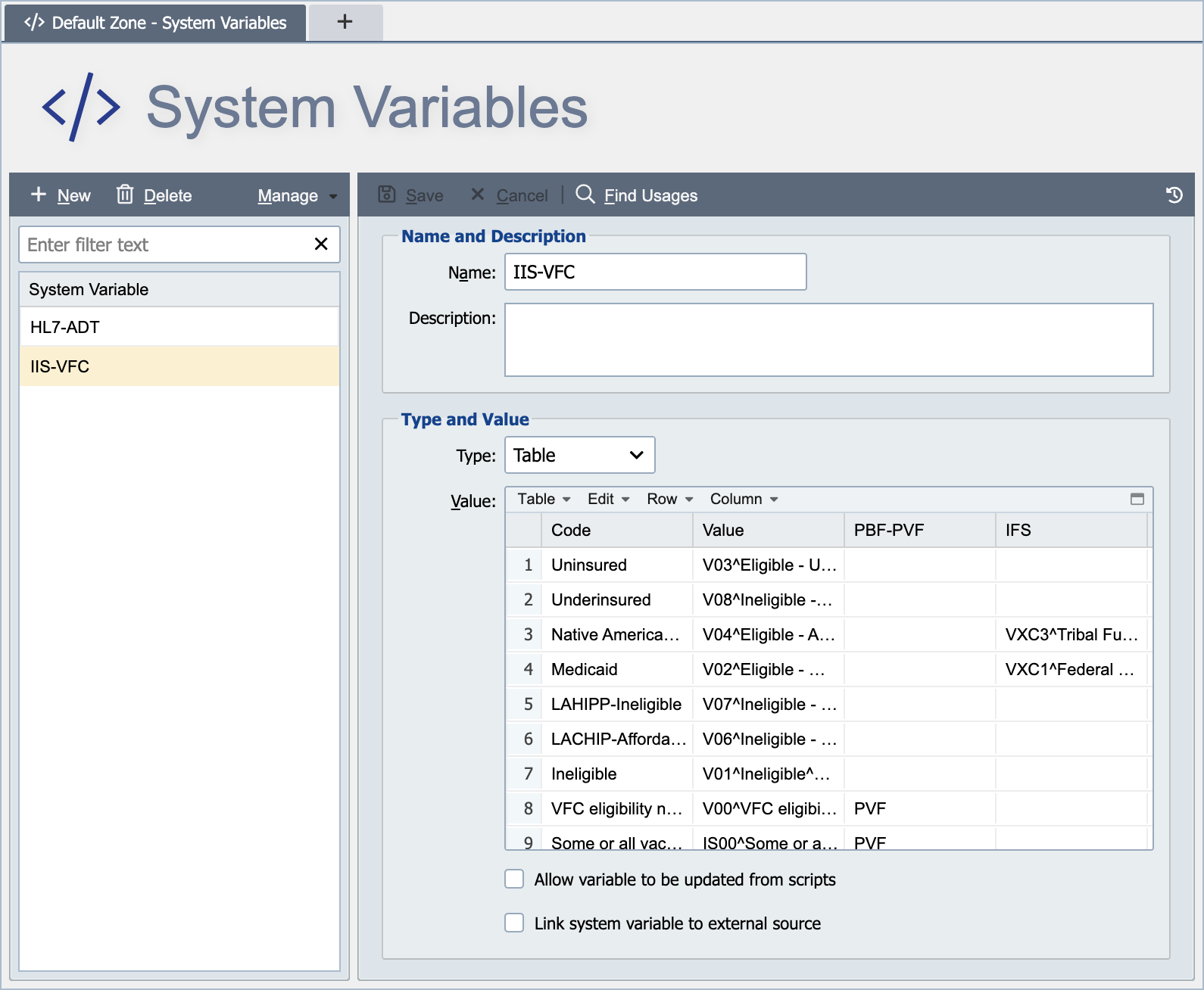
System variables are created and managed from the System Variables Page. System variables are defined at either the global level or the zone level (see Global vs. Zone Scope for more information).
Name
The name associated with the system variable identifies the variable for use in mapping functions, conditions and custom scripts. The name must be unique within the applicable scope. For example, a system variable created at the global level must have a globally unique name. A globally unique name is unique within the global system variables and across all zone level system variables. A system variable created at the zone level must have a name unique to that zone and all global system variables.
Description
The description is only visible from the system variables page and can be used to provide additional information about the variable and how it is used.
Type
The type drop-down list is used to control the variable type (see Supported System Variable Types above).
Value
The value field stores the applicable value associated with the system variable. The editor adapts to the data type selected:
| Type | Value editor |
|---|---|
| Boolean | A checkbox or True / False selector. |
| Credentials | A username text field and a separate password entry button. The password is never returned to the browser in plaintext. |
| Date | A date picker; stores a single calendar date. |
| Decimal | A numeric input that accepts a decimal value (e.g. 3.14). |
| Integer | A numeric input that accepts a whole number (e.g. 42). |
| String | A free-form text area with a Display As drop-down that renders the value using the syntax highlighting of the selected format: Text (ASCII), HEX, HL7, JSON, JavaScript, SQL, X12, ASTM, EDIFACT, or XML. |
| Table | A grid editor for adding rows and named columns (see below). |
For Table type variables, the value is a grid of rows with named columns. A QIE table can have any number of columns, and the caller specifies at the time of the lookup which column to search and which column to return. This means a single table can be cross-referenced in multiple directions. For example, a Providers table with PVID, NPI, LastName, and FirstName columns can be used to look up PVID → NPI for one channel and NPI → LastName for another. The search column and the return column can be the same column. Searching and returning the same column is a quick way to confirm that a value exists in the table: the lookup returns the matched value on a match and the not found value when the value is absent. Matching is case-insensitive, and the value returned is always the value stored in the table rather than the value that was searched for, so a search for 'abc' against a row holding 'ABC' returns 'ABC'.
The table can be referenced from a mapping script via qie.doTableLookup(), or from a Mapping node via the Table Lookup mapping function.
Looping Through a Table Variable in a Script
To loop through every row of a Table variable, call qie.getVariable(name). For a Table variable it returns a table object rather than text, and the object can be read directly. Reading the table does not need qie.parseCSVString; parse the table only to make a copy you can edit.
| Method | Returns |
|---|---|
getHeaders() |
The column names, as a List<String>. |
getRows() |
The data rows, as a List<List<String>>. The header row is not included. |
getCell(row, column) |
One value. row starts at 1. column is a column name (not case-sensitive) or a column index starting at 0. Returns an empty string when the row or column does not exist. |
// Log the NPI for every provider in the Providers table
var providers = qie.getVariable('Providers');
var rowCount  = providers.getRows().size();

for (var i = 1; i <= rowCount; i++) {
   qie.info(providers.getCell(i, 'PVID') + ' -> ' + providers.getCell(i, 'NPI'));
}
Treat the table as read-only
The object is QIE's cached copy of the variable, shared with every script that reads it. Changes made to it are not saved, and other scripts can see them. To change the table, edit a copy and save it with qie.setVariable, as shown in Updating a Table System Variable from a Script.
Linking a System Variable to an External Source
A system variable can be configured to refresh from an external file on a CRON schedule, so a cross-reference table or any other variable value stays in sync with a master file maintained outside QIE. Check Link system variable to external source on the Variable dialog, choose a source type, and enter a CRON schedule for the refresh. See CRON String Format for the six-field syntax and examples.
The feature applies to every variable type except Credentials.
Source types
| Source type | Required fields |
|---|---|
| File | File Path on the QIE server filesystem; CRON String |
| URL | URL; CRON String |
| Network Share (SMB) | Path (UNC), Username, Password; CRON String |
| FTP / SFTP / FTPS | Host, Port, Protocol, Encryption, Username, Password, Path; CRON String |
The file content is parsed as a CSV (for Table variables) or treated as plain text (for scalar types).
Refresh schedule and status
The external-variable updater runs continuously on the engine, checks each linked variable's CRON schedule once per minute, and refreshes the variable when the next scheduled time has arrived. The Variable dialog shows three timestamps that reflect the current state of each linked variable:
- Last Check: the last time the updater attempted to fetch the source.
- Last Update: the last time the source content changed and QIE wrote a new value.
- Last Alert: the last time QIE sent a failure alert (see below).
Error notification
If a refresh attempt fails (file missing, network share unreachable, etc.), QIE counts the missed check against a configurable threshold. When the threshold is reached, QIE sends an alert email to administrators. Configure the alert behavior on the same dialog:
- Alert Interval: minimum time between alert emails so a persistently broken source does not spam the inbox.
- Alert After Misses: number of consecutive missed checks before the first alert.
HA behavior
In an HA cluster, only one node performs the refresh at a time (gated by a database mutex), so a linked variable updates exactly once per scheduled check across the engine. After the refresh, other nodes pick up the new value through the standard system-event cache invalidation.
Programmatic Updates
A script can update a system variable only when Allow variable to be updated from scripts is checked on that variable; otherwise qie.setVariable throws an error stating that the variable does not allow edits. The option is not available for Credentials variables, and it cannot be combined with Link system variable to external source: checking one clears the other.
Scripts can update a system variable's value with qie.setVariable(name, valueString). For Table-type variables, the value string represents the entire table. There is no per-row put, so the write replaces the whole table. The change is persisted to the database immediately and propagated to other channels (and other HA nodes) via the system event log; channels see the new value on their next read. See Updating a Table System Variable from a Script for a worked example.
Concurrent writes are not serialized
qie.setVariable does not hold a lock around its write. If two channels (or two HA nodes) update the same variable at the same time, the last writer wins and the other update is lost. System variables are intended for slowly-changing reference data (interface configuration, code-set tables, partner registries) not for high-frequency cross-references. When the value updates often (every message, every minute), use a real database connection instead so QIE's database engine can manage the concurrency.
Message De-Identification
QIE 24.2.1 and later support replacing patient identifiers using a Table-type System Variable, a certificate, and the qie.deIdentifyMessage / qie.reIdentifyMessage script functions. The Table editor's Manage drop-down imports preset rule sets for DICOM, HL7 v2.3, v2.5, and v2.6. See Deidentifying DICOM Messages for the full walkthrough.