Condition Nodes
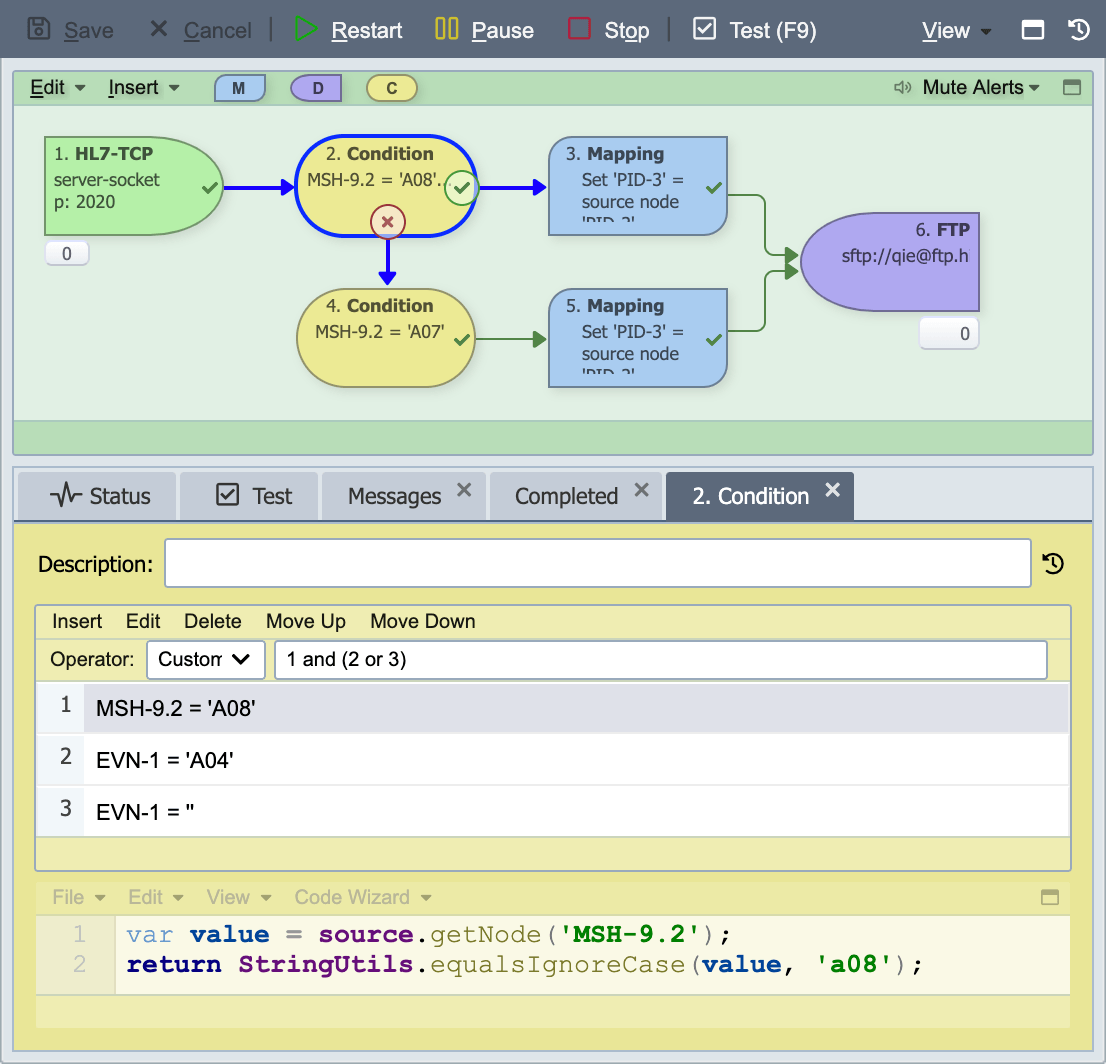
Condition nodes are used to control message flow through a channel. If the condition is met, the message is forwarded to any nodes connected to the "pass" connector ( ). If the condition fails, the message is forwarded to any nodes connected to the "fail" connector (
 ). If the condition fails and no fail nodes have been specified, the message is sent to the channel's error queue.
When a condition node contains more than one condition, the operator is used to specify an execution plan.
Condition Node Configuration
Description
If specified, the description is displayed in the condition node on the visual channel editor.
Operator
The operator is used to define the execution plan (or logical expression) associated with each item in the condition item list.
| Operator | Description |
|---|---|
| and | All items in the list must be true: 1 and 2 and 3 |
| or | Only 1 item in the list must be true: 1 or 2 or 3 |
| Custom | The logical expression or execution plan is specified by the user: 1 and (2 or 3) |
Enabling and Disabling Conditions
Each condition in the list is either enabled or disabled. A disabled condition stays in the list and keeps its place and its configuration, but QIE does not evaluate it. The list shows a disabled condition with a gray power icon and a grayed description. An enabled condition has no marker.
To change the setting, right-click the condition and select Enable Condition or Disable Condition. The Enabled checkbox in the Add/Edit Condition dialog does the same thing.
A disabled condition drops out of the operator it sits under. With the and or or operator, the remaining enabled conditions are combined as usual. With the Custom operator, the plan keeps its numbering, so positions never shift. The term for the disabled condition drops out of its group, and a group whose conditions are all disabled drops out of its parent group. When no enabled condition remains, the condition node evaluates to true.
| Plan | Disabled | Evaluates as |
|---|---|---|
| 1 and (2 or 3) | 2 | 1 and 3 |
| 1 and (2 or 3) | 2, 3 | 1 |
| 1 and (2 or 3) | 1 | 2 or 3 |
| 1 or !2 | 2 | 1 |
| 1 and 2 | 1, 2 | true |
The Test tab writes "Condition N is disabled and was not evaluated." for each disabled condition. When every condition is disabled, the condition trace reads "(no enabled conditions)". The same checkbox and menu items appear wherever a condition list is edited: condition nodes, source filters, message filters, and message search criteria. A filter or a search whose conditions are all disabled matches every message, for the same reason.
Condition Item Types
In QIE there are three (3) types of conditions.
| Condition Item Type | Description |
|---|---|
| Standard Condition | A standard condition item is used when comparing the value of a node or field from the source object against a known value (e.g. field 'MSH-9.2' == 'A08'). |
| DB Query Condition | A database (DB) query condition is used when comparing a value returned by a database query against a known value (e.g. 'SELECT COUNT(*) FROM Patient WHERE…' > 0). |
| Custom Condition | A custom script which returns either true or false. |
Standard Condition
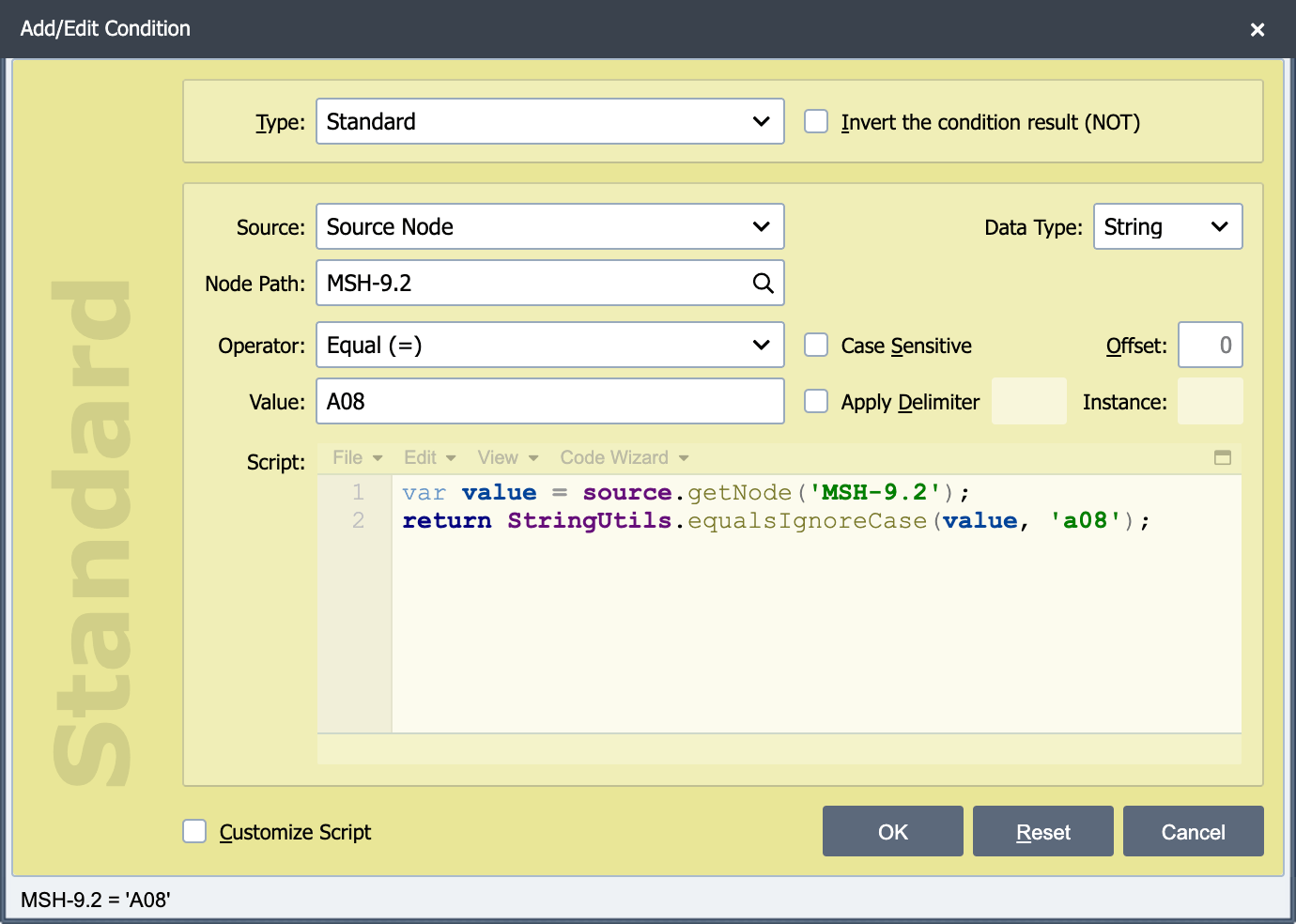
A standard condition function is used when comparing the value of a node or field from the message against a known value (e.g. field 'MSH-9.2' == 'A08')
Invert the condition result (NOT)
If this option is selected, the result of the condition is inverted (true becomes false and false becomes true).
Enabled
Checked by default. Clear this checkbox to keep the condition in the list without evaluating it (see Enabling and Disabling Conditions).
Source
This field identifies the source object being used when evaluating the condition. The supported source objects are:
| Source Object | Description |
|---|---|
| Message Cache | A value stored in the Message Cache is evaluated in this condition. |
| Message Node | A field from the Message object is evaluated in this condition. |
| Source Node | A field from the Source object is evaluated in this condition. |
| Variable | A system variable is evaluated in this condition. |
| WS Endpoint URL | A web service endpoint URL is evaluated in this condition. |
| WS Password | A web service password is evaluated in this condition. |
| WS Username | A web service username is evaluated in this condition. |
Data Type
The source's data type must be known before a proper comparison can be made. When dealing with a numeric value, for example, QIE can be configured to evaluate where the source value is greater than a fixed number, but a "greater than" evaluation does not apply when dealing with a string value. The system resource source types (variable, WS) do not require a data type so the parameter is not displayed for those resource types. QIE supports the following source data types.
| Source Data Type | Description |
|---|---|
| Boolean | The source value represents a Boolean value (true or false, T or F, 1 or 0, etc.). |
| Date | The source value represents a date. |
| Length | The length of the source value is used for evaluation (assumes the source value is a string). |
| Number | The source value represents a number (integer or decimal). |
| String | The source value is a string. |
Node Path
This field is used to specify the name or path of the source object field or node which is evaluated in this condition item (see Node Paths and Node Tags for more information).
Variable
If a Source of variable is selected, this field is a drop-down list of the variables available to the channel.
WS Conns
If any of the WS sources are selected this field is a drop-down list of the available web service connections.
Operator
This field is used to specify the operator to be used. The following operators are supported by QIE.
| Operator | Description | Available for Data Type |
|---|---|---|
| Exists (Not Null) | The node exists and is populated. | Boolean, Date, Length, Number, String |
| Equal (=) | The value of the node path equals the specified value. | Boolean, Date, Length, Number, String |
| Not equal (!=) | The value of the node path does not equal the specified value. | Date, Length, Number, String |
| Begins with | The value of the node path begins with the specified value. | String |
| Does not begin with | The value of the node path does not begin with the specified value. | String |
| Contains | The value of the node path contains the specified value. | String |
| Does not contain | The value of the node path does not contain the specified value. | String |
| Ends with | The value of the node path ends with the specified value. | String |
| Does not end with | The value of the node path does not end with the specified value. | String |
| Greater than (>) | The value of the node path is greater than the specified value. | Date, Length, Number |
| Greater than or equal to (>=) | The value of the node path is greater than or equal to the specified value. | Date, Length, Number |
| Less than (<) | The value of the node path is less than the specified value. | Date, Length, Number |
| Less than or equal to (<=) | The value of the node path is less than or equal to the specified value. | Date, Length, Number |
Case Sensitive Checkbox
If the data is case sensitive check this box, otherwise the comparison does not use the case to determine a match.
Offset
Available only when Data Type is String. Skips the first N characters of the value before the comparison runs, where N is the number entered here. If the value is shorter than the offset, the value used for comparison is an empty string.
Example: with a source value of Mickey and an Offset of 3, the value used for comparison is key.
Apply Delimiter
Available only when Data Type is String. When the checkbox is selected, QIE splits the source value on a delimiter and uses one token from the result as the value to compare.
- Apply Delimiter checkbox: turns the feature on. The delimiter and Instance fields are read-only until this is checked.
- Delimiter (the unlabeled text field to the right of the checkbox), the character or string that separates values in the source. Matched literally, not as a regular expression.
- Instance: the 1-based position of the token to extract after splitting. If the source has fewer tokens than Instance, the extracted value is an empty string.
Example: with a source value of Rat_Pig_Dog_Cat_Mouse_Cow, a delimiter of _, and an Instance of 5, the value used for comparison is Mouse.
If both Apply Delimiter and Offset are configured, QIE first extracts the token by instance, then applies the character offset to that token before comparing.
Value
This field contains the value to be used when comparing the value of the Source node.
Customize Script
When specifying a Standard or Database Query condition, QIE automatically generates the associated script that is executed. Selecting the Customize Script option converts the current Standard or Database Query condition to a Custom condition and allows the auto-generated script to be manually customized or changed (see Creating Custom Scripts for more information).
DB Query Condition
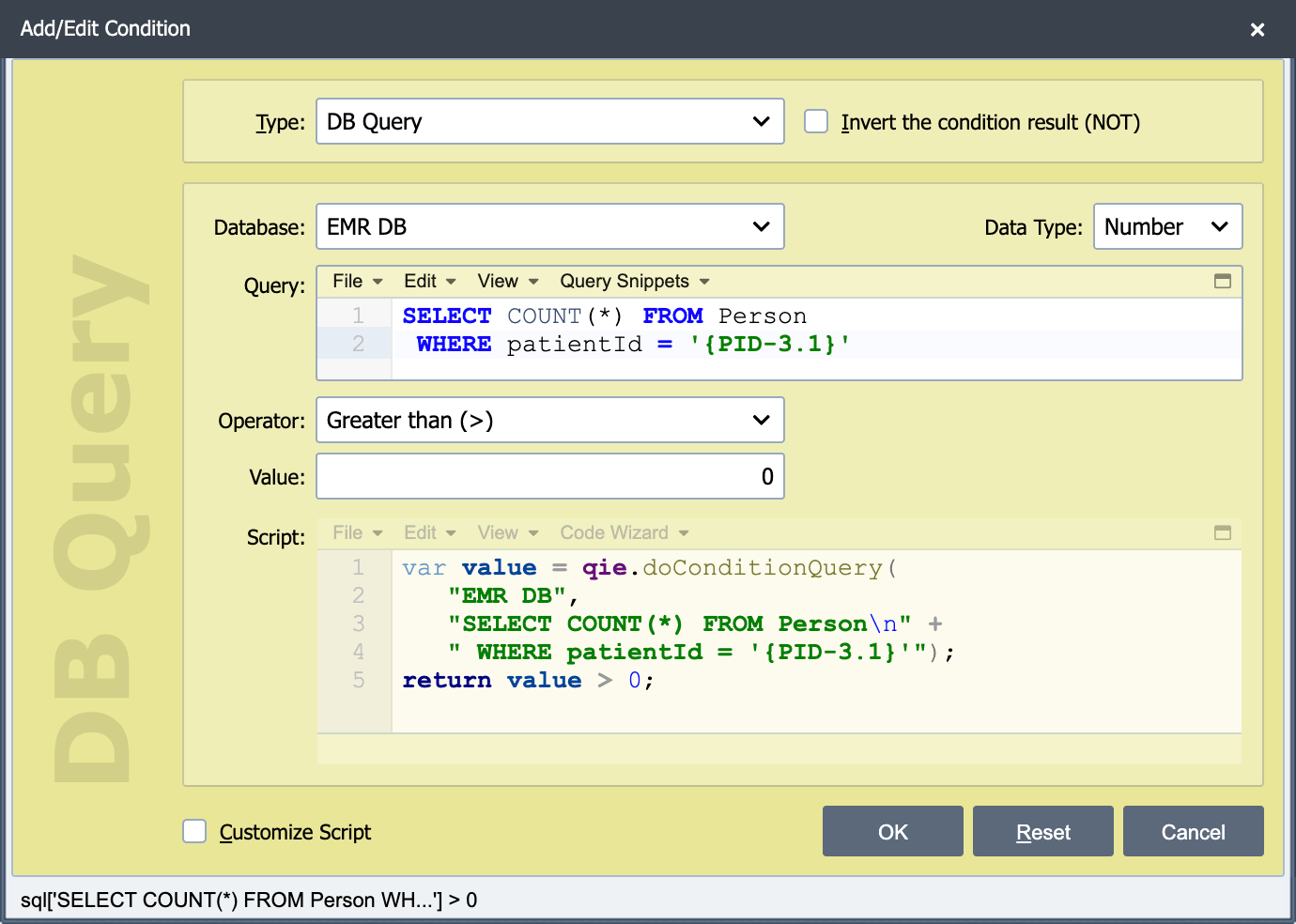
A database (DB) query condition is used when comparing a value returned by a database query against a known value
Invert the condition result (NOT)
If this option is selected, the result of the condition is inverted (true becomes false and false becomes true).
Enabled
Checked by default. Clear this checkbox to keep the condition in the list without evaluating it (see Enabling and Disabling Conditions).
Database
Select the desired database connection from the drop-down list. All database connections in the current scope are listed in the drop-down list (see Database Connection for information on creating and managing database connections).
Data Type
The source's data type must be known before a proper comparison can be made. When dealing with a numeric value, for example, QIE can be configured to evaluate where the source value is greater than a fixed number. QIE supports the following source data types.
| Source Data Type | Description |
|---|---|
| Boolean | The source value represents a Boolean value (true or false, T or F, 1 or 0, etc.). |
| Date | The source value represents a date. |
| Number | The source value represents a number (integer or decimal). |
| String | The source value is a string. If the value is a string, an offset can be used to compare part of the string. |
Query
The SQL query statement should be entered here.
Note
Only the 1st column of the 1st row is used when evaluating a database query condition. The query should be written such that it only returns a single value if possible. 'SELECT COUNT(*) FROM …' is an example of a query that returns a single value.
Note
SQL query statements can contain embedded node tags. See Node Tags for more information on how to use node tags in SQL query statements
Operator
This field is used to specify the operator (greater than, less than, equal to, etc.) to be used.
Value
This field contains the value to be used when comparing the value of the source field/node.
Customize Script
When specifying a Standard or Database Query condition, QIE automatically generates the associated script that is executed. Selecting the Customize Script option converts the current Standard or Database Query condition to a Custom condition and allows the auto-generated script to be manually customized or changed (see Creating Custom Scripts for more information).
Custom Condition
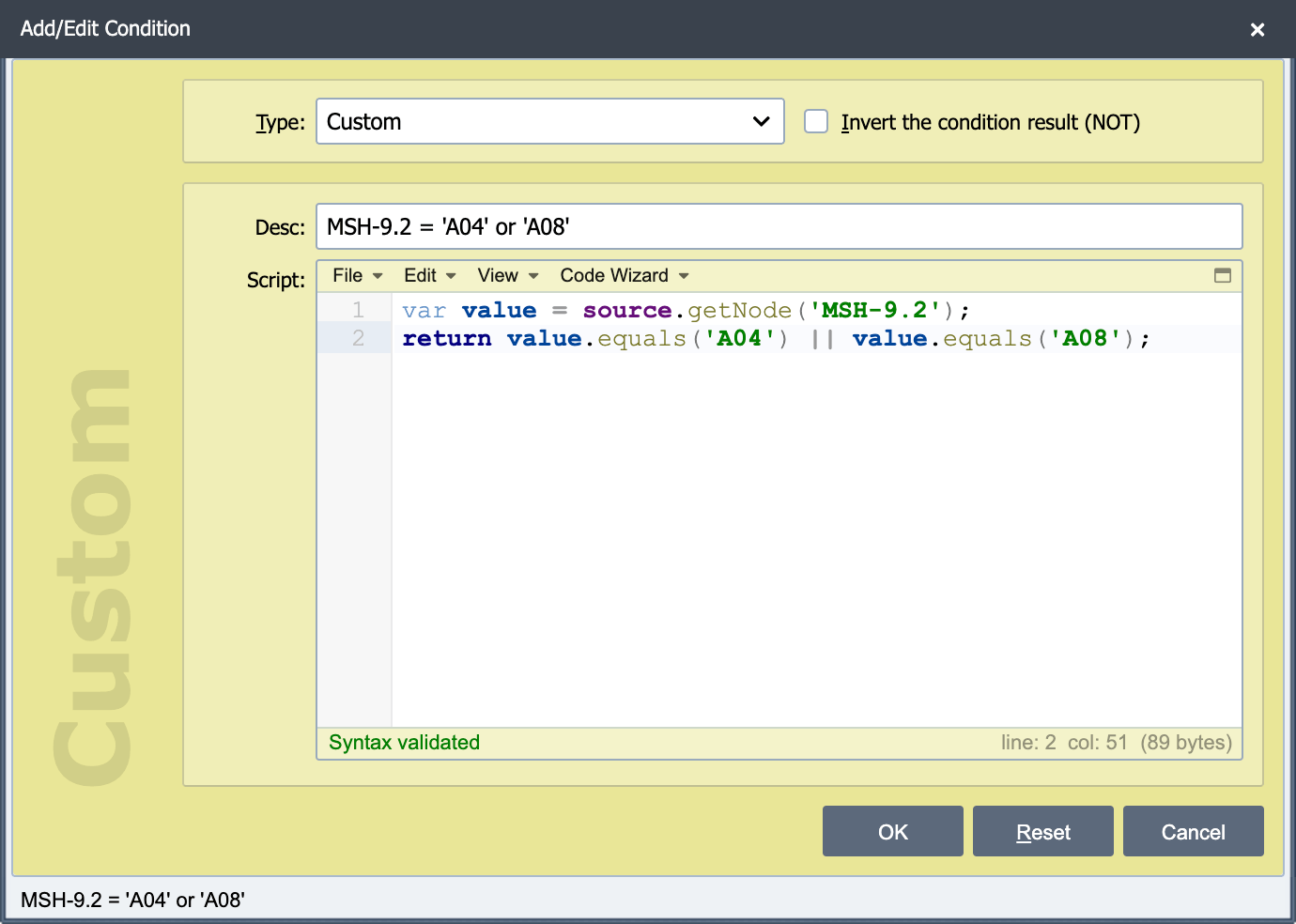
A custom condition is used when creating a custom script which returns either true or false.
Invert the condition result (NOT)
If this option is selected, the result of the condition is inverted (true becomes false and false becomes true).
Enabled
Checked by default. Clear this checkbox to keep the condition in the list without evaluating it (see Enabling and Disabling Conditions).
Description
This field is used to describe the custom condition script and is displayed in the condition item list associated with the condition node.
Script
The custom script to be executed is entered here (see Creating Custom Scripts).
Allow-list filtering against a table
To pass a message only when a field value is present in a Table system variable, call qie.doTableLookup with a sentinel notFound value and return true when the lookup found a match. Wire the fail output of the condition node to a Discard sender so unmatched messages are dropped silently.
var lookup = qie.doTableLookup(
    message.getNode('PV1-3.1'),  // ward code from the inbound message
    '__not_in_table__',          // sentinel returned when no match
    'AllowedWards',              // Table system variable
    'WardCode',                  // column to search
    'WardCode'                   // same column, because only the existence of the value matters
);
return lookup !== '__not_in_table__';
The script must return its result. QIE runs a custom condition script as the body of a function and passes the condition only when that function returns the boolean true, so a script that ends with an expression and no return always fails.
For a check that has to succeed for every iteration of a repeating segment (e.g. every OBX must reference a known observation), loop over message.getCount('OBX') and return false as soon as any iteration's lookup misses.