HL7 v2 to FHIR with a Template
This chapter builds an end-to-end channel that ingests an HL7 v2 ADT^A04 message, converts it into a FHIR Patient resource using a JSON template stored as a System Variable, and PUTs the result to the HAPI FHIR sandbox under the MRN from PID-3.1. Using PUT (FHIR's create-or-update verb) with the MRN as the FHIR resource id means every submit upserts the same Patient, so you can re-run the same message as many times as you like without 409 Conflict errors, and different inbound MRNs land on different Patient resources.
The pattern of a template plus qie.evaluateTemplate() is the recommended way to produce FHIR (or any other JSON) from any inbound format. The template is written once, lives in the zone's resources, and can be re-used from every channel that needs to emit that resource type.
Prerequisites
- The
adt-sample.hl7file from the Before Running chapter.
Step 1: Create the Web Service Connection
The destination node POSTs to the HAPI FHIR sandbox through a QIE Web Service Connection. Create it first so the rest of the chapter has something to point at.
In QIE, open the zone you want to work in and go to the Web Service Connections page. Click New and fill in:
| Field | Value |
|---|---|
| Name | HAPI FHIR Sandbox |
| Description | Public FHIR test server at https://hapi.fhir.org/baseR4. Not for PHI. |
| Type | REST Web Service (Encoded Content) |
| Manually set the endpoint URL | Checked |
| Endpoint URL | https://hapi.fhir.org/baseR4/Patient |
| Authentication | Basic |
| Username / Password | leave both blank |
| Send username and password only when challenged | Checked, which keeps the Authorization header off the request unless the server demands it |
The HAPI sandbox does not require credentials. The combination above tells QIE to omit the Authorization header entirely until a 401 challenge comes back (which it does not, against HAPI).
The Endpoint URL ends at /Patient rather than /baseR4 so the connection clearly scopes to FHIR Patient operations. The destination in Step 3 overrides this URL on every call to append the per-message patient id ({s:PID-3.1}), so the trailing path segment on the connection is mostly cosmetic. The override URL is what actually gets called.
Step 5: Extend the pattern covers the alternatives, including switching to POST for server-assigned IDs, or moving to a Bundle-based submit.
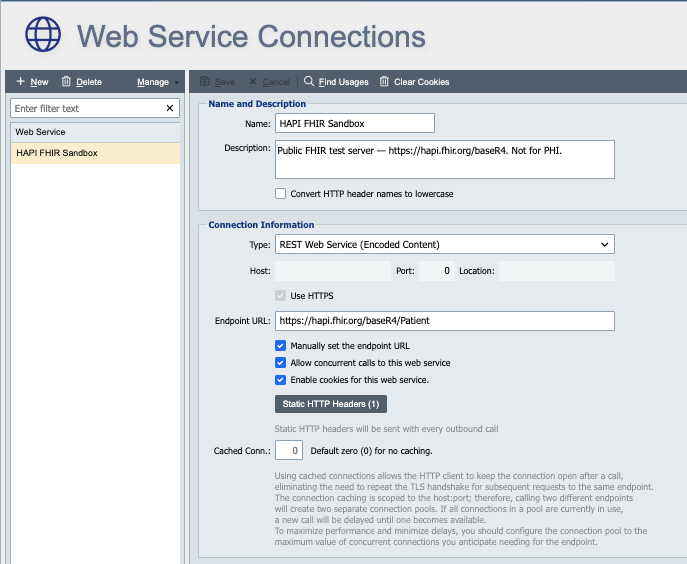
Click the Static HTTP Headers button and add a single row:
| Name | Value |
|---|---|
Accept |
application/fhir+json |
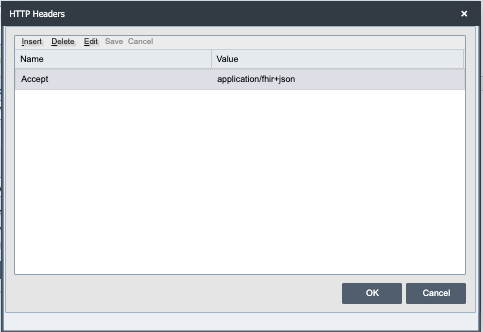
That header tells HAPI to return JSON instead of its default response format. Click OK to close the dialog, then save the connection.
TLS
The HAPI sandbox uses a publicly-trusted certificate, so the default Trust Policy (Use JVM Keystore/Truststore) works without extra configuration. A production FHIR server signed by a private CA would need its CA certificate imported via Certificate Management and the connection's Trust Policy switched to Trust Selected Certificates.
Step 2: Create the System Variable
A System Variable holds the JSON template. Keeping the template in a variable (rather than inline in the script) means you can edit it without re-deploying the channel, and reference it from many channels.
In the same zone as the connection you just created, open the System Variables page and click New.
| Field | Value |
|---|---|
| Name | FHIR_PatientTemplate |
| Type | String |
| Display As | JSON (helps with syntax highlighting in the editor) |
Paste the template below into the Value field:
{
  "resourceType": "Patient",
  "id": "/*{s:PID-3.1}*/",
  "identifier": [
    {
      "system": "urn:oid:1.2.3.4.5.6.7",
      "value": "/*{s:PID-3.1}*/"
    }
  ],
  "active": true,
  "name": [
    {
      "use": "official",
      "family": "/*{s:PID-5.1}*/",
      "given": [
        "/*{s:PID-5.2}*/",
        "/*{s:PID-5.3}*/"
      ],
      "suffix": [ "/*{s:PID-5.4}*/" ],
      "prefix": [ "/*{s:PID-5.5}*/" ]
    }
  ],
  "gender": "/*{s:PID-8}*/",
  "birthDate": "/*{s:PID-7}*/",
  "address": [
    {
      "use": "home",
      "line": [ "/*{s:PID-11.1}*/" ],
      "city": "/*{s:PID-11.3}*/",
      "state": "/*{s:PID-11.4}*/",
      "postalCode": "/*{s:PID-11.5}*/",
      "country": "/*{s:PID-11.6}*/"
    }
  ],
  "telecom": [
    { "system": "phone", "value": "/*{s:PID-13.1}*/", "use": "home" },
    { "system": "phone", "value": "/*{s:PID-14.1}*/", "use": "work" }
  ]
}
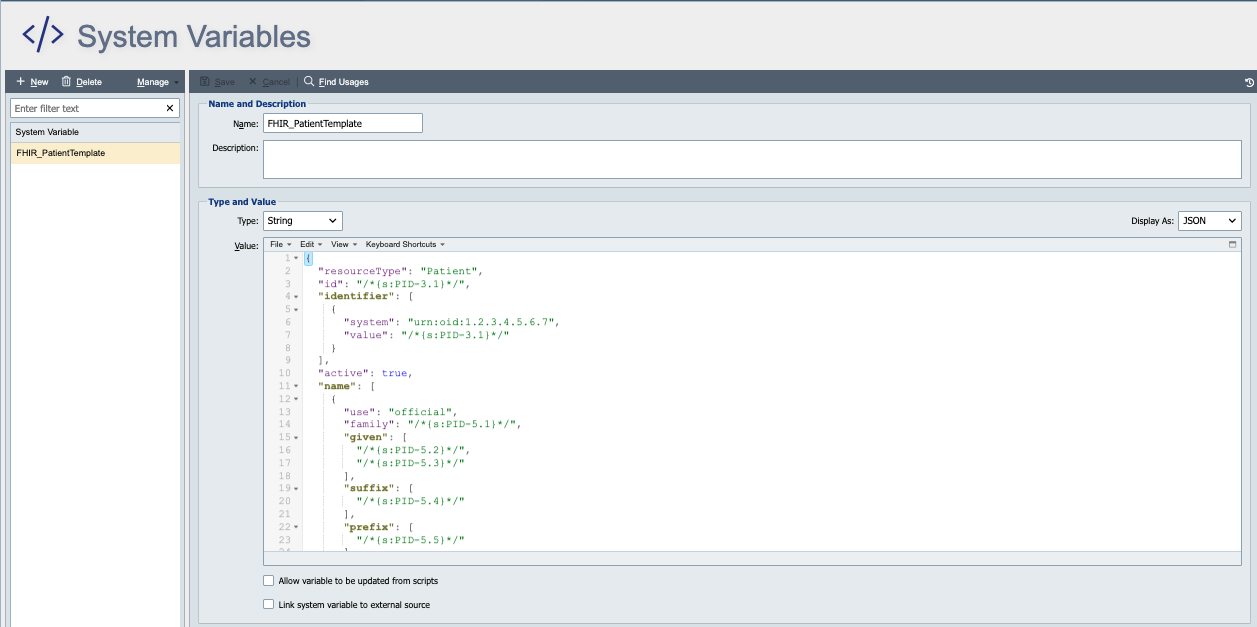
Why the /* … */ wrappers
The node-tag syntax /*{s:PID-5.1}*/ puts the placeholder inside a JavaScript-style comment. That keeps the template valid JSON in editors and validators (a bare {s:PID-5.1} would break JSON parsing). At evaluation time QIE strips the comment markers and substitutes the value. The s: prefix means Source, the unmodified inbound HL7 message. Use m: to read from the current Message object instead. See Node Tags for the full list of prefixes.
The id field
The template's "id": "/*{s:PID-3.1}*/" line is what makes the channel safe for PUT. FHIR's PUT semantics require the resource body's id to match the id segment of the URL. The destination URL is .../Patient/134908585, so the body needs "id": "134908585". Substituting PID-3.1 produces exactly that, since PID-3.1 in the sample is 134908585. A template intended for use inside a Bundle (POST as a transaction entry) would omit id and rely on the entry's fullUrl instead.
Save the variable.
The sample is pre-shaped
The template substitutes PID-7 directly into Patient.birthDate and PID-8 directly into Patient.gender. The sample HL7 message in Before Running has been pre-shaped with FHIR-compatible values (1970-01-01 and male) so the template can submit successfully without a translation step.
A production channel does not see those values. Real HL7 v2 uses 19700101 for the date and single-letter codes (M, F, O, U) for sex. For that case, add a Table Lookup before evaluating the template to translate the sex code and reformat the date, or split the template across smaller mapping functions that format each field appropriately. See Step 5: Extend the pattern for a starting point.
Step 3: Create the channel
In the same zone, open the Channels page and create a new channel called ADT to FHIR Patient. Configure the nodes as follows.
Source node: File
Set Format = HL7 and Source = File, then on the Directory Configuration tab set the Path to the folder where you drop adt-sample.hl7 (with a *.hl7 filter, e.g. C:\HL7\In\*.hl7). Leave Execution = Continuous and Scan Interval at the default 500 ms. Leave the folder empty for now. The file is only needed when you run the channel end-to-end in Step 4.
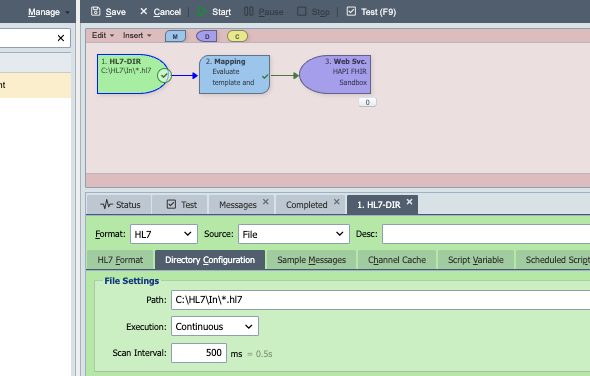
Then switch to the Sample Messages tab on the source node, click Insert -> Import, choose your adt-sample.hl7 file, give it a description like ADT A04 sample, and OK. Importing the file as a sample message does not move or consume the original file; it stores a copy on the channel so the Test tab can replay it without touching disk.
Sample message vs. live file
The Test tab uses only the imported sample message. It runs the mapping node, shows the rendered FHIR JSON, and writes log entries, but it does not call the destination, so the message is never actually POSTed to HAPI. To exercise the full pipeline you have to drop the adt-sample.hl7 file into the configured folder (e.g. C:\HL7\In\) while the channel is running. The File source then picks the file up, runs it through the mapping, and the destination POSTs the result to HAPI.
Mapping node: Evaluate the template and build the JSON message
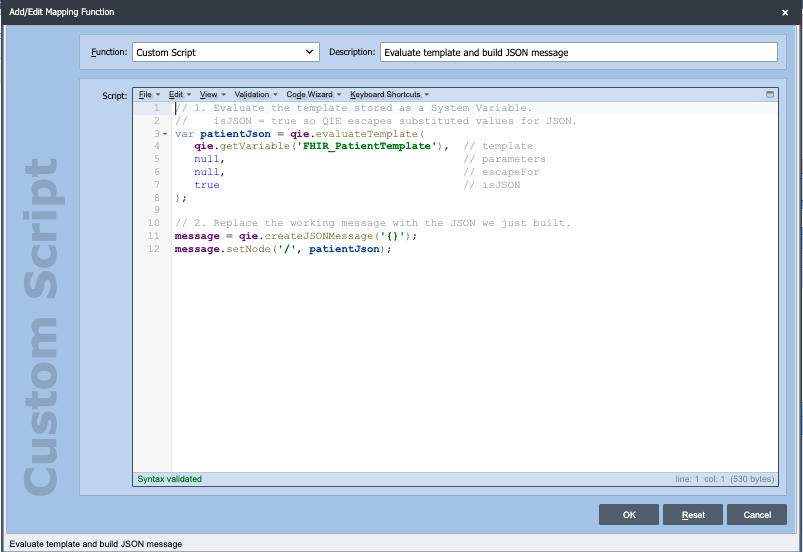
Insert a Custom Script mapping function with the description Evaluate template and build JSON message, then paste:
// 1. Evaluate the template stored as a System Variable.
//    isJSON = true so QIE escapes substituted values for JSON.
var patientJson = qie.evaluateTemplate(
   qie.getVariable('FHIR_PatientTemplate'),  // template
   null,                                     // parameters
   null,                                     // escapeFor
   true                                      // isJSON
);

// 2. Swap the working message from the inbound HL7 over to the rendered FHIR JSON.
//    The original HL7 is still available as `source`.
message = qie.createJSONMessage('{}');
message.setNode('/', patientJson);
A quick walk through what each line does:
qie.evaluateTemplate(...)reads the template, replaces every{s:PID-...}tag with the matching value from the inbound HL7, escapes the substituted values so they are JSON-safe, and returns the rendered JSON string.qie.createJSONMessage('{}')discards the inbound HL7 from the working message and creates an empty JSON document in its place.message.setNode('/', patientJson)parses the rendered template string and installs it as the root. From this point on every reference tomessage, in later mapping functions, in node-tag substitutions, and in the destination's/*{m:/}*/content, sees the FHIRPatient. The original HL7 is still readable throughsourceand{s:...}node tags if you need it.
Destination node: Web Service
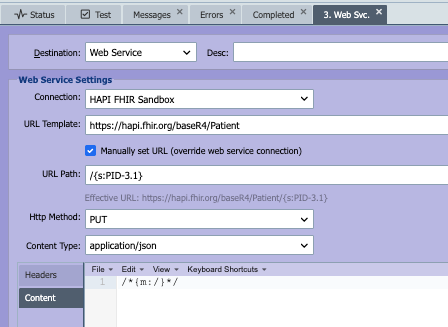
Pick Web Service as the destination, then configure the Web Service Settings:
| Field | Value |
|---|---|
| Connection | HAPI FHIR Sandbox |
| Manually set URL (override web service connection) | Checked |
| URL Template | https://hapi.fhir.org/baseR4/Patient |
| URL Path | /{s:PID-3.1} |
| Http Method | PUT |
| Content Type | application/json |
| Headers tab | leave empty, because the Content Type field above is enough for HAPI |
| Content (in the Content tab below the Headers/Content selector) | /*{m:/}*/ |
| Escape node tag values for | Unchecked |
| Timeout | 15000 (15 s) |
With Manually set URL checked, the destination ignores the Endpoint URL on the HAPI FHIR Sandbox connection and instead builds the final URL from URL Template + URL Path. The URL Path field accepts node tags, so {s:PID-3.1} is evaluated at send time and replaced with the MRN from the inbound HL7 message. For the sample message in Before Running the Effective URL below the fields resolves to https://hapi.fhir.org/baseR4/Patient/134908585; a different inbound MRN PUTs to its own Patient resource on the same server.
/*{m:/}*/ in the Content tab substitutes the current Message at its root (the rendered FHIR Patient JSON the mapping function produced) as the request body. The /* … */ wrappers behave the same way they did in the System Variable template: they keep the node tag from interfering with the surrounding text and are stripped at evaluation time.
Acknowledgement script: log the FHIR response
On the destination node, make sure Wait For Ack is checked, leave Stop on Error unchecked, and leave Ack Timeout at 15000 ms. Then open the Ack Script editor and paste:
if (response === null || response.length === 0) {
   return false;
}
qie.info('Response: ' + response);
return true;
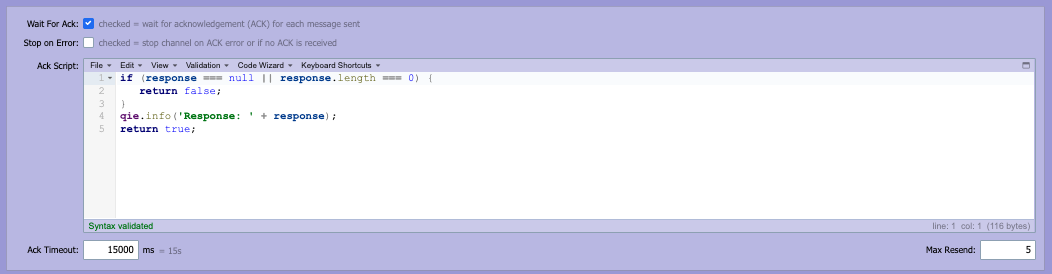
The response binding holds the raw HTTP response body returned by HAPI for the PUT call, a FHIR Patient resource on success, or an OperationOutcome describing the error on failure. The script does three things:
- If
responseis null or empty, returnfalseso QIE flags the call as un-acknowledged and (depending on the channel's retry settings) queues a resend. With Wait For Ack checked, this is the signal QIE uses to decide whether the destination call succeeded. - Otherwise call
qie.info('Response: ' + response)to write the full response body as an info-level entry in the Channel Log. That makes HAPI's reply, including the assigned id andmeta.versionId, visible in QIE without leaving the console. - Return
trueso QIE marks the message complete and moves it to the Completed queue.
Save the channel.
Step 4: Test it
There are two test surfaces: the Test tab (mapping-only verification) and a live file drop (full pipeline through to HAPI).
Verify the mapping in the Test tab
Open the channel in the editor and switch to the Test tab. Pick the ADT A04 sample message from the source's sample list and click Play.
The After window for the mapping node should show the rendered FHIR JSON, a complete Patient resource with Doe, John, Q, Jr., Mr., male, 1970-01-01, 123 Main St, etc. populated from the HL7 message. The Test tab stops there: it does not call the destination, so nothing has been sent to HAPI yet.
Run the channel end-to-end
To actually PUT to HAPI, run the channel:
- Make sure the
adt-sample.hl7file is not already in the configured input folder (the channel consumes it as soon as it sees it). - Start the channel from the Channels page.
- Drop a copy of
adt-sample.hl7into the configured folder (e.g.C:\HL7\In\).
Open the channel's Operations -> Channel Log panel. You should see:
- The File source picks up the file and removes it from the folder.
- The mapping node renders the FHIR JSON.
- The destination evaluates
{s:PID-3.1}against the inbound message and PUTs tohttps://hapi.fhir.org/baseR4/Patient/134908585. HAPI returns the storedPatientresource with the sameidyou submitted. - The Acknowledgement script logs the FHIR response as an info-level entry. Look for
Response: { "resourceType": "Patient", "id": "134908585", … }in the Channel Log. - The message is marked complete and lands in the destination's Completed queue.
Because the call is a PUT keyed by PID-3.1, you can drop the file again and the channel simply updates the same Patient resource, with no duplicates, no 409 Conflict. The meta.versionId and meta.lastUpdated fields in the logged response increment on each submit, which is a quick way to confirm new runs landed. A different inbound MRN PUTs to its own Patient resource on the same server.
To confirm it really landed on the server, open in a browser:
You should see the same Patient resource you just submitted (or last submitted, if you re-ran).
Step 5: Extend the pattern
A few useful next steps you can try with the same channel as the starting point. The destination already has Manually set URL checked, so changing the URL just means editing the override value. No further connection changes are required for the bullets below.
- Translate HL7 codes properly. Replace the FHIR-shaped values in the sample (
male,1970-01-01) with real HL7 values (M,19700101) and add a Table Lookup mapping function before the template evaluation: lookup PID-8 (M→male,F→female, …) and reformat PID-7 (19700101→1970-01-01), store both translated values inmessageCache, and reference them from the template with{mc:gender}and{mc:birthDate}instead of{s:PID-8}and{s:PID-7}. - Read from FHIR inside a mapping script. Call
qie.callRESTWebService('HAPI FHIR Sandbox', 'https://hapi.fhir.org/baseR4/Patient?_id=' + id, 'GET', '', 'application/json', qie.newParameterMap(), 60000)from a mapping function. The response is thesearchsetBundle from the previous chapter. Parse it withqie.parseJSONString(...)and read fields withbundle.getNode('/entry[1]/resource/name[1]/family')and so on. - Switch from PUT to POST for server-assigned IDs. If the upstream system does not produce stable IDs, drop the
"id"field from the template, change the destination Http Method toPOST, and override the destination URL tohttps://hapi.fhir.org/baseR4/Patient(no id). HAPI assigns a fresh server-side id on each call, which is convenient for one-time tests, but every run creates a new resource. - Add an Encounter and wrap both in a Bundle. Create a second System Variable
FHIR_EncounterTemplatemapping the PV1 segment to a FHIREncounterresource (see HL7 v2 to FHIR segment-to-resource mapping). Evaluate both templates in the mapping node and build atransactionBundle. POST the Bundle tohttps://hapi.fhir.org/baseR4(no/Patient) using the override URL field. Inside the Bundle, give the Patient entry a UUIDfullUrland reference it from the Encounter'ssubject.reference; HAPI rewrites the UUID to the assigned id on commit.
What you have built
A complete FHIR-producing channel: an HL7 v2 message comes in via File source, a templated mapping function plus qie.evaluateTemplate() produces a FHIR Patient resource, a REST Web Service Sender PUTs it to a FHIR server at a known patient id, and an Acknowledgement script writes HAPI's response to the Channel Log. The same pattern (template plus evaluate plus sender plus ACK) scales to every resource you need to emit. Add Bundles, OAuth, and code translations as the destination server requires.
The companion reference page Resources -> FHIR has the full URL, search, Bundle, and HL7-to-FHIR mapping tables you reach for as you extend the channel. For securing the connection with OAuth 2.0 or SMART on FHIR, work through the OAuth 2.0 Tutorial.