Elastic File System (EFS)
There are certain resources that may need to be added to your container such as 3rd party jar files, jdbc drivers, and certificates. To attach these resources to the container, they must be mountable from the EFS into the container. The EFS becomes the static storage used for these resources.
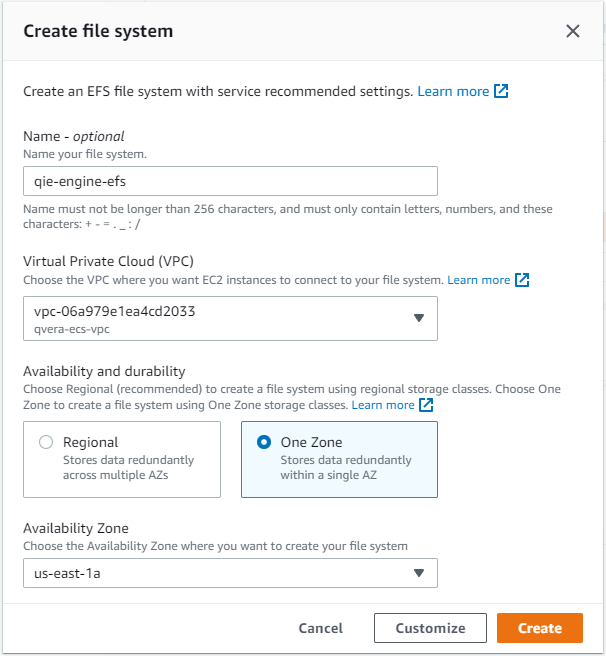
Create New EFS
Navigate to the EFS management page and then select the 'File systems' menu option on the left side of the page. Select the 'Create file system' button on the top of the 'File systems' panel.
Set the name to 'qie-ecs-efs' and set the VPC to 'qie-ecs-vpc'. For the 'Availability and durability' you can select 'Regional' or 'One Zone', this example sets it to 'One Zone'. The 'Availability Zone' is set to 'us-east-1a'. Select the 'Create' button.
Access Points
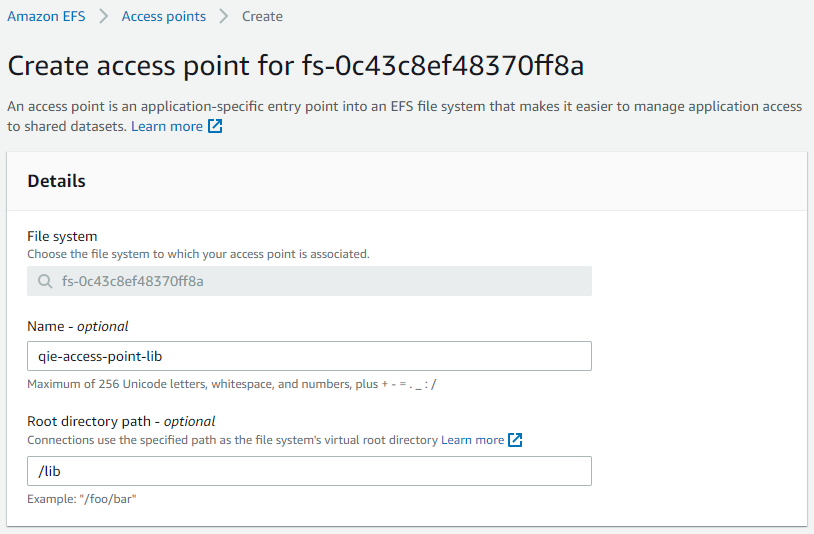
The 'Access Points' are used to create a mount to a specific folder on the EFS (think sharing the folder from the EFS). These are used as volume definitions on the ECS task, and are then mounted to a folder on the container.
Select the new 'qie-ecs-efs' file system, then on the lower screen select the 'Access points' tab. Click on the 'Create access point' button.
Set the name to 'qie-ecs-ap-lib', and the 'Root directory path to '/lib'. Leave the rest of the options as the default. Click on the 'Create access point' button at the bottom of the screen.
Create a second access point with the name 'qie-ecs-ap-jdbcDriver', and the root directory path set to '/jdbcDriver'.