Generating Certificate Signing Request (CSR) or Self-Signed Certificate
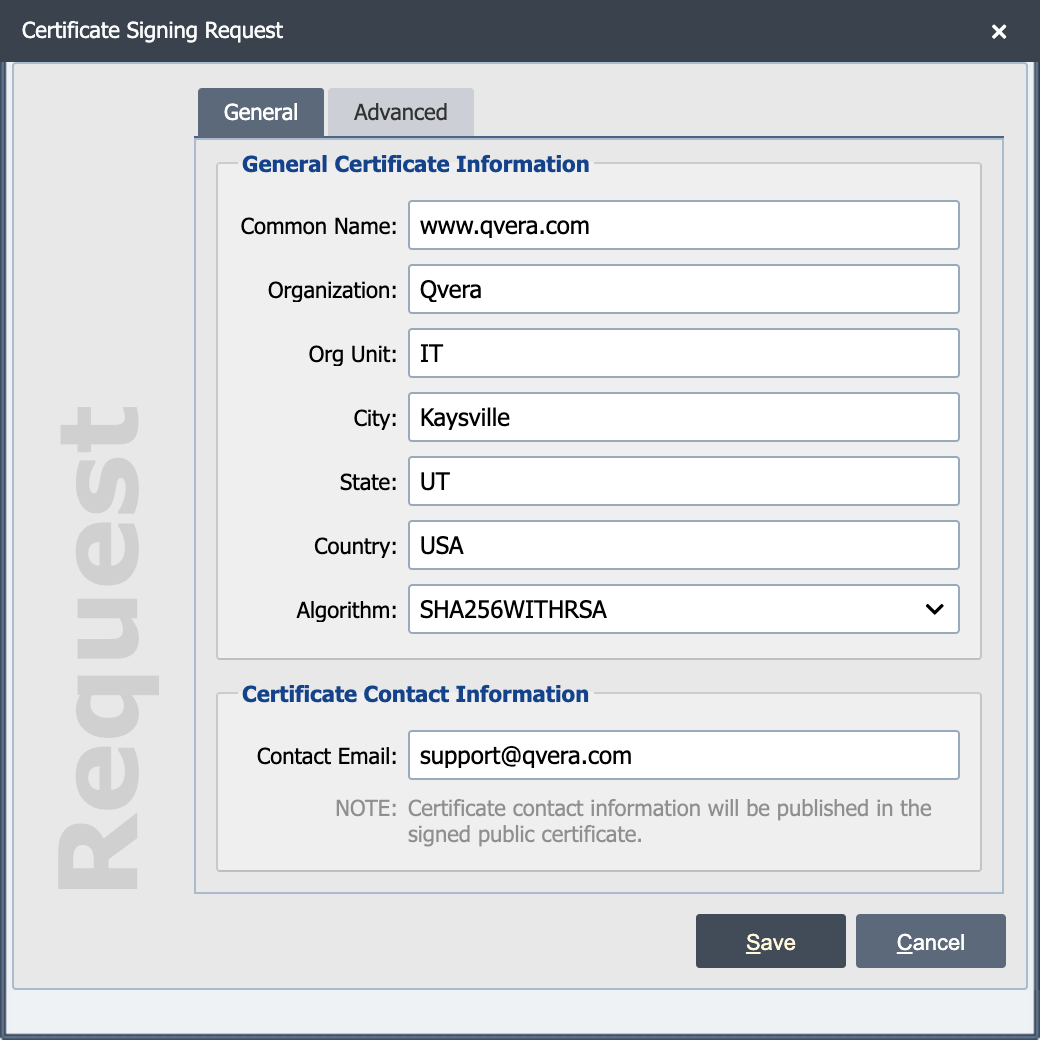
Certificate Signing Requests (CSRs) are used to get signed certificates from trusted certificate authorities (such as VeriSign, DigiCert, GoDaddy, or Let's Encrypt). CSRs contain the public key along with demographic information about the requestor. You must have a private key to generate a new CSR.
Self-Signed certificates are valid public certificates but have not been issued by a Certificate Authority. They are usually avoided on public-facing websites because random visitors have no out-of-band way to verify the certificate belongs to the site they think they are visiting. That is the problem Certificate Authorities solve.
For QIE's typical use case (a point-to-point integration with a specific known trading partner) a self-signed certificate is just as secure as a CA-signed certificate. The strength of a TLS connection comes from the private key, which is identical either way. A CA's job is to vouch for a stranger; partners who have already exchanged certificates directly (email, a vendor onboarding portal, etc.) do not need anyone in the middle. Use a CA-signed certificate when a vendor's policy or a compliance regime requires it; otherwise a self-signed certificate is fine.
Is this certificate self-signed or CA-issued?
Open the certificate on the Certificate Management page and compare the Issued To and Issued By fields. If they are the same, the certificate is self-signed. If they differ, Issued By is the Certificate Authority that signed it (VeriSign, DigiCert, an internal corporate CA, etc.).
To generate a new CSR or Self-Signed Certificate, select the private key that you would like to use and then select the 'New' button. QIE presents a sub-menu, where you select 'Certificate Signing Request' or 'Self-Signed Certificate'.
Once you save the CSR, send it to the signing authority that is requesting the file. They then send you a signed public certificate.
Name (Self-Signed Only)
This is the alias for the certificate being generated.
Description (Self-Signed Only)
The description is only visible from the certificate page and can be used to provide additional information about the connection and how it is used.
Common Name
The Common Name (CN) is the fully qualified domain name (FQDN) for the server that uses this certificate.
Organization
The Organization (O) is the name of the company using the certificate.
Organizational Unit
The Organizational Unit (OU) is the department of the company using the certificate. Often it is just set to 'IT'.
City, State, Country
The City (in the certificate this is known as the Locality (L)), State (S), and Country (C) are for the location of the company using the certificate.
Algorithm
The Algorithm is the signature algorithm used to sign this certificate. The list holds only the algorithms the selected private key can sign with:
| Key type | Algorithms offered | Default |
|---|---|---|
| RSA | SHA1WITHRSA, SHA256WITHRSA | SHA256WITHRSA |
| ECDSA | SHA256WITHECDSA, SHA384WITHECDSA, SHA512WITHECDSA | SHA256WITHECDSA |
| ed25519 | ED25519 | ED25519 |
| ed448 | ED448 | ED448 |
Leave the default unless you are requested to provide a different algorithm.
Contact Email
The contact email is optional and shows up in the signed public certificate.