DB Query Result
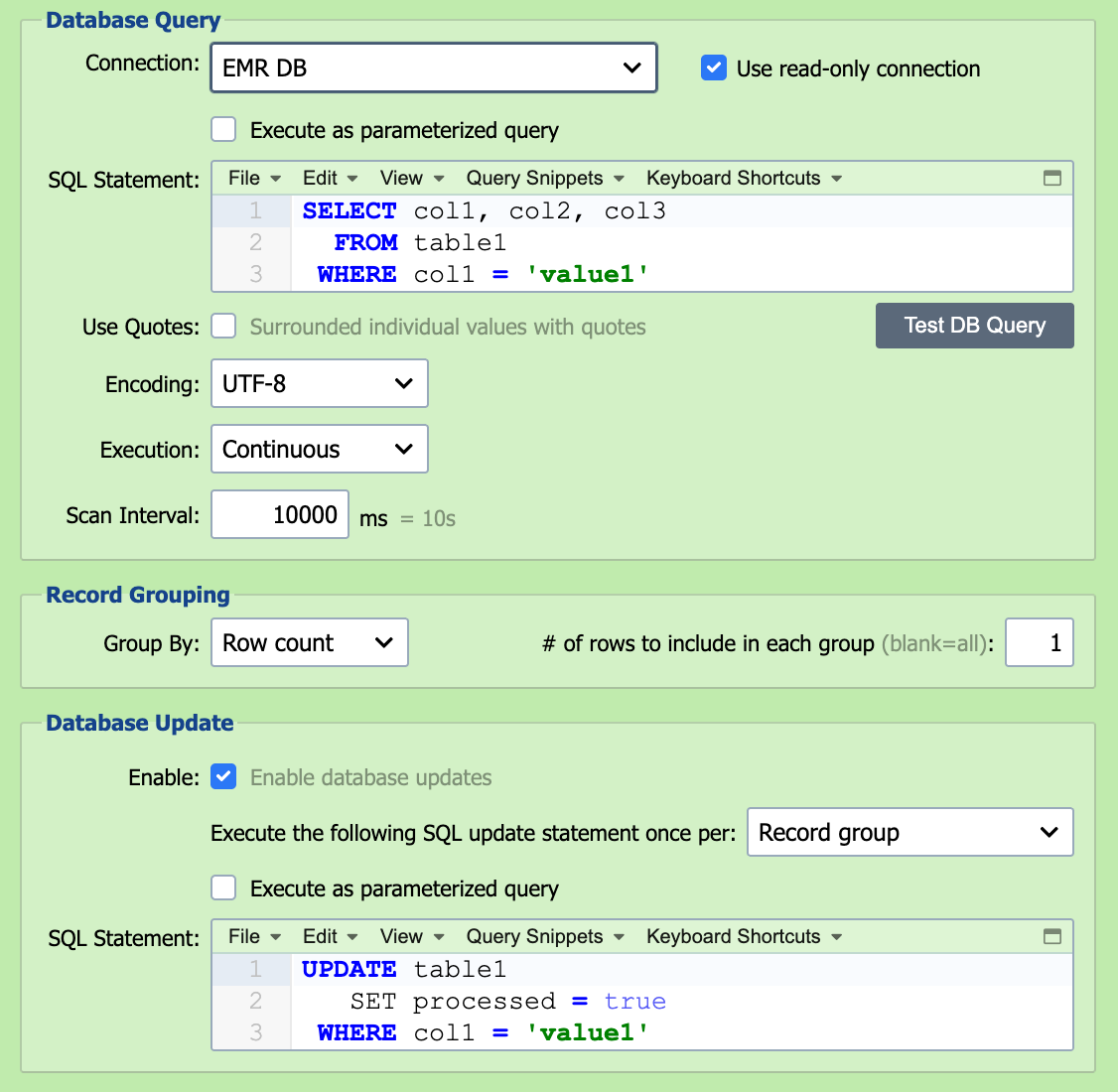
QIE can query a database and use the result set of that query as the input to a channel.
Restart re-runs the query from the beginning
Stopping and restarting a DB Query Result channel restarts the SQL query from the first row of the result set. QIE does not save a "last row processed" cursor. Use the Database Update statement (described below) to mark or remove each row as it is processed; the next run's SELECT then naturally skips what's already been done.
Connection
Select the desired database connection from the connection drop-down list (see Database Connections for information).
SQL Statement
The SQL Select Statement used to generate the database result set is entered here.
Execution
Execution defines the frequency and schedule associated with running the database query and processing the result set.
If execution is set to Continuous, the database query is re-executed continuously with a timeout period between executions equal to the 'Scan Interval'.
If execution is set to Scheduled, the database query is executed according to the schedule specified in the associated CRON String. Runs never overlap: if a query is still being processed when the next CRON time arrives, QIE skips that time and runs it at the first CRON time after the current run finishes.
Scan Interval
When using Continuous execution, the scan interval is used to set the 'timeout' or wait period between completing the processing of the last result set and executing the query again to generate a new result set.
CRON String
When using Scheduled execution, the CRON String is used to specify the schedule to be used for executing the query to generate a result set. See CRON String Format for the six-field syntax and examples.
Record Grouping
QIE can be configured to group records in a database result set based on either column values or row counts. When using the 'Column Value' option, QIE continues adding rows to the current message until it encounters a change in value for the specified column. When using the 'Row Count' option, QIE groups the specified number of rows together into a single message. The most common configuration is to treat each row as an individual message.
Database Update
When processing a database result set, an associated SQL update statement can be executed to 1) record the fact that the record or result set has been processed or 2) delete the processed records from the database.
The update statement references the current row's column values using column-name tags like {patientId} or positional tags like {1}, {2}, {3}. QIE substitutes each tag with the matching column from the result set before executing the update. Column-name tags are recommended when the SELECT statement has stable column names; positional tags are useful when the column list may change but the order is stable.
For example, a SELECT that returns id and processed columns can be paired with this update to mark processed rows:
Filtering by a timestamp window instead of marking rows
When the source database is read-only (or the schema owner does not let QIE flip a processed flag) you can filter the SELECT itself by a timestamp column and remember the last poll's window in channel cache. Reference cache keys in the SELECT using the {cc:name} node-tag syntax.
Check Enable Pre-Run Script on the DB Query source node and enter a Pre-Run Script that shifts the window forward. QIE runs this script immediately before each poll of the query:
channelCache.setValue('windowStart', channelCache.getValue('windowEnd', '1970-01-01 00:00:00'));
channelCache.setValue('windowEnd', qie.formatDate('yyyy-MM-dd HH:mm:ss'));
Then filter the SELECT against that window:
SELECT id, patient_id, message
FROM inbound_queue
WHERE created_at >= '{cc:windowStart}' AND created_at < '{cc:windowEnd}'
ORDER BY created_at
Because each poll's windowEnd becomes the next poll's windowStart, rows are never re-fetched and no window boundary is missed. Two caveats: rows whose created_at is set by the source system and arrives out of order (later insert, earlier timestamp) are skipped if their timestamp falls before the current windowStart; and clock skew between the QIE server and the database server can shift the window relative to what the database is actually writing. Use the database's own clock (e.g. GETDATE(), SYSDATE) in the source system when possible.
Execute once per
The database update statement can be configured to execute once per 1) record group, 2) row, or 3) result set.