SOAP Sender
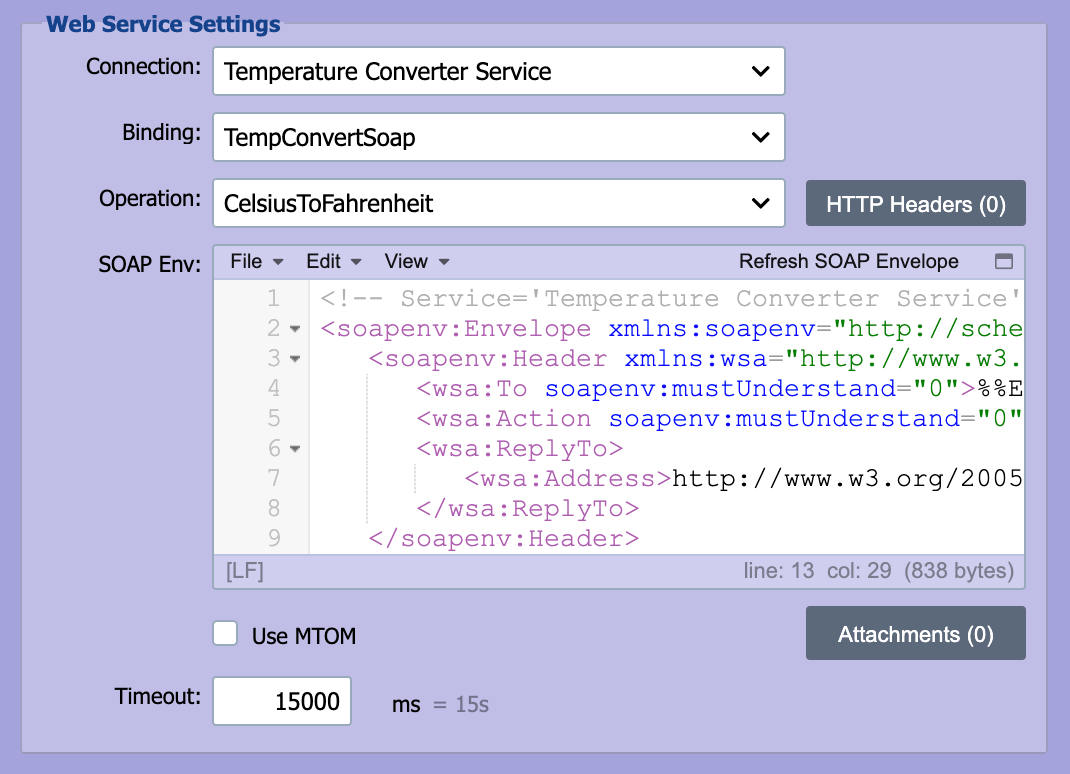
The SOAP Sender is used to call a SOAP based web service endpoint.
Submitting a CDA to an HIE via IHE ITI-41
For the full end-to-end pattern, including the IHE Web Service Connection, XDS.b metadata, attachments, and the ack script that surfaces HIE RegistryError responses. See Sending a CDA Document to an HIE.
Binding
If the SOAP based web service supports multiple protocols or bindings, the supported bindings associated with the web service is listed in the drop-down list.
Operation
A SOAP web service endpoint exposes one or more operations (functions) that can be called. Select the desired operation from the drop-down list.
SOAP Envelope (SOAP Env)
QIE communicates with SOAP based web services by submitting a SOAP envelope which contains both a header section (meta-data about the SOAP call) and a body section. Using the WSDL associated with the SOAP web service connection (see Web Service Connections for more information), QIE generates a SOAP envelope template for the selected operation. The template contains all the required elements of the SOAP envelope including question mark (?) placeholders for all data elements. Message data is embedded in the SOAP envelope using node tags (see Node Paths and Node Tags for more information).
Refresh SOAP Envelope
This menu option is used to reset or refresh the SOAP envelope for the selected operation.
Note
Refreshing the SOAP envelope overwrites embedded node tags and values.
Use MTOM
SOAP Message Transmission Optimization Mechanism (MTOM) describes a mechanism for optimizing the transmission or wire format of a SOAP message by selectively re-encoding portions of the message while still presenting an XML Information Set (Infoset) to the SOAP application. MTOM uses XML-binary Optimized Packaging (XOP) in the context of SOAP and MIME over HTTP. XOP is an alternate serialization of XML that just happens to look like a MIME multipart or related package, with XML documents as the root part. Refer to the documentation for the SOAP web service being called to determine if MTOM should be used.
Attachments button
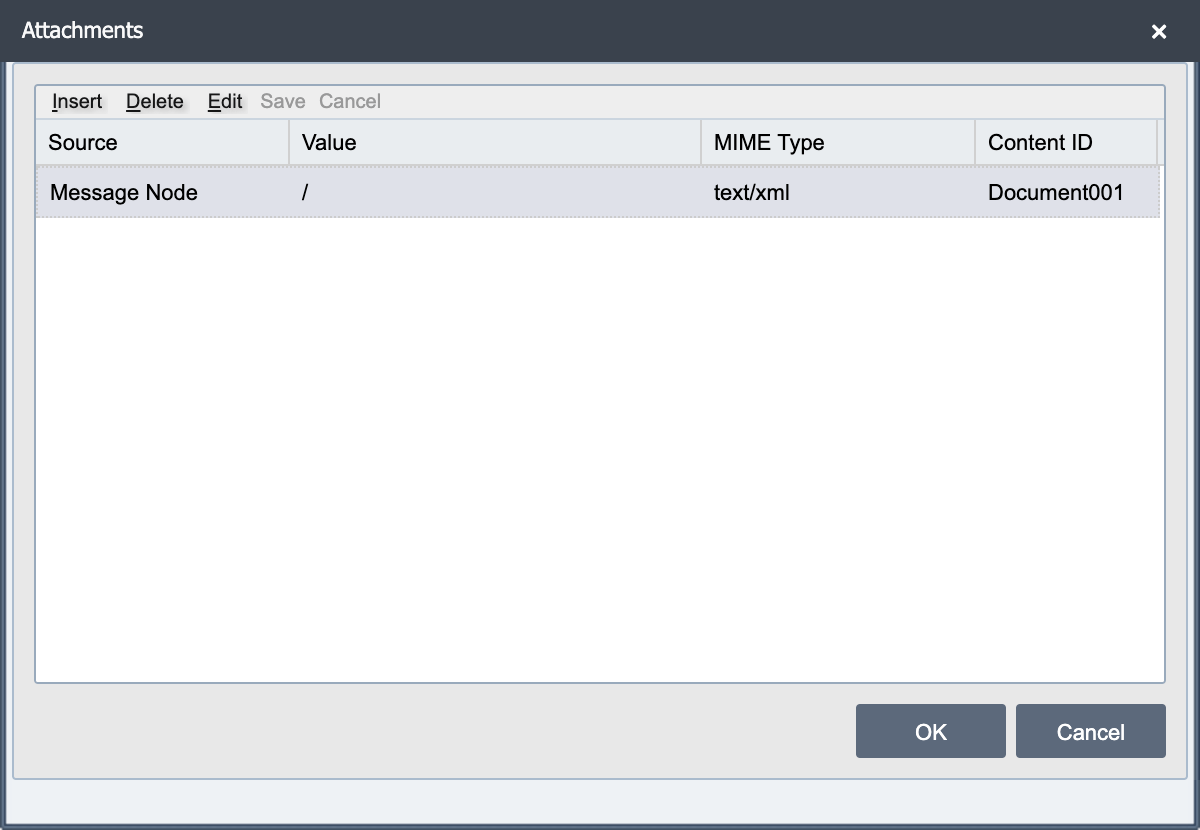
A SOAP message may need to be transmitted together with one or more attachments. Select the attachments button to open the Attachments dialog. Attachments are often in some binary format. For each attachment added to the SOAP message, the following fields must be specified.
| Field | Description |
|---|---|
| Source | Select the source of the data to be used with the attachment (Message Cache, Message Node, etc.). |
| Value | Depending on the selected Source, the value is either a node path or a cache name. |
| MIME Type | Specify the MIME Type associated with the content of the attachment. |
| Content ID | Each attachment must include a unique content ID. This ID is often used to reference the attachment from within the SOAP envelope. See the example below. |
For example, an XDS.b ProvideAndRegisterDocumentSetRequest SOAP envelope that references an attached document would contain a reference to the attachment similar to the following:
<soapenv:Envelope ...>
  <soapenv:Header>
    ...
  </soapenv:Header>
  <soapenv:Body>
    <xdsb:ProvideAndRegisterDocumentSetRequest ...>
      ...
      <xdsb:Document id="Document01">
        <xop:Include href="cid:{Content ID Goes Here}" .../>
      </xdsb:Document>
    </xdsb:ProvideAndRegisterDocumentSetRequest>
  </soapenv:Body>
</soapenv:Envelope>
Some examples of common file types and their associated MIME types include:
| File type | MIME type |
|---|---|
| JPG | application/jpeg |
| application/pdf | |
| PNG | image/png |
| TIF | application/tiff |
| TXT | application/txt or text/plain |
| XML | application/xml |
| ZIP | application/x-compressed |
Timeout
The timeout specifies how long QIE waits to get a response from the REST web service before issuing a timeout error and aborting the web service call.