Socket (ASTM) Receiver
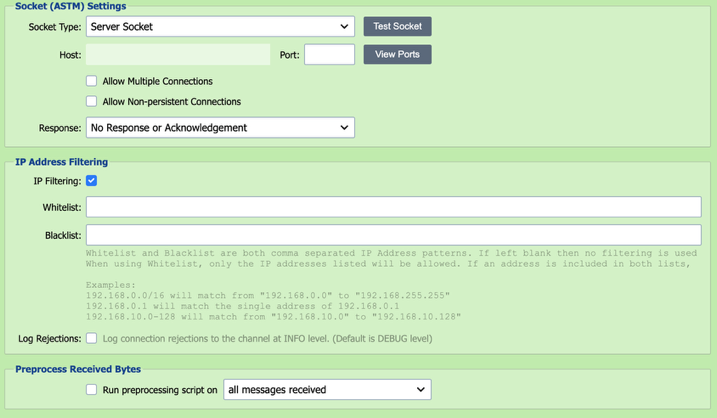
An ASTM socket is a TCP/IP socket connection which implements the ASTM communication protocol. QIE can be configured to listen for ASTM socket connection requests on a specified port.
Serial-attached ASTM devices
QIE's ASTM source listens on a TCP/IP socket; it does not communicate over a hardware serial port (RS-232) directly. If a lab analyzer or other ASTM device is serial-only, place a serial-to-TCP bridge between the device and QIE (many lab vendors and third-party utilities provide this) and point QIE's ASTM source at the bridge's TCP endpoint.
For computing the ASTM mod-256 checksum and returning a framed acknowledgement from a mapping or destination script, see Building an ASTM ACK with a Mod-256 Checksum.
Socket Type
QIE can either be configured to listen for connection requests from remote hosts (Server Socket) or to establish a connection directly with a remote host (Client Socket). In most cases, the socket receiver is configured as a Server Socket.
Test Socket
Selecting the Test Socket button verifies the port is available and create a socket connection. Because a running channel already owns its listening port, Test Socket cannot check the port of a channel that is currently running. Stop the channel first if you want to re-test.
Host
If the socket type is set to Client Socket, the host that QIE is connecting to is entered here. The host should be entered as either a fully qualified domain name (FQDN) or an IP address.
Port
When acting as a Server Socket, QIE listens on the specified port. When acting as a Client Socket, QIE attempts to establish a connection with the Host on the specified port.
View Ports
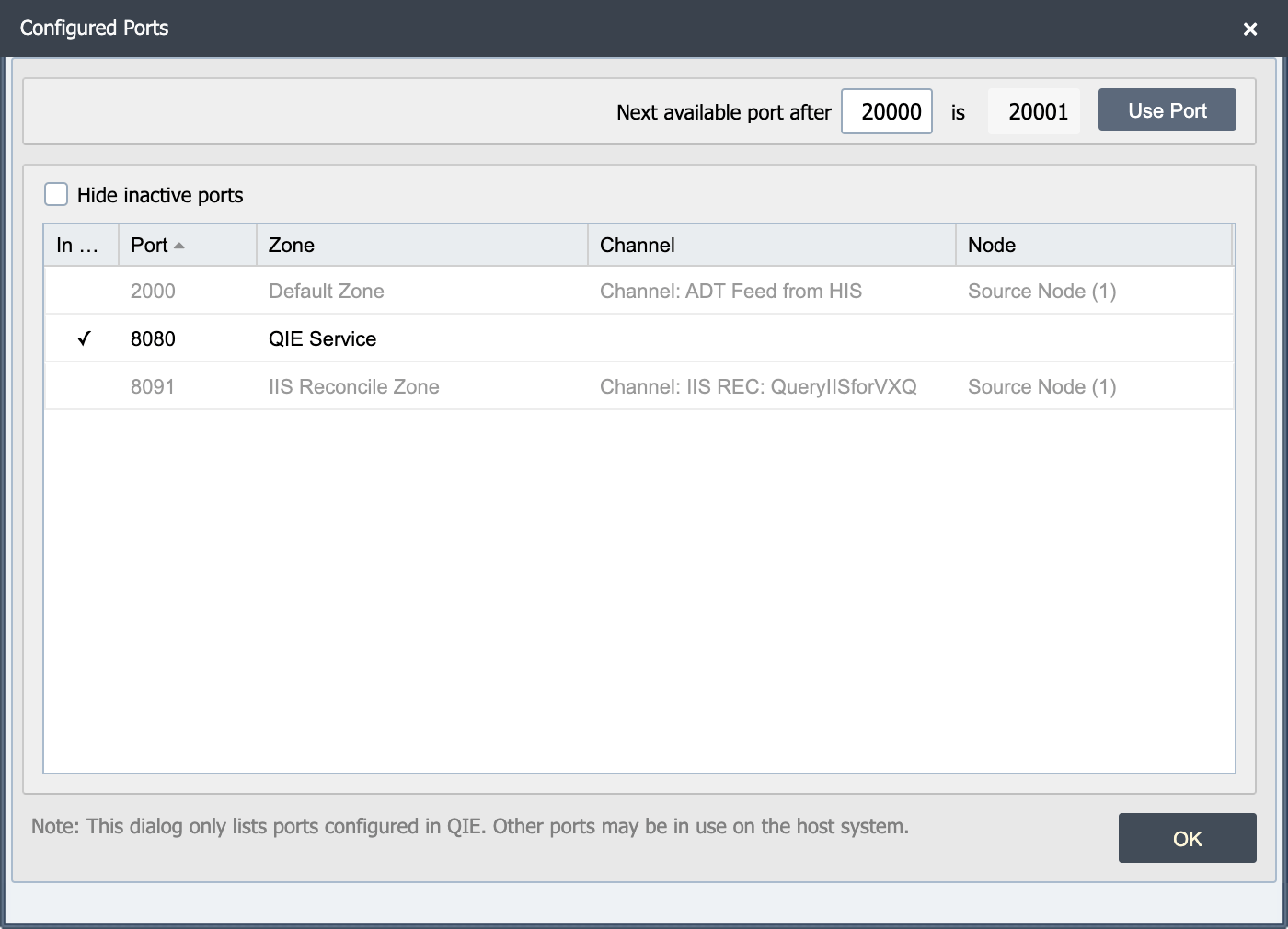
The view ports button displays a list of ports in use on the QIE server. This dialog highlights the active ports, and a checkbox allows the user to hide the inactive ports from the list.
Note
This dialog only lists the ports configured in QIE. Other ports may be in use on the host system.
Note
When publishing a Socket Listener, be sure to open the selected port on the local and/or network firewall. Otherwise, remote clients may be unable to connect.
Allow Multiple Connections
When acting as a Server Socket, QIE can be configured to accept incoming messages from multiple clients or connections. If this option is not selected, QIE denies any subsequent connection attempts that are made while a client is already connected.
Allow Non-Persistent Connections
Select this box if the sender is creating a new connection for each message.
IP Address Filtering
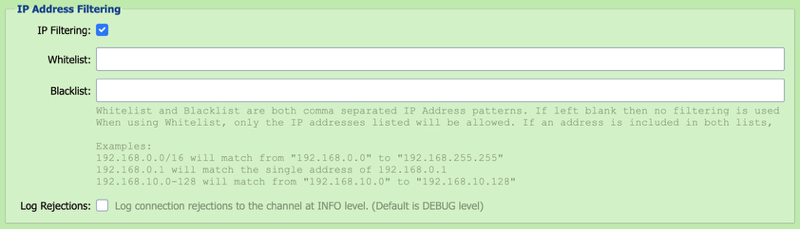
IP addresses can be added to the Whitelist or Blacklist to allow or deny access to the ASTM Socket endpoint. By default, rejections are logged to the channel as DEBUG level entries but can be logged at INFO level by checking the Log Rejections checkbox.
Response
When processing inbound messages, the sending system may require a response or acknowledgement. QIE supports the following response options:
| Response Option | Description |
|---|---|
| No Response or Acknowledgement | No response or acknowledgement message is sent back to the client. |
| From Acknowledgement Script | The response is generated using the Response Script and posted back to the client prior to the message being processed through the channel. |
| From Mapping or Destination node | QIE holds the request open while the message is processed through the channel and waits for a response to be posted by one of the channel nodes (by calling the qie.postMessageResponse() function). |
Response Script
When the Response option above is configured to post a response From Acknowledgement Script, the response script is executed in order to generate and post the desired response back to the client prior to processing the message through the channel.
Timeout
When the Response option above is configured to post a response From Mapping or Destination node, QIE holds the request open until 1) a response is posted by one of the channel nodes (by calling the qie.postMessageResponse() function) or 2) the specified timeout period is exceeded while waiting for a response.
Timeout Script
If the request times out waiting for a response to be posted, the timeout script is executed and is expected to post a "timed out" response to the client by calling the qie.postMessageResponse() function (see Creating Custom Scripts for more information).
Preprocess Received Bytes
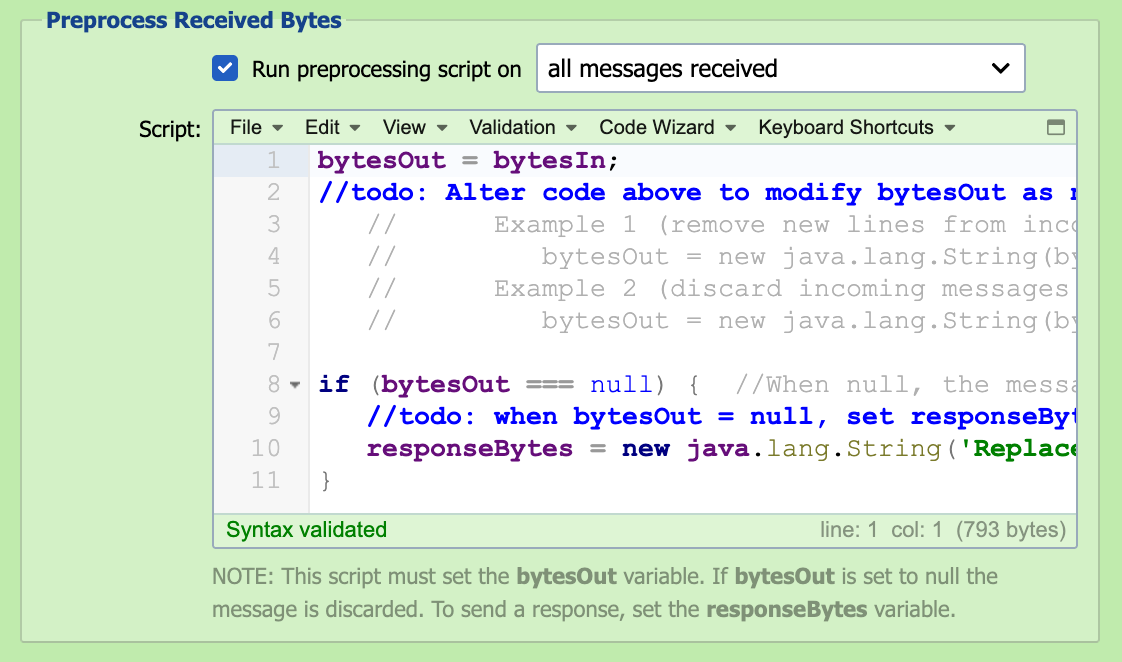
In some cases, it may be necessary to pre-process the received bytes to correct malformed messages before submitting them to the inbound queue. Configuring a preprocessor script allows the bytes to be manipulated and/or discarded before processing the message through the channel.
Run Preprocessing Script On
The preprocessing script can be run against all messages received or only on messages that fail to parse.
Script
The received bytes are available to the script as the bytesIn byte-array. To inspect or edit the content as text, convert it to a String using the channel's configured encoding, which qie.getChannelEncoding() returns. The preprocessing script must set the bytesOut variable as a byte-array. If bytesOut is set to null, the message is discarded and not submitted to the inbound queue. The preprocessing script can also be used to post a message response. To send a response, set the responseBytes variable as a byte-array. Changing the preprocessing script does not change messages QIE has already received. The preprocessing script runs only when the receiver first receives the bytes, and resolving or resubmitting a message from the channel's message history does not run it again. To correct a message that is already in the error queue, select Edit source message in the Message Detail dialog before resolving it. A message that fails in the preprocessing script never enters the channel, so it has no stored source content. Resolving or resubmitting it without an edit is refused. Copy its content from the Message Detail dialog into the Test window to debug the script, then either edit the source message and resolve it, or discard it. To test a change to the script, send the source a new copy of the message.
Resolving a preprocessing script error
When the preprocessing script fails, the receiver sends no acknowledgement, so the sending system may send the message again. Check for a resent copy before resolving the error with an edit, or the message is processed twice.
Message Encoding
Responses and send-out messages are transmitted in the Encoding set on the source node. UTF-8, ISO-8859-1 and windows-1252 are supported, and each frame checksum is calculated over the bytes as sent. Received messages are stored exactly as the bytes arrive.
ASTM framing uses single-byte control characters, so a source whose Encoding is UTF-16 cannot send a response or send-out message. The send fails with the message "ASTM socket sends support single-byte and UTF-8 encodings only, not UTF-16."