HTTP Listener
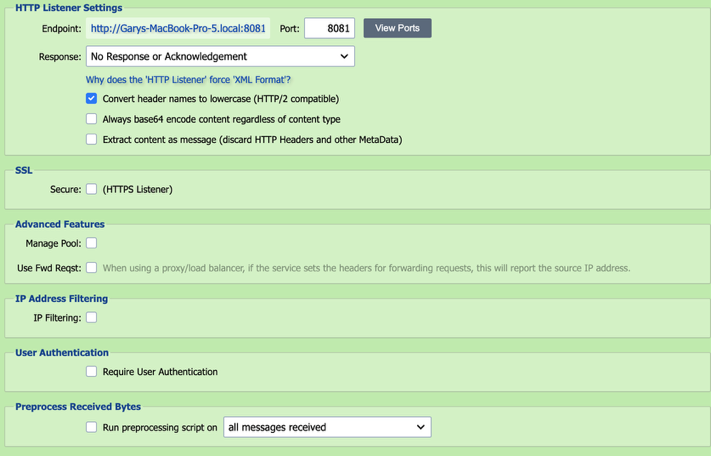
HTTP is the foundation of data communication for the World Wide Web. It is also the communication protocol used for SOAP and REST based web services. Using the HTTP Listener, QIE can be configured to listen for and respond to HTTP requests, including SOAP requests and REST web service calls.
Connection
Endpoint
Displays the endpoint of the receiver.
Port
The HTTP listener must be published to an available port on the QIE server.
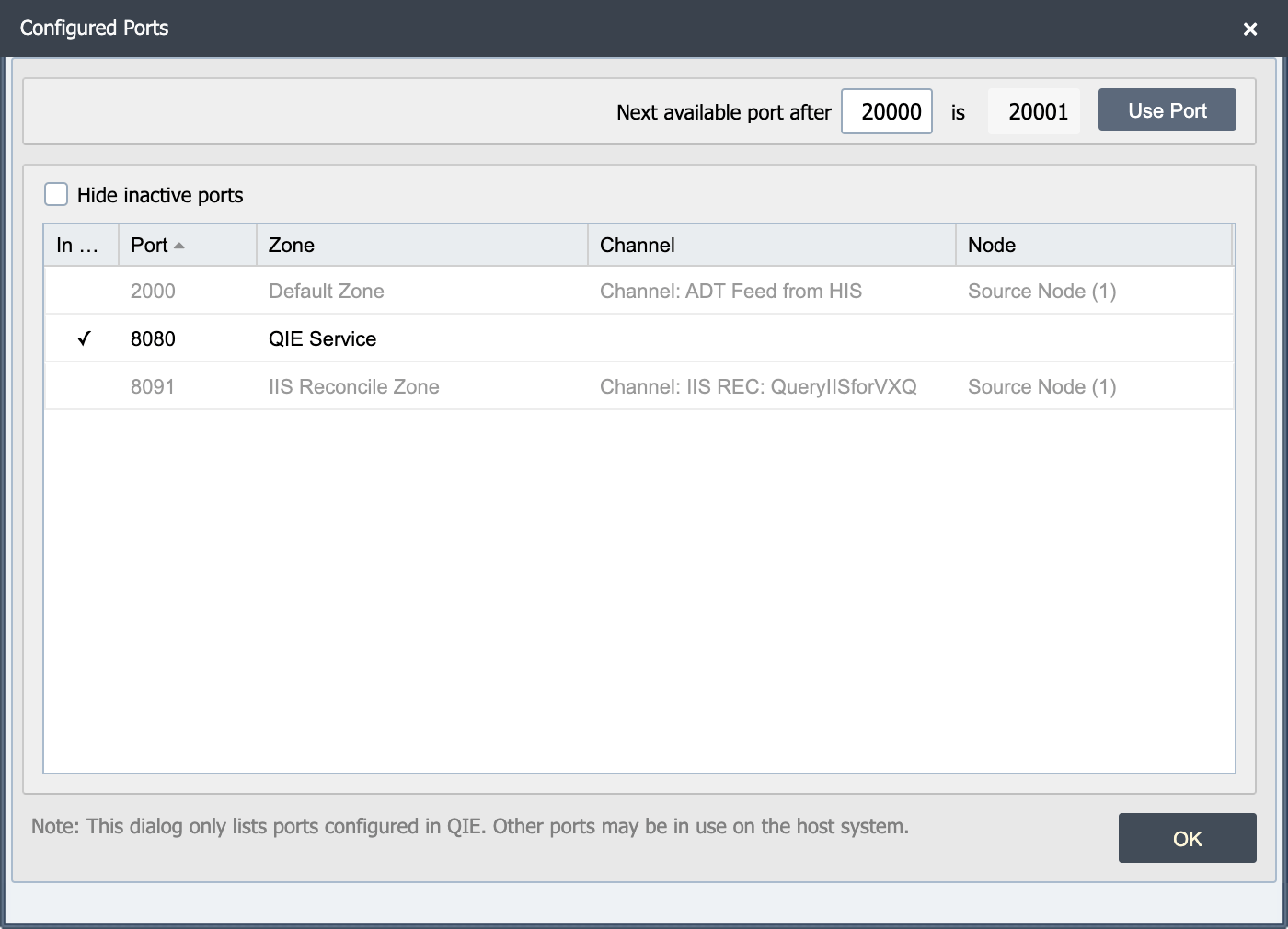
View Ports
The view ports button displays a list of ports in use on the QIE server. This dialog highlights the active ports and a checkbox allows the user to hide the inactive ports from the list.
Note
This dialog only lists the ports configured in QIE. Other ports may be in use on the host system.
Note
When publishing an HTTP Listener, be sure to open the selected port on the firewall.
Secure
When this checkbox is selected the listener becomes an HTTPS listener. QIE is the server in this connection, so QIE needs its own server certificate; client applications only need QIE's public certificate to trust the connection.
For inbound HTTPS only
This setting governs the inbound HTTPS listener on the source node. It has no effect on outbound HTTPS calls that this channel makes to downstream systems. Outbound TLS trust and client-authenticated TLS are configured on the Web Service Connection used by the destination or by a mapping-script call.
Server Cert
Select QIE's server certificate. QIE presents this to incoming HTTPS clients during the TLS handshake; the matching private key is held in QIE and never sent.
Client Auth
Check this box to require client-authenticated (mutual) TLS, then select the public certificate (or CA certificate) that incoming HTTPS clients must present. QIE rejects any caller that does not present a matching certificate.
Server certificate vs Client Auth certificate
The Server Cert is QIE's own certificate (proves QIE's identity to the client). Client Auth is the optional second half of mutual TLS. Only enable it when you want to require the caller to present a certificate too. See Certificate Management for how to generate or import these.
Override cipher suites for this connection
By default, the listener accepts the JVM's default TLS cipher suites. Check this box to restrict the listener to a specific set, then enter the suite names in the field below as a comma-separated list. Use this when a partner can only negotiate a particular cipher or when site security policy requires excluding weaker suites. Suite names use the standard Java naming convention, for example TLS_RSA_WITH_AES_128_CBC_SHA, TLS_ECDHE_RSA_WITH_AES_256_CBC_SHA384.
Response Handling
Response
When processing inbound requests, the client sending the request often require a response. QIE supports the following response options:
| Response Option | Description |
|---|---|
| No Response or Acknowledgement | No response or acknowledgement message is sent back to the client. |
| From Acknowledgement Script | The response is generated using the Response Script and posted back to the client prior to the message being processed through the channel. |
| From Mapping or Destination node | QIE holds the request open while the message is processed through the channel and waits for a response to be posted by one of the channel nodes (by calling the qie.postMessageResponse() function). |
Response Body Format
The response content returned by the Response Script, Timeout Script, or qie.postMessageResponse() may begin with one or more optional header lines that set the HTTP status code and response headers on the reply sent back to the client. The first line that does not match a recognized prefix marks the start of the response body.
Recognized prefixes (each terminated by \r\n):
| Prefix | Description |
|---|---|
HTTP Status: <code> |
Sets the HTTP status code (e.g. HTTP Status: 200, HTTP Status: 404). If omitted, the response defaults to status 200. The value must be numeric; a non-numeric value causes an Internal Server Error response. |
http.header.<name>=<value> |
Sets an arbitrary response header (e.g. http.header.Content-Type=application/pdf). Multiple http.header. lines may be included. The prefix match is case-insensitive; the delimiter between header name and value is =. |
Content-Type: <value> |
Convenience form for setting the response Content-Type header (e.g. Content-Type: application/json). |
Pass the response content to qie.postMessageResponse() as either a String (when using the header-line convention above) or a byte[] (for binary content such as a PDF). When a byte[] is passed, the bytes are written to the response body as-is and the status defaults to 200.
Examples:
Plain text body with default status 200:
JSON body with explicit status and content type:
var response = 'HTTP Status: 200\r\n' +
   'http.header.Content-Type=application/json\r\n' +
   '\r\n' +
   '{"result":"success"}';
qie.postMessageResponse(response);
Mirroring an upstream error status and JSON body:
var response = 'HTTP Status: 400\r\n' +
   'http.header.Content-Type=application/json\r\n' +
   '\r\n' +
   '{"detailedmessage":"Encounter not found.","error":"The data provided is invalid."}';
qie.postMessageResponse(response);
Returning binary content (such as a PDF) as the response body:
Sending an HTTP redirect to a different URL:
var redirect = 'HTTP Status: 303\r\n' +
               'http.header.Location=https://example.com/landing\r\n';
qie.postMessageResponse(redirect);
For a browser-only client that follows HTML refreshes, an HTML body with a meta-refresh tag works without setting Location explicitly:
qie.postMessageResponse(
    '<html><head><meta http-equiv="refresh" content="0; url=https://example.com/landing"></head></html>');
Response Script
When the Response option above is configured to post a response From Acknowledgement Script, the response script is executed in order to generate and post the desired response back to the client prior to processing the message through the channel (see Creating Custom Scripts for more information).
Timeout
When the Response option above is configured to post a response From Mapping or Destination node, QIE holds the request open until a response is posted by one of the channel nodes (by calling the qie.postMessageResponse() function) or the specified timeout period is exceeded while waiting for a response.
Enter the timeout in milliseconds. The default is suitable for fast pass-through channels (a few seconds); raise it (e.g. 60000 for 60 seconds) when the channel performs database lookups or downstream calls that can take longer. Setting it too low can return a 504 Gateway Timeout to the client (or whatever response the Timeout Script posts) before processing has actually finished. Setting it too high lets clients wait longer than they should before they know the call has stalled.
Timeout Script
If the request times out waiting for a response to be posted, the timeout script is executed and is expected to post a "timed out" response to the client by calling the qie.postMessageResponse() function (see Creating Custom Scripts for more information).
Message Content
Extract Content As Message
Selecting this option enables a pre-defined preprocessor script which extracts the HTTP content from the HTTP request and submits the content as the inbound message, removing all HTTP headers and other HTTP meta-data. This allows the channel to be configured with any message format such as HL7 or JSON and messages are processed without having to extract the payload from the HTTP request as a first step in the channel's configuration.
If the HTTP body itself wraps the payload in a vendor-defined envelope (for example <Request><Part><Content>...</Content></Part></Request>, with optional base64 encoding), leave Extract Content As Message unchecked and use a custom preprocess script to peel the wrapper. See Unwrapping a Vendor Envelope from an HTTP Body.
When this option is unchecked, QIE submits the entire HTTP request (method, request URI, query string, headers, and body) as an XML message under a root /Request element. This lets the channel inspect request metadata that would otherwise be discarded:
<?xml version="1.0" encoding="UTF-8"?>
<Request>
<Content-Type><![CDATA[application/json]]></Content-Type>
<Method>POST</Method>
<RequestURI>/something/labs</RequestURI>
<QueryString>fileName=patient101record.pdf&createdDate=04302024</QueryString>
<RemoteUser></RemoteUser>
<RemoteAddress>10.0.0.15</RemoteAddress>
<RemoteHost>10.0.0.15</RemoteHost>
<RemotePort>58992</RemotePort>
<Headers>
<Host><![CDATA[localhost:8083]]></Host>
<User-Agent><![CDATA[Apache-HttpClient/5.3 (Java/17.0.4)]]></User-Agent>
<Content-Type><![CDATA[application/json]]></Content-Type>
</Headers>
<Part>
<Host><![CDATA[localhost:8083]]></Host>
<User-Agent><![CDATA[Apache-HttpClient/5.3 (Java/17.0.4)]]></User-Agent>
<Content-Type><![CDATA[application/json]]></Content-Type>
<Content><![CDATA[ ...the request body... ]]></Content>
</Part>
</Request>
The request body is inside <Part>, not directly under <Request>. A request with no body has an empty <Content/> element.
Access the parts you need with source.getNode() in a mapping script, or by setting the Node Path on a Standard condition node:
| Node path | Returns |
|---|---|
/Request/RequestURI |
The request path only, without host or query string (e.g. /something/labs). |
/Request/QueryString |
The raw, unparsed query string (e.g. fileName=patient101record.pdf&createdDate=04302024). |
/Request/Headers/<HeaderName> |
A single request header value (e.g. /Request/Headers/Content-Type). |
/Request/Headers |
All request headers. |
/Request/Part/Content |
The request body. |
var requestUri  = source.getNode('/Request/RequestURI');
var queryString = source.getNode('/Request/QueryString');
var contentType = source.getNode('/Request/Headers/Content-Type');
The query string is returned raw, so split it on & and = to read individual parameters, and URL-decode encoded characters such as %40 as needed. A small helper makes the call sites cleaner:
function parseQueryString(qs) {
    var params = {};
    if (!qs) return params;
    qs.split('&').forEach(function(pair) {
        var idx = pair.indexOf('=');
        if (idx < 0) {
            params[qie.urlDecode(pair)] = '';
        } else {
            params[qie.urlDecode(pair.substring(0, idx))] =
                qie.urlDecode(pair.substring(idx + 1));
        }
    });
    return params;
}

var params = parseQueryString(source.getNode('/Request/QueryString'));
qie.info('fileName=' + params.fileName + ', createdDate=' + params.createdDate);
To serve several REST endpoints from a single listener (the port accepts any path, so one channel dispatches on the request URI) see Routing Multiple REST Endpoints on One HTTP Listener.
\"Content is not allowed in prolog\" on POST
If a channel with an XML message format throws Content is not allowed in prolog when a client POSTs a non-XML body, it is because Extract Content As Message is selected, which makes QIE parse the raw body as XML on receipt. Uncheck the option so the request is wrapped in the /Request envelope instead; the body is then available at /Request/Part/Content and is not parsed as XML when received. To work with a JSON body as a JSON message, replace the working message in a mapping script: message = qie.createJSONMessage(source.getNode('/Request/Part/Content'));
User Authentication and Sessions
Require User Authentication
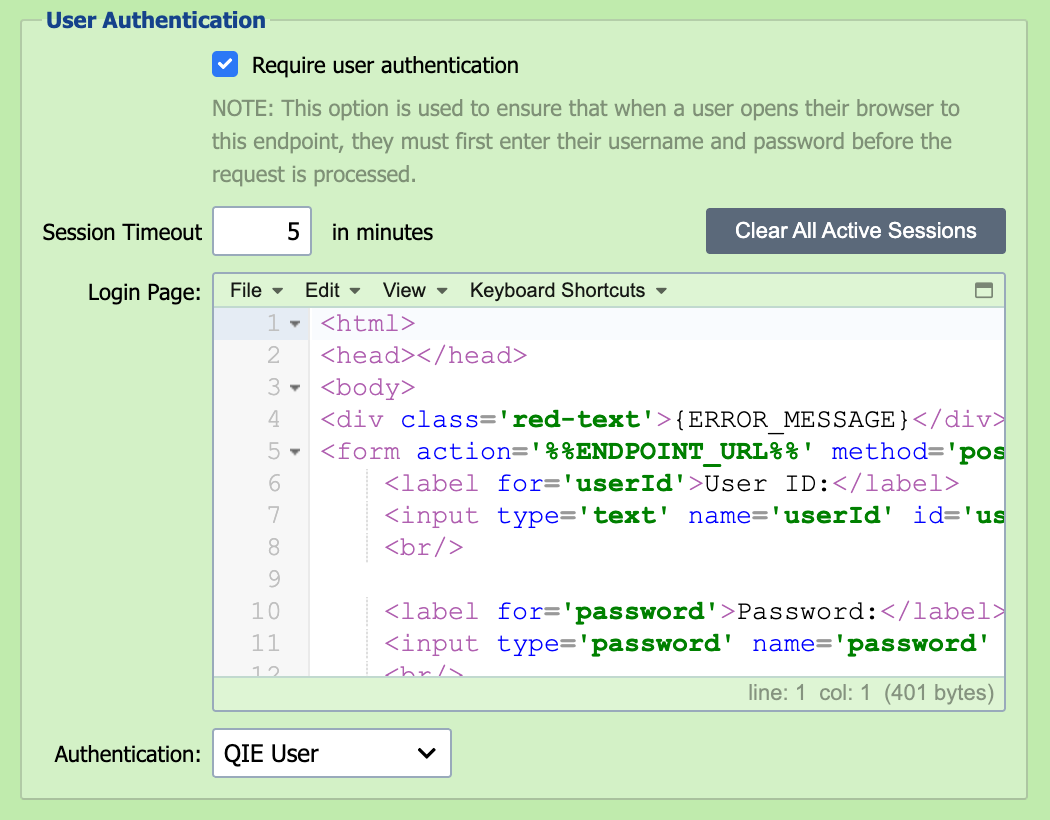
Selecting this option enables HTTP session management, including user authentication to the HTTP listener.
Session Timeout
Session timeout specifies how long a user can be inactive without being logged out and required to login again before further interaction with the HTTP listener.
Clear All Active Sessions
Clicking this button clears all active sessions for the HTTP receiver. Any users that are still active are required to login again.
Login
This is the HTML content that is returned to the browser when a user connects to the HTTP listener but does not have an active session. This HTML can be modified to apply any desired style or formatting.
SSL
Enables the channel as a HTTPS Listener
Advanced Features
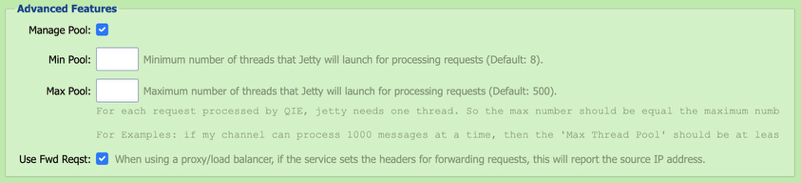
Min Pool:
Minimum number of threads that Jetty launches for processing requests (Default: 8).
Max Pool:
Maximum number of threads that Jetty launches for processing requests (Default: 500).
For each request processed by QIE, Jetty needs one thread. So, the max number should equal the maximum number of concurrent processing.
For example: if my channel can process 1000 messages at a time, then the 'Max Thread Pool' should be at least 1000.
Use Fwd Reqst
When using a proxy/load balancer, if the service sets the headers for forwarding requests, this reports the source IP address.
IP Address Filtering
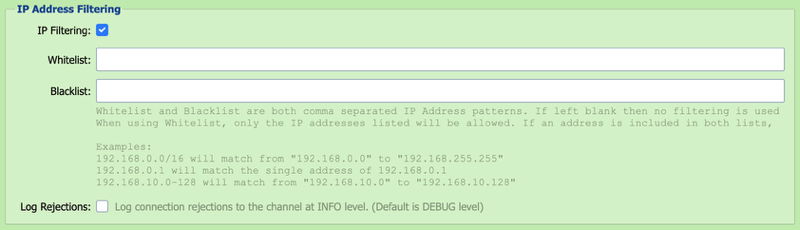
IP addresses can be added to the Whitelist or Blacklist to allow or deny access to the HTTP Listener endpoint. By default, rejections are logged to the channel as DEBUG level entries but can be logged at INFO level by checking the Log Rejections checkbox.
Note
Filtering checks the address of the machine that opened the connection, never a forwarded address. When Use Fwd Reqst is checked and requests arrive through a proxy or load balancer, the filter sees the proxy's address, so list the proxy rather than the clients behind it.
Authentication
This option controls how users are authenticated.
| Authentication Option | Description |
|---|---|
| QIE User | The user is authenticated against the users that have been configured in QIE (see Users). |
| Custom Script | Users can be authenticated using a custom script. The script receives userIdIn and passwordIn extracted from the request's parameters or body, along with channelCache, sharedCache, and qie. Set authenticatedUserId to a non-empty string to grant access; set authErrorMessage for a custom failure message. The script does not have access to HTTP request headers. For header-based authentication such as a bearer token or API key, validate in a preprocessor script instead (see Preprocess Received Bytes below and the Validating an Inbound Bearer Token recipe). |
Preprocess Received Bytes
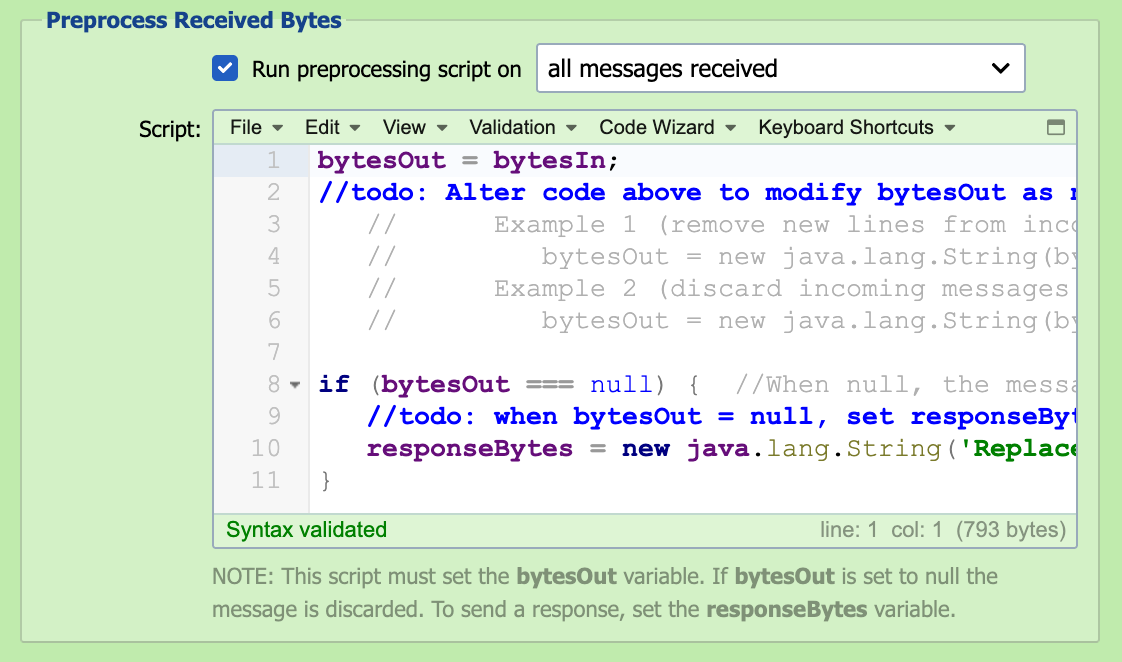
In some cases, it may be necessary to pre-process the received bytes to correct malformed messages before submitting them to the inbound queue. Configuring a preprocessor script allows the bytes to be manipulated and/or discarded before processing the message through the channel.
Run Preprocessing Script On
The preprocessing script can be run against all messages received or only on messages that fail to parse.
Script
The received bytes are available to the script as the bytesIn byte-array. To inspect or edit the content as text, convert it to a String using the channel's configured encoding, which qie.getChannelEncoding() returns. The preprocessing script must set the bytesOut variable as a byte-array. If bytesOut is set to null, the message is discarded and not submitted to the inbound queue. The preprocessing script can also be used to post a message response. To send a response, set the responseBytes variable as a byte-array. To return a specific HTTP status code on that response, prefix the bytes with a HTTP Status: <code> line followed by a blank line, for example HTTP Status: 401\n\nUnauthorized. For HTTP Listener sources, bytesIn is the full XML-wrapped request (with /Request/Headers/<Name>, /Request/Method, /Request/RequestURI, and the body under /Request/Part/Content), which lets a preprocessor inspect headers before the message enters the channel. See the Validating an Inbound Bearer Token recipe for a worked example. Changing the preprocessing script does not change messages QIE has already received. The preprocessing script runs only when the receiver first receives the bytes, and resolving or resubmitting a message from the channel's message history does not run it again. To correct a message that is already in the error queue, select Edit source message in the Message Detail dialog before resolving it. A message that fails in the preprocessing script never enters the channel, so it has no stored source content. Resolving or resubmitting it without an edit is refused. Copy its content from the Message Detail dialog into the Test window to debug the script, then either edit the source message and resolve it, or discard it. To test a change to the script, send the source a new copy of the message.
Response to a failed preprocessing script
When the preprocessing script fails, the receiver answers with HTTP status 500 and the body Internal Server Error On Message ID: <id>, whatever the response type, because the message was not accepted. A caller that retries once the script is fixed delivers the message again, so discard the earlier preprocessing script errors instead of resolving them.