Configuring OAuth 2.0 in QIE
This chapter is a field-by-field reference for the OAuth section of a Web Service Connection. The exercises in the following chapters refer back to these field descriptions.
Field Reference
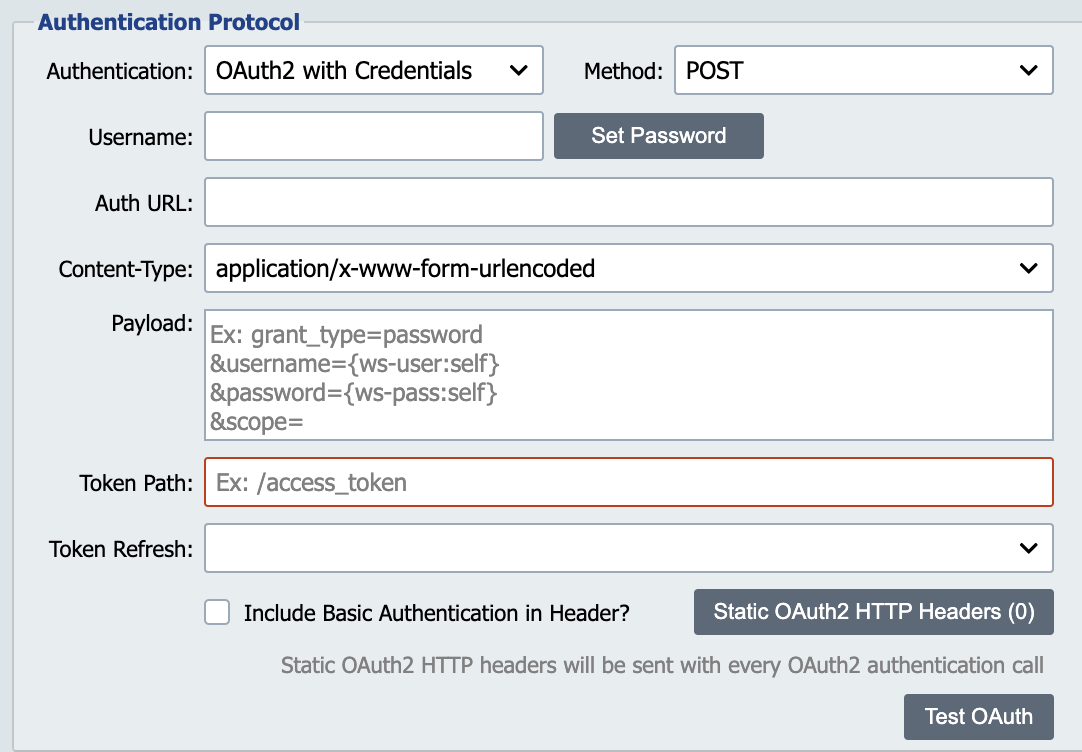
Configure the following fields in the Authentication Protocol section of the Web Service Connection.
| Field | Description |
|---|---|
| Authentication | Select OAuth2 with Credentials for client-secret flows or OAuth2 with JWT for private-key JWT-bearer flows. |
| Method | POST or GET, depending on what the Identity Provider's token endpoint expects. Most providers (including Auth0) expect POST. |
| Username / Password | Your client ID and client secret. QIE stores both values encrypted and substitutes them into the payload at runtime via the {ws-user:self} and {ws-pass:self} tags. |
| Include Basic Authentication in Header? | When checked, QIE sends the Username and Password in an HTTP Basic Authorization header on the token request. Some providers require this in addition to (or instead of) the credentials in the payload. |
| Auth URL | The Identity Provider's token endpoint, the URL QIE posts the credentials to. |
| Content-Type | The format of the Payload field. Choose application/x-www-form-urlencoded or application/json to match what the Identity Provider expects. |
| Payload | The body of the POST request. May reference {ws-user:self} and {ws-pass:self} along with any additional grant parameters the Identity Provider requires (audience, scope, grant_type, and so on). |
| Token Path | A JSON pointer into the token response that locates the access token (for example, /access_token). QIE reads this path from the response and uses the value as the bearer token. The drop-down lists common defaults (/access_token, /token, /oauth/token, /oauth2/token, …); you can type a custom path if your provider returns the token elsewhere. |
| Token Refresh | When QIE should request a new access token. See Token Refresh Options below. |
Payload Formats: JSON vs. URL-Encoded
QIE supports the two common payload formats for Client Credentials requests.
JSON: a structured object using key-value pairs:
{
  "client_id": "/*{ws-user:self}*/",
  "client_secret": "/*{ws-pass:self}*/",
  "audience": "your_api_audience",
  "grant_type": "client_credentials"
}
Each {ws-user:self} / {ws-pass:self} tag is wrapped in a /* … */ comment so the editor parses the payload as valid JSON. QIE strips the comment markers before substitution.
URL-encoded: key-value pairs joined into a URL query string:
client_id={ws-user:self}&client_secret={ws-pass:self}&audience=your_api_audience&grant_type=client_credentials
In the URL-encoded form the bare tag is sufficient. No comment wrapping is needed.
Token Refresh Options
The Token Refresh drop-down controls when QIE asks the Identity Provider for a new access token:
| Setting | Behavior |
|---|---|
Refresh upon failure |
QIE re-requests the token only when a call to the Resource Server fails with an authorization error. |
Refresh after fixed time |
QIE re-requests the token on a fixed interval (in seconds) that you specify. |
Refresh when token expires |
QIE reads the expiration time from the token-response payload and re-requests the token shortly before it expires. |
Refresh based on token |
QIE re-requests the token using a refresh-token endpoint and refresh-token value from the original token response. |
Refresh upon failure is the simplest setting and is appropriate for the exercises in this tutorial.
Testing the Configuration
After you save the Web Service Connection, click the Test OAuth button at the bottom of the Authentication section. QIE sends the configured payload to the Auth URL and displays the response in the Test Log dialog. A successful response includes the access token returned by the Identity Provider.
Test OAuth only exercises the Identity Provider configuration; it does not call the Resource Server.