Network Share (SMB)
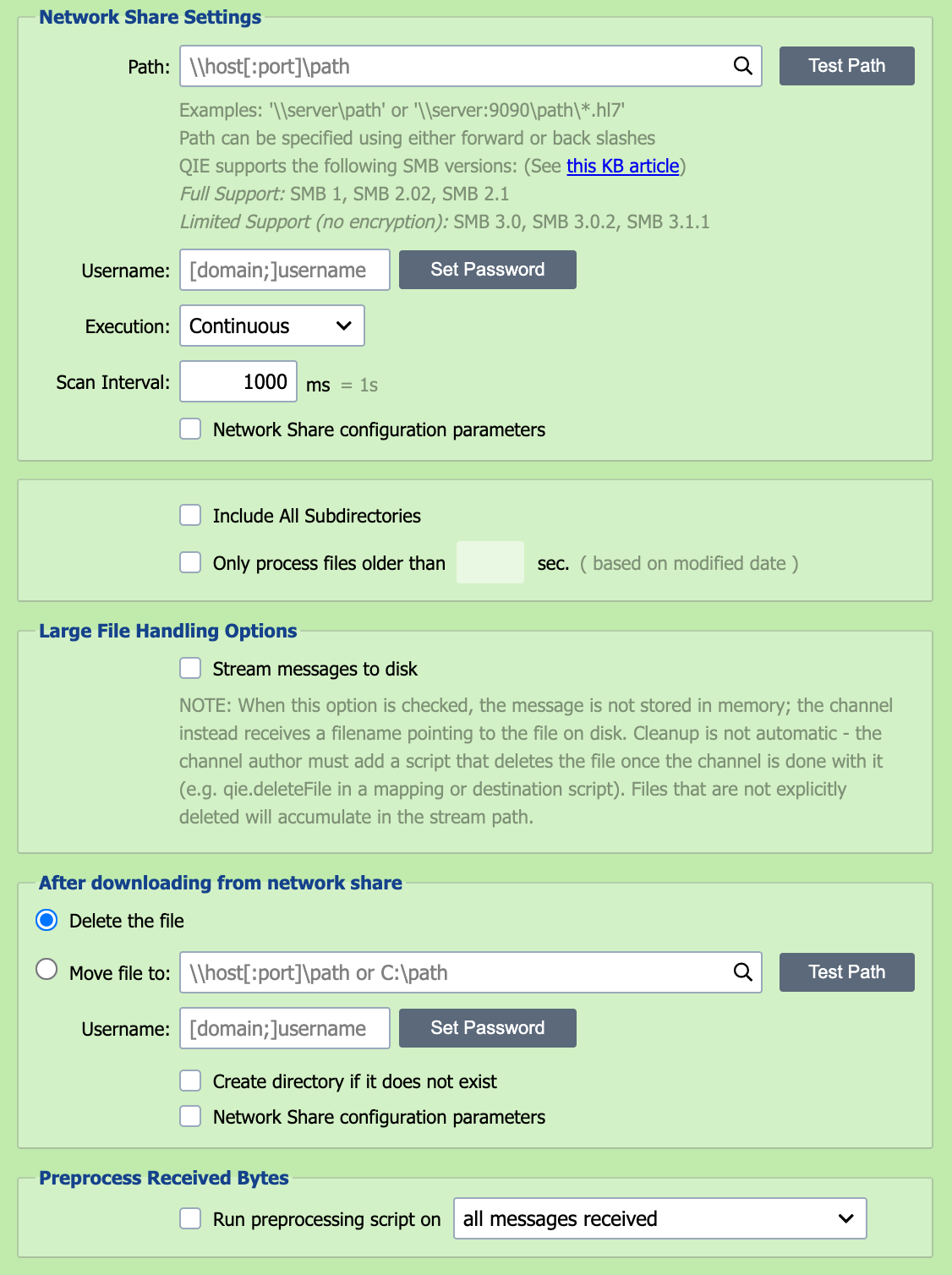
Messages can be placed in a network directory that QIE is configured to monitor. A username and password can be entered if required for access to the network share.
Path
Enter the full path to the network share as:
\server\directoryPath\.hl7.
If a port is required enter the path as: \server:port\directoryPath\.hl7
Note
The path can be entered using forward (/) or back (\) slashes.
The path field accepts node tags, for example, {cc:FolderYear} substitutes a channel cache value into the path on each scan.
Folder names that contain a period
QIE reads the last element of the path as a file name when that element contains a period. A path of \\server\share\drop.box is therefore treated as a file named drop.box until a folder of that name exists, and is then scanned as a folder: every file in it is picked up and the Include All Subdirectories setting applies. To name a folder before it exists, end the path with a separator (\\server\share\drop.box\) or add a filename pattern (\\server\share\drop.box\*). The same applies to a share name that contains a period, such as \\server\share.name\.
Username/Password
Enter a username and password with access to the network share. The username can be entered with a domain if required.
Execution
Execution defines the frequency and schedule associated with scanning the Network Share for matching files. The three available options are continuous, scheduled or manual.
If execution is set to Continuous, QIE scans again immediately while scans keep finding files. After a scan that finds none, it waits the 'Scan Interval' before scanning again.
If execution is set to Scheduled, the Network Share is scanned according to the schedule specified in the associated CRON String. Scans never overlap: if a scan is still running when the next CRON time arrives, QIE skips that time and scans at the first CRON time after the current scan finishes.
If execution is set to Manual, the Network Share is scanned only when a user selects the Run Now button.
run now
If execution is Scheduled or Manual, use the Run Now button for immediate execution.
Scan Interval
When using Continuous execution, the scan interval is used to set the 'timeout' or wait period between Network Share scans.
Network Share Configuration Parameters
Selecting this checkbox allows entry of custom parameters for the network share. Parameters are entered as key=value pairs, one per line. QIE uses the jcifs-ng Java library (version 2.1.10) for SMB connections; the parameter names follow the jcifs.smb.client.* namespace defined by jcifs-ng.
A few parameters that come up routinely:
| Parameter | Purpose |
|---|---|
jcifs.smb.client.soTimeout |
Socket read timeout in milliseconds. Increase when a slow server or large directory listing causes the receiver to hang. |
jcifs.smb.client.connTimeout |
Connection-establishment timeout in milliseconds. |
jcifs.smb.client.responseTimeout |
How long QIE waits for a response from the server before giving up. |
jcifs.smb.client.minVersion / jcifs.smb.client.maxVersion |
Restrict the SMB protocol version negotiated with the server (SMB1, SMB202, SMB210, SMB300, SMB311). Use when a server only supports a specific version. |
jcifs.smb.client.dfs.disabled |
Set to true to disable DFS referral resolution when not needed. |
For the full parameter list, see the jcifs-ng configuration documentation.
CRON String
When using Scheduled execution, the CRON String is used to specify the schedule to be used for Network Share scans. See CRON String Format for the six-field syntax and examples.
Include All Subdirectories
Selecting this checkbox instructs QIE to scan matching files in subfolders beneath the configured network share path. This is useful when inbound files are organized into date-based, customer-based or location-based folders beneath a common root.
When this option is enabled, QIE preserves the source-relative folder as source metadata. That metadata can be referenced in archive paths, destination paths or templates using Source Metadata node tags such as {s-meta:FILE_DIRECTORY} or the source.getFileDirectory() function.
A destination file name of *, or a blank file name, takes the source file's original name, and with this option enabled that name includes the source-relative folder. A destination path of /out/*.* therefore writes /out/orders/2026/file1.hl7, and the write fails when that folder does not exist. To write every file to the same folder, use {s-meta:FILE_NAME} as the destination file name. To recreate the source folders instead, have the destination create missing directories: check Create directory if it does not exist on a File or Network Share destination, or add autoCreate=true to Custom Apache Camel Parameters on an FTP destination.
delayed processing
Checking this box delays processing a file until it has been in the network share path the specified number of seconds. This can help to prevent file locks.
Large File Handling Options

When this option is checked, the message is not stored in memory; the channel instead receives a filename pointing to the file on disk. Cleanup is not automatic - the channel author must add a script that deletes the file once the channel is done with it (e.g. qie.deleteFile in a mapping or destination script). Files that are not explicitly deleted accumulate in the stream path. For the recommended mapping pattern, see Passing Through Large Files Without Loading Them Into Memory.
After downloading from Network Share
After processing files from the Network Share, QIE can be configured to either Delete the file or Move the file to another folder.
When Include All Subdirectories is enabled and the archive path does not use source metadata, nested folder values are flattened into the archived filename. To preserve the original relative folder structure, include source metadata node tags such as {s-meta:FILE_DIRECTORY} in the archive path. If the archive folder is located beneath the source root, QIE skips that archive tree during recursive scans.