Key QIE Concepts to Understand
This chapter describes some of the key concepts that a user must understand in order to successfully use the QIE application.
Message
A message is the basic unit of data that QIE operates on. It is a packet of data which represents a communication in digital format from a source system to a destination system. A message consists of a format (HL7, XML, CSV, etc.) and content. Using QIE, messages can be routed based on content or other conditional logic. Message content can be manipulated using mapping functions, and message format can be changed from one format to another (e.g. from HL7 to XML).
Channel
A QIE Channel represents an interface between two (or more) systems and contains the entire configuration for managing the flow of information between the systems. A channel always has one (and only one) data source and at least one destination. A channel typically also contains one or more mapping and/or condition nodes which handle message routing and data manipulations.
Channel Node
In QIE, channels are represented graphically (using QIE's Visual Channel Editor) as a series of inter-connected nodes. The connections between the channel nodes control how messages flow through the channel.
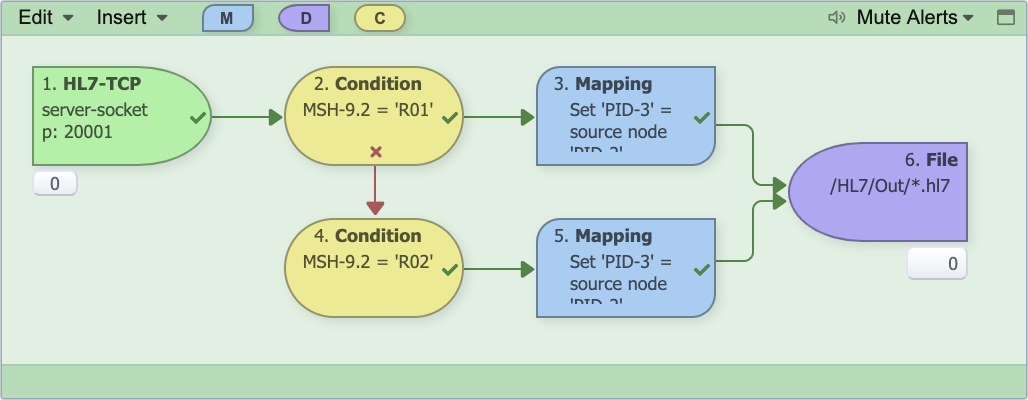
There are 4 types of channel nodes:
-
Source Node (green): The source node represents the data source for the channel. It is used to configure how messages are received (e.g. socket connection, file transfer, database query, etc.). The source node also specifies the expected format of the incoming messages (e.g. HL7, XML, CSV, etc.).
-
Condition Node (yellow): The condition node is used to route messages based on message content or other conditional logic. If the condition is met, the message is routed to any nodes connected to the success connection point (green check mark). If the condition is not met, the message is routed to any nodes connected to the failure connection point (red 'x').
-
Mapping Node (blue): The mapping node contains one or more mapping functions which are used to manipulate the data in the message or format of the message.
-
Destination Node (purple): The destination node represents a data destination for the channel. Similar to a source node, the destination node is used to configure how messages are sent to the destination system (e.g. socket connection, file transfer, web-service call, etc.).
Mapping and Mapping Function
A mapping consists of one or more related mapping functions which are executed in a specific order. A mapping function is an operation performed on a message to manipulate the message data, format, etc. All data manipulations in QIE are performed using mapping functions.
Database Connection
A database connection contains the connection information (username, password, schema, driver, etc.) for connecting to a database in QIE. Database connections are used by source nodes and mapping functions to query for information in a database. They are also used by destination nodes to insert or update information in a database.
Web Service Connection
A web service connection contains the connection information (username, password, service type, end-point URL, etc.) for establishing a web service connection. Web service connections are used by mapping functions and destination nodes to query a web service for data or information and/or submit data to a web service. Connectivity to immunization registries and HIE networks is typically established using web services.
System Variable
System variables are used to store static values that can be referenced by mapping functions (e.g. a cross-reference table used to map physician IDs from one system to another).
Zone
In QIE, all channels, variables, connections, etc. (objects) are grouped and managed by zones. An object in one zone cannot be seen by any other zone. QIE users are granted permissions based on zones.
Global Settings
The global settings section of QIE contains variables, connections, published mappings, etc. which are visible to all zones. A database connection, for example, which is used by more than one zone, could be defined as a global connection instead of creating multiple duplicate connections at the zone level.
Application Navigation
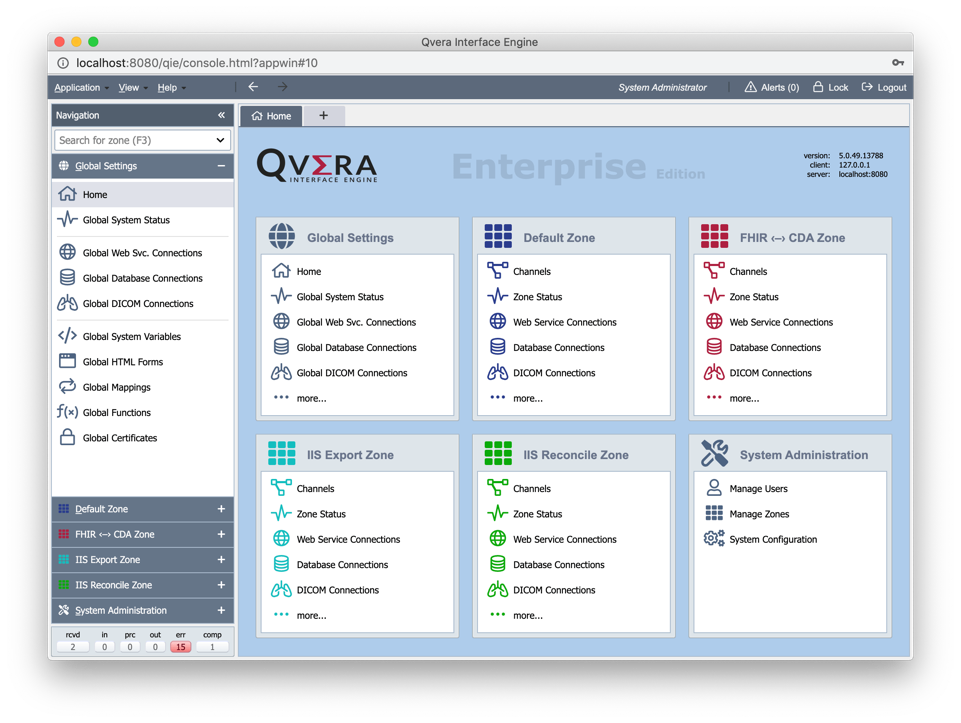
The QIE user interface is divided into two main sections: the Navigation Panel and the Content Panel.
Navigation Panel: Used to move between zones, channels, and the resources channels draw on. What you select here decides what the content panel shows.
Content Panel: The working area. It displays the page for whatever is selected in the navigation panel (a channel, a connection, a system administration page), and is where the configuration and monitoring actually happens. When nothing is selected, it lists the zones the signed-in user has access to.
Source and Message Objects
When a message is received or created in QIE two copies of the message are created and stored in variables called the "Source" and "Message". These two variables form the basis for every message that passes through QIE.
The Source object is an unchangeable copy of the original message. The functions supported for this object are only "Get" functions that allow the user to reference at any time data elements from the source message to be used to modify the Message object. The source message is also written to the QIE database and can be historically referenced at any time to determine exactly what the sending system sent.
An example function in QIE might look like this, getting the patient id from the original source message and setting it into a variable called patientId.
The Message object initially is an exact copy of the Source Message. It is this copy of the message that undergoes changes and is eventually sent out of QIE on the destination node. Changes to the Message object can be as simple as moving a few data elements around to a complete change of message format like from CSV to HL7. The functions supported on this object are both "Get" and "Set" functions which allows the user to manipulate the message as needed.
An example function in QIE of setting a field into the message object might look like this, taking the patient id from the previous example and setting it into the PID-4 (external ID) field.