Alerts
QIE emails an alert when something needs a person's attention: a queue backing up, a channel stopping, a certificate nearing expiry, a run of send errors. This page covers the system-wide alert settings: the handler script that every alert email passes through, and the default thresholds channels inherit.
Alerts need SMTP configured, or nothing is sent
No alert of any kind (queue, channel stopped, error, certificate, variable, daily count, user account, license, or HA) can be delivered until an outgoing mail server is configured under Email Settings. QIE does not warn you when you subscribe to an alert on a system with no SMTP server; the alerts simply never arrive. If alerts are not turning up, check that first.
A user also needs the Alerts permission on the zone and a valid email address before they receive anything. See Roles and Permissions.
Global Alert Handler Script
This script acts as the final checkpoint for any alert email queued to be sent by QIE. It provides one last opportunity to review, modify, or suppress the email before delivery. Use it to sanitize content, reroute or rewrite recipients, or discard the email entirely.
Enable the script with the Enable alert handler script checkbox. When enabled, the script runs every time an alert email is queued. This includes queue, channel stopped, error, certificate, variable, daily count, user account, license, and HA environment alerts.
The following variables are bound into the script:
-
alertEmail: the email that triggered this handler, with the following properties:to: a semicolon-delimited list of all "to" recipient email addresses.cc: a semicolon-delimited list of all "cc" recipient email addresses.bcc: a semicolon-delimited list of all "bcc" recipient email addresses.replyTo: the email's reply-to email address.subject: a string containing the email's subject.htmlBody: a string containing the email body, including HTML mark-up.attachments: a Map of attachments, if any. The key is a string containing the name. The value is a byte array containing the attachment.date: ajava.util.Dateobject containing the date of the email.
-
emailOrigin: additional details about the origin of the email when available, with the following properties:zoneId: a string containing the zone id.zoneName: a string containing the zone name.channelId: a string containing the channel id.channelName: a string containing the channel name.sourceId: a Long containing the source id.filename: a string containing the source file name.threadName: a string containing the thread name.errorCount: an Integer containing the error queue count at the time of this email.
-
sendOriginalEmail: determines whether the email is sent or discarded after the handler executes. Setting this variable totruecauses the email to be sent if SMTP is configured. Setting it tofalseprevents the email from being sent. The default value istrue.
Note
If this script throws an exception and SMTP is configured, the email is sent regardless of the value assigned to sendOriginalEmail.
The following variables are only available when this handler was triggered by a script error:
exceptionToHandle: ajava.lang.Exceptionfor the exception that triggered the error handler.exceptionMessage: a string containing the error message.exceptionClass: a string containing the name of the exception class.exceptionFunction: a string containing the function's name/number where the error occurred.exceptionLine: a string containing the line number in the function where the error occurred.
Queue Alert Defaults
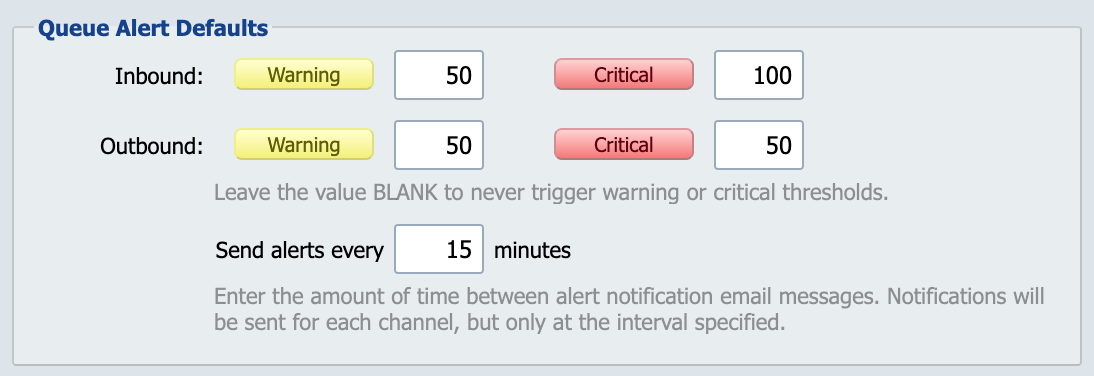
Queue alert thresholds determine the number of messages that can exist in a channel's inbound or outbound queue before an alert email is sent out from QIE to end users.
Send alert every 'XX' minutes
The default minimum interval between successive queue or inactivity alerts for the same channel. After QIE sends an alert email about a channel exceeding a queue threshold or hitting an inactivity rule, it does not send another alert for that channel until at least this many minutes have passed. The throttle applies even if the condition continues. QIE still checks the channel's queue counts and inactivity status on every monitoring cycle. Only the email send is throttled.
The default is 15 minutes. Individual channels can override this value on the Email Alerts tab of the channel's properties dialog.
If the alerting condition clears for longer than this interval and then re-occurs, the next alert is sent immediately on the following monitoring cycle. The throttle does not persist across periods when the channel is healthy.
Abnormal Shutdown Alerts
QIE tracks each service startup and shutdown in the qie_instance_history table. A clean shutdown records a matching stop timestamp; a kill/crash/host-reboot leaves the row without one. On the next start, QIE detects the missing stop timestamp and emails administrators an "abnormal shutdown detected" alert.
Common causes:
- The host operating system was rebooted while QIE was running.
- The QIE service was force-killed (
kill -9, Task Manager End Task, out-of-memory kill). - The QIE process crashed.
An abnormal shutdown alert expires automatically after 30 days by default. Adjust the retention window with the -Dqie.daysTillAbnormalShutdownAlertsExpire Java option (any positive integer number of days).
MCP Security Alerts
When the MCP server is enabled, QIE raises three more administrator alerts. Each one appears as a banner in the console and is emailed to every enabled administrator with an email address, when SMTP is configured. Each names the QIE user, the MCP client and the MCP audit log entry when they are known. None ever contains a token.
| Alert | Raised when | How often |
|---|---|---|
| Token replay | A refresh token or an authorization code is used a second time, or a change arrives with a revision token that fails its check. For a reused token or code, QIE also revokes the tokens issued from it. | Every time for a reused token or code. For a revision token that fails its check, at most once an hour for the same user and client. |
| Abuse | One address trips a login or request limit, or registers clients faster than the limit allows. | One alert per address, which stays for 14 days; no other for that address while it is listed. The email goes out the first time, then at most once an hour while it continues. |
| Audit failure | QIE cannot write the MCP audit log, so it refuses the call that needed the entry. | At most once a minute. |
The once an hour and once a minute limits are counted on each node, so in a cluster each node can email about the same burst and raise its own audit failure alert. The abuse alert is checked against the alerts already listed, so a cluster raises one per address. The MCP audit log holds an entry for every event, including the ones that raised no alert.