REST Web Service Functions
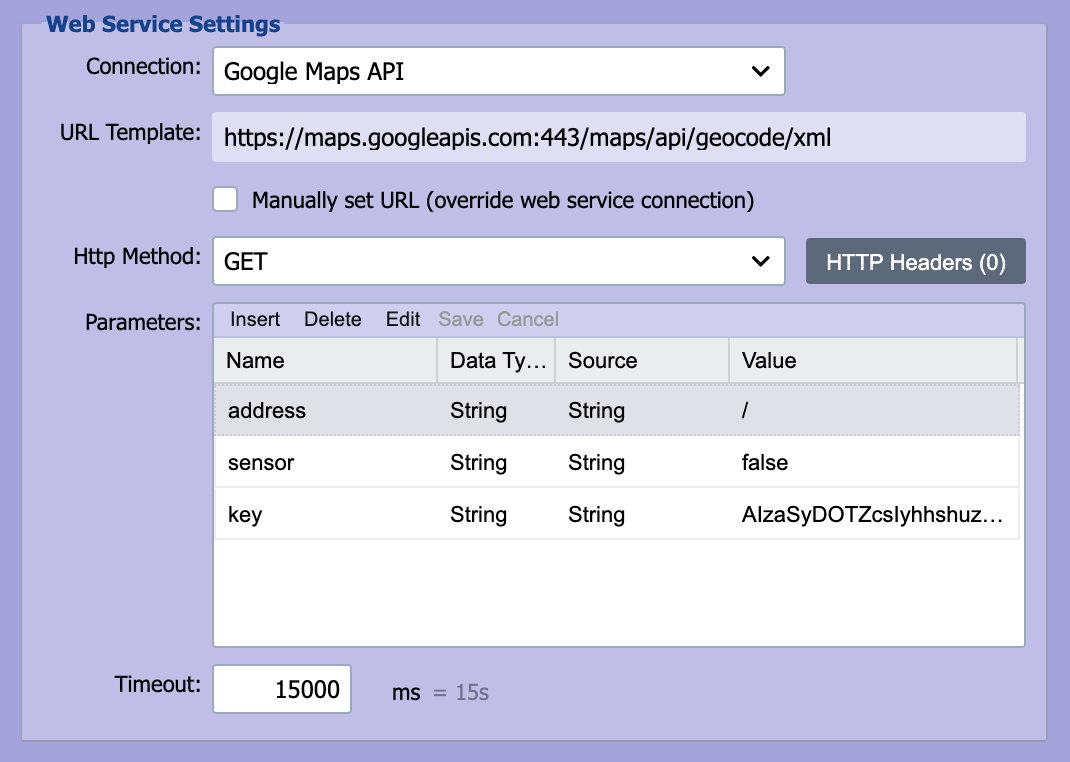
REST web services use the standard HTTP methods. Content included in REST web services can be transferred using either URL encoding or content encoding.
URL
REST web services are based on the HTTP protocol. The web service call is made by issuing an HTTP request to the associated endpoint URL. Based on the request method, the endpoint URL may need to include additional parameters (such as an ID for a DELETE call). Parameters can be added to the URL using Node Tags (see Node Paths and Node Tags for more information). For example, a DELETE endpoint that targets a specific patient could use:
At runtime, {PID-3} is replaced with the MRN from the message.
Manually set URL (override web service connection)
By default, the destination's request URL is built from the Endpoint URL on the selected Web Service Connection. Check Manually set URL (override web service connection) to bypass that and build the URL on the destination itself from two fields:
- URL Template: the absolute base URL (for example,
https://api.example.com/patients). - URL Path: the per-call suffix appended to the URL Template (for example,
/{PID-3}to insert the patient MRN from the inbound message).
Both fields accept node tags, including message cache values like {mc:senderOid} that earlier mapping nodes can populate via messageCache.setValue(...). QIE evaluates the tags for each outbound message, and the dialog shows the resolved value in the Effective URL preview below the fields.
Use this when the destination URL must vary per message, for example, a FHIR PUT to /Patient/{s:PID-3.1}, or a partner-specific endpoint selected by an upstream script.
HTTP Headers button
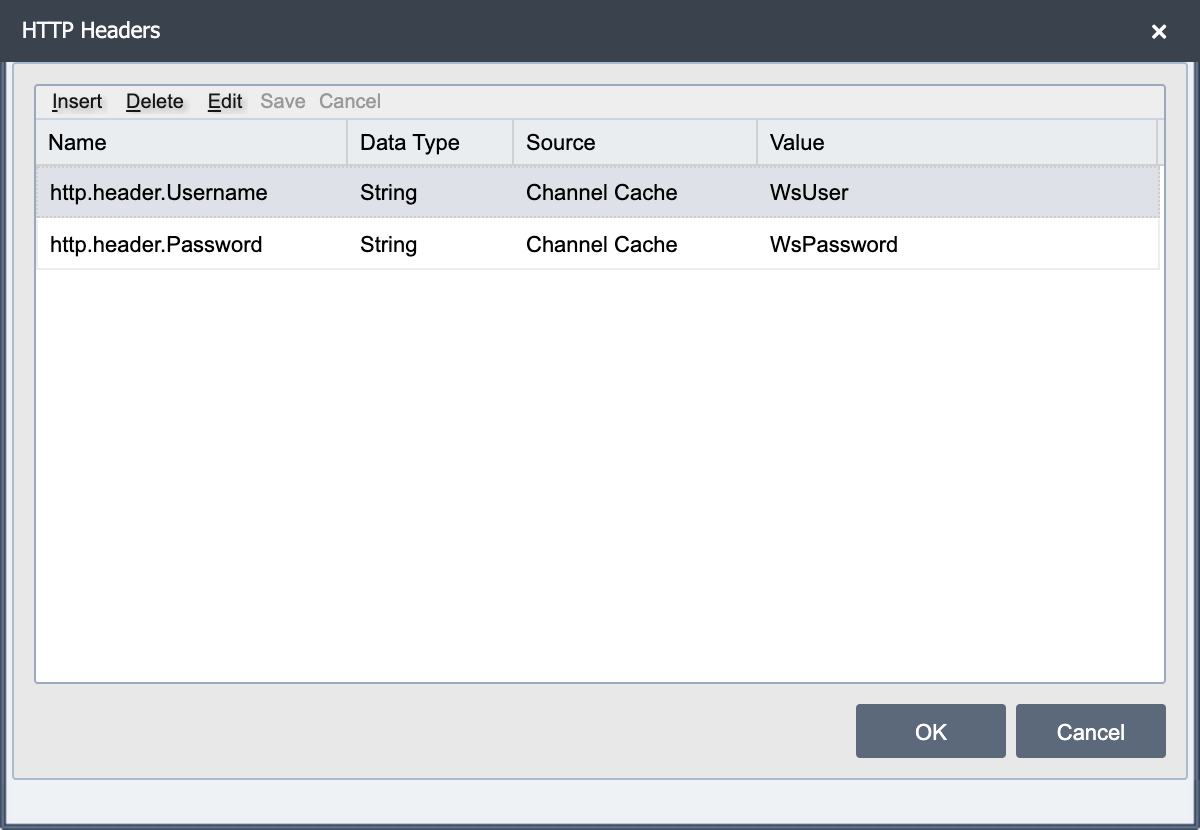
Selecting the HTTP Headers button displays the HTTP Headers dialog. Add one row for each header. Each header name must start with the prefix http.header., which QIE fills in on each new row.
Name: The header name, including the http.header. prefix.
Source: Where QIE reads the header value from when it sends each message.
Value: What the source reads. For String, this is the header value itself. For the other sources, it is a node path, cache key or variable name.
The most common sources are:
| Source | Value column holds | Header value sent |
|---|---|---|
| String | The header value | The text exactly as typed |
| Message Node | A node path | That node in the current message |
| Source Node | A node path | That node in the source message |
| Message Cache | A cache key | That key's value in the message cache |
| Channel Cache | A cache key | That key's value in the channel cache |
| Sys Variable | A system variable name | That variable's value |
For example, to send a fixed Accept header and a CSRF token that a mapping script stored in the message cache:
| Name | Source | Value |
|---|---|---|
http.header.Accept |
String | application/fhir+json |
http.header.X-CSRF-Token |
Message Cache | csrfToken |
Node tags are not evaluated in header values
A String value is sent exactly as typed. A value such as {mc:csrfToken} is sent as that literal text, not as the cached token. To use a cached value, select Message Cache as the source and enter the key, csrfToken.
Each source supplies the whole header value, so the dialog cannot combine fixed text with data, as in Bearer <token>. Build the complete value in a mapping script, store it in the message cache, and then select Message Cache as the source:
Content-Length on GET requests
QIE omits the Content-Length header on outbound HTTP GET calls that have no body, the HTTP specification treats Content-Length: 0 as an entity header describing an entity that a GET does not typically carry, and most servers accept the omission without complaint. Some strict servers or middleware boxes still require the header to be present, even set to zero, or the request is rejected.
To force it, add an entry to the HTTP Headers dialog:
| Name | Value |
|---|---|
http.header.Content-Length |
0 |
The same override works from a mapping script by setting parameterMap.put('http.header.Content-Length', '0') before the destination call.
Method
REST based web services are called using one of the following methods:
| Method | Description |
|---|---|
| GET | This method sends an HTTP GET request to the REST web service endpoint. The GET request is used to retrieve information from the REST web service. |
| POST | This method sends an HTTP POST request to the REST web service endpoint. The POST request is used to submit data to the REST web service. |
| PUT | This method sends an HTTP PUT request to the REST web service endpoint. The PUT request is similar to the POST request and is used to submit data to the REST web service. |
| DELETE | This method sends an HTTP DELETE request to the REST web service endpoint. The DELETE request is used to request that data be deleted or removed. The DELETE request typically includes a URL encoded ID associated with the record or data to be deleted or removed. |
| PATCH | Sends an HTTP PATCH request, used to apply a partial update to an existing resource. |
| HEAD | Sends an HTTP HEAD request, which returns the same status and headers as GET without a body. |
| OPTIONS | Sends an HTTP OPTIONS request, used to ask the endpoint which methods and options it supports. |
| TRACE | Sends an HTTP TRACE request, which asks the server to echo the request back for diagnostics. |
Note
These eight methods are the only ones QIE sends. Any other name, such as MERGE, fails with Unknown Http Method specified. For a server that accepts a method override, send POST with an http.header.X-HTTP-Method header set to the method it expects.