Find Usages
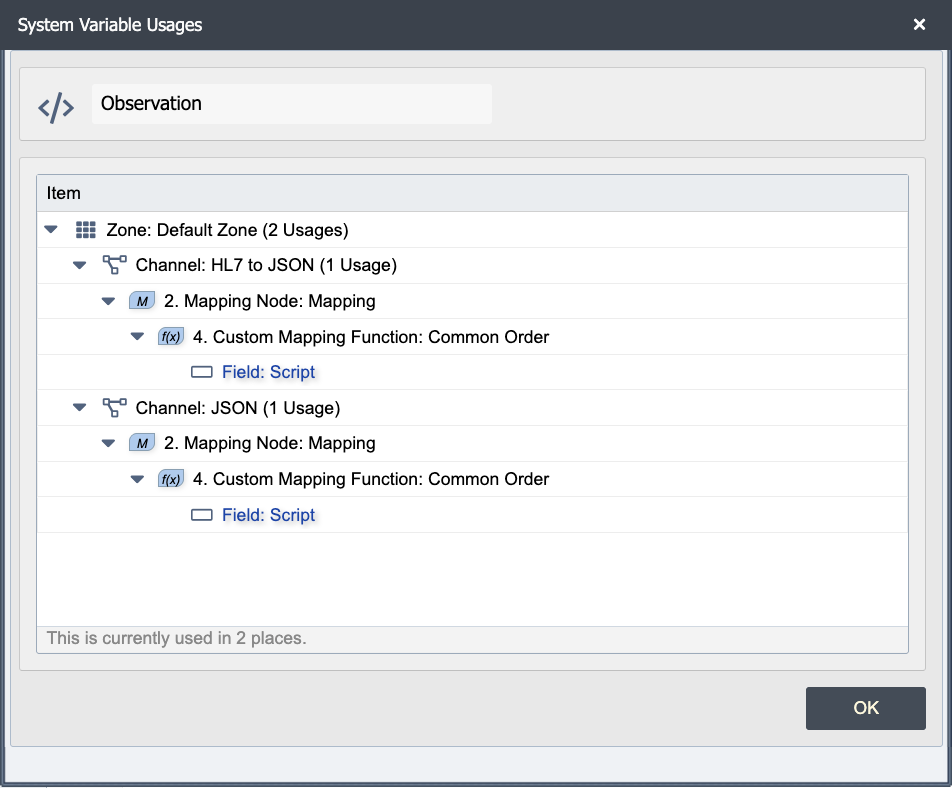
Find Usages answers a single question for one configuration object: what else references this? Run it on a system variable to see every channel and script that reads or writes the variable. Run it on a web service connection to see every destination node or mapping script that calls through it. Run it on a channel to see what other channels route messages to it. The result is a list of consumers grouped by zone and object type; double-click any row to jump straight to the offending field.
Use Find Usages when you already have the specific object in front of you. For "where is this text used across the configuration?" without a specific object, use Global Search instead.
Where to find it
Find Usages lives on each resource page's Manage menu, on a row's context menu, and inside delete/rename confirmations. The action is available on:
- Web Service Connections. See Web Service Connections
- Database Connections. See Database Connections
- DICOM Connections. See DICOM Connections
- System Variables. See System Variables
- Published Mappings and Published Functions. See Published Mappings and Functions
- SSL Keys and SSL Certificates. See Certificate Management
- Packages. See Packages
- Channels, from the channels grid context menu
- Channel Cache entries, from the channel's Channel Cache tab
- HTML Forms, from the Forms editor
For each object type, the dialog opens with the heading <ObjectType> Usages (for example, "Web Service Connection Usages") and lists every consumer that references the object by ID, not by name.
What the results show
Each row identifies:
- The zone the consumer lives in.
- The consumer's object type (Channel, Mapping Node, Custom Sender Script, etc.).
- The consumer's name.
- The specific field where the reference was found.
Double-click a row to navigate to that field in its owning object. The dialog hides and the relevant page opens, scrolled to the reference.
Unverified scripts
A script that contains a syntax error cannot be fully analyzed. QIE still searches it for
anything it can recognize, and it also lists the script in the usages dialog with the red
tag (Possible usage - script contains errors) next to the field name. The status bar shows the
confirmed count on the left, for example This is currently used in 1 place., and the
number of scripts it could not verify on the right in red, for example 2
scripts containing errors.
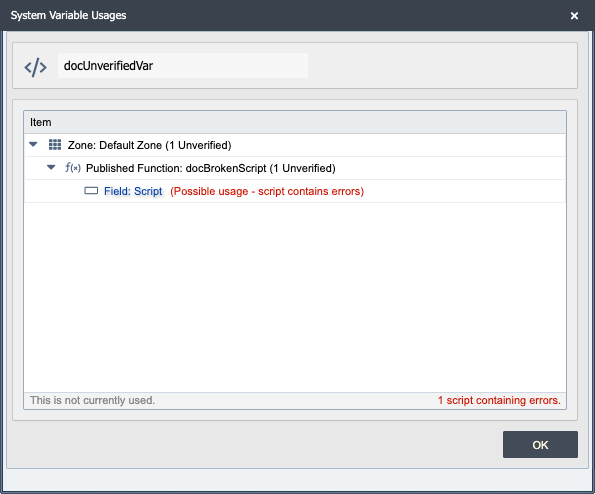
Open each unverified script from the dialog, fix the syntax error, and run Find Usages again. The count of unverified scripts must reach zero before the result can be trusted.
Deleting an object that has usages
Clicking Delete on a zone object runs Find Usages first.
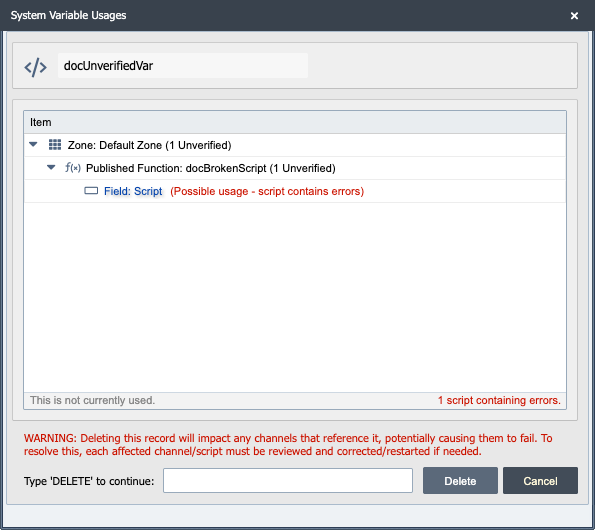
- When no usages and no unverified scripts are found, the plain delete confirmation opens.
- When usages or unverified scripts are found, the usages dialog opens instead. Review the
list, or type
DELETEin the dialog to delete the object anyway. TypingDELETEclears every database reference to the object before deleting it, so anything that pointed to it is left pointing at nothing rather than at a deleted record. - A plain delete never clears database references; only Type DELETE does. HTML Forms and Published Functions used to clear references on a plain delete; that no longer happens, so a delete that used to succeed by silently clearing an undetected reference can now be refused. The same Type DELETE override applies.
- When a usage is in a zone you do not have permission to view, the dialog explains that and the object cannot be deleted or moved until an administrator resolves the usage. The same rule applies when a search is cancelled or fails before it finishes and the hidden usages cannot be ruled out. This block applies only to an object in the global zone, because only a global object can be used from a zone you cannot see. An administrator can view every zone, so this rule never blocks one.
Channels follow the same flow. A channel that another channel sends to with
qie.sendToChannelQueue or that a channel queue receiver reads from is reported as in use.
Typing DELETE for a channel deletes it without clearing anything: a script that sends to it
by name is left pointing at a channel that no longer exists.
Packages follow the same flow. The dialog lists every place a member of the package is used
outside the package. The grid groups the results by object type, including a Channel
section, and adds an Unverified column for each member's unverified-script count. Channels
and DICOM connections are searched for both package delete and move, so a script outside the
package that sends to a package channel blocks the delete until you use the Type DELETE
override. Typing DELETE deletes the package and its members and clears those outside
references; channels in the package are disabled and kept if they have message history, and
deleted if they have none.
Removing the last publication from a purchased package deletes the package the same way. An outside usage or an unverified script can block it, and the same Type DELETE override applies.
Moving an object that has usages
Moving an object to another zone checks the same usages. Confirmed usages that would be left behind block the move. When only unverified scripts are found, the dialog offers Continue and Cancel so you can decide whether to move first and fix the scripts afterwards.
Channels follow the same flow. When a script in any zone sends to the channel queue, the move is blocked. While the search runs, the Find Usages box offers Cancel, which leaves the channel where it is.
Find Usages vs Global Search
Both answer "where is X used?" but they index differently and miss different things.
Find Usages walks the configuration tree looking for references to a specific object by its internal ID. It does not need to know the object's current name, and it does not produce false positives from unrelated strings that happen to match the name.
Global Search matches a literal text string in field values across the configuration. It finds usages a Find Usages walk would not (script literals, free-text comments, partial name matches, hostnames buried in URLs) but it also surfaces hits in unrelated places where the same string appears coincidentally.
Practical guidance:
- Renaming, moving, or deleting a specific saved object: use Find Usages. It catches every real reference and does not depend on the current name.
- "Which channels call
qie.sendEmail?": use Global Search. Find Usages cannot answer it becauseqie.sendEmailis a function, not a configuration object. - "Which scripts reference this database connection?": Find Usages on the connection. Scripts that hold the connection name as a literal string are found because they reference the connection's ID-bearing field, not the literal name.
- "Which channels mention
legacy-host.example.com?": Global Search. The hostname is a literal value embedded in a connection's URL or in script text.
A useful pattern: run Find Usages first for the precise answer, then run Global Search for the named object to catch any literal-text references the structural walk would miss.
Limitations
- One object at a time. Find Usages operates on a single object. To audit a set, run it per object or fall back to Global Search for a text-based sweep.
- Locked packages are skipped. Items inside a package the current user cannot view do not appear in the results, the same way they do not appear in Global Search.
- References by ID only. A script that holds a name as a free-text string and resolves the object at runtime is found because the resolved object's ID is part of the script's stored configuration. A free-text mention that does not resolve to an object (for example, a comment) is not found. Use Global Search when that matters.
Related tools
- Global Search: find a literal text string anywhere in the configuration. Use when you have a string, not a saved object.
- View Endpoints: list every source and destination endpoint grouped by transport type. Use when the question is shaped by host/port/path.