Published Functions
A published function is a single function that does one thing, written once and called from any channel that needs it, such as calculating a patient's age from a date of birth, say. Both local mappings and published mappings can call published functions, which is what makes them worth extracting: the logic lives in one place and every caller picks up a fix.
The distinction from a published mapping is scope. A published mapping is a collection of mapping functions; a published function is one function with one job.
Note
Published functions are cached when a channel starts and are only reloaded when the channel is restarted. After editing a published function, restart every channel that uses it for the change to take effect. Find Usages tells you which channels those are.
Managing Published Functions
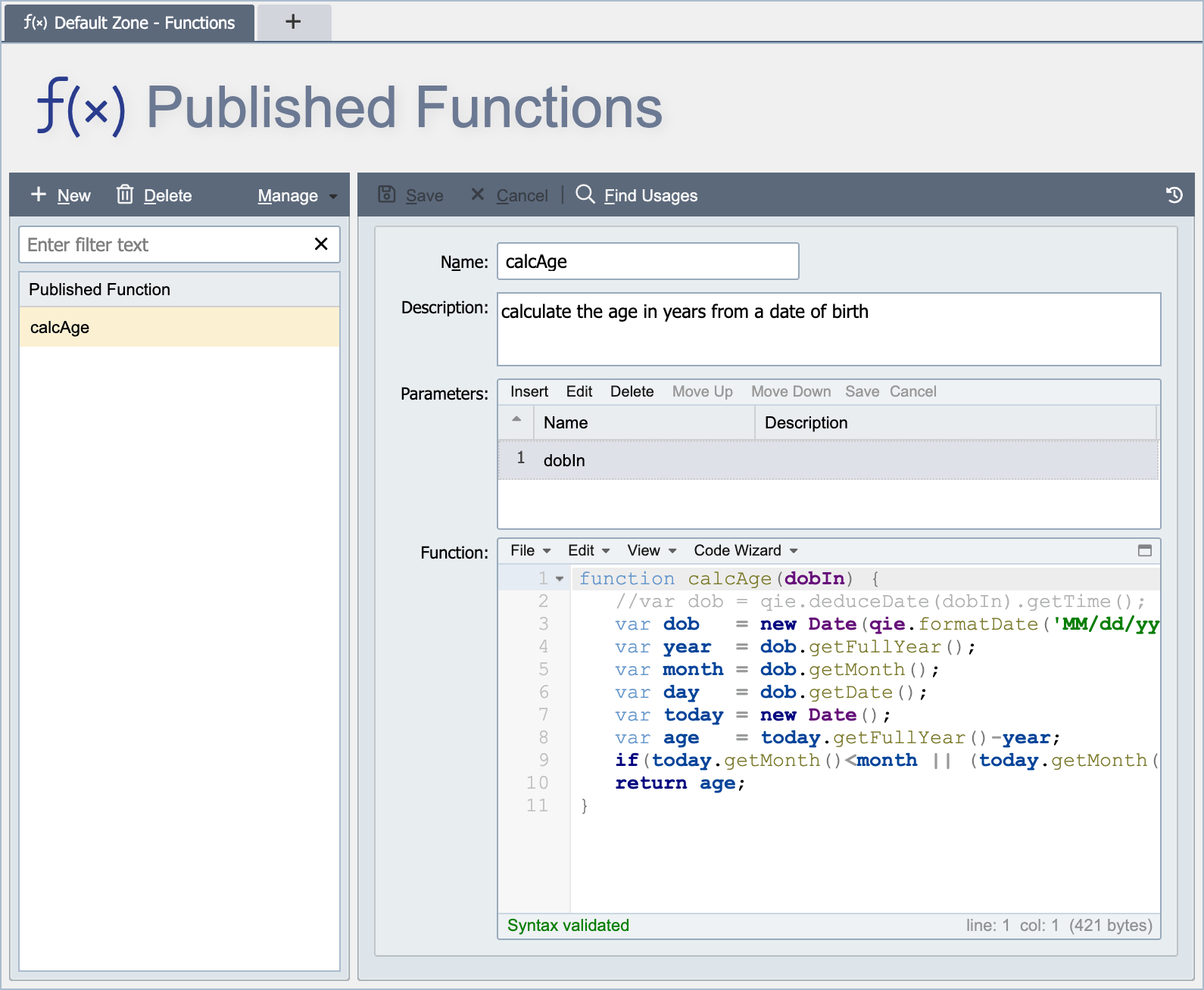
Published Functions are managed from the Published Functions Page. Published Functions are defined at either the global level or the zone level (see Global vs. Zone Scope for more information). A published function is used to help eliminate duplication of commonly used functions allowing functions to easily be modified and keep up to date. An example published function may be set up specifically to calculate the age of a patient. It may be that you need to apply this function across multiple interface channels. So in this case it makes sense to develop the logic in a published function and then reference it on each individual channel or mapping that may need it.
Name
The name associated with the published function identifies the function for use in channel configurations. The name must be unique within the applicable scope. For example, a published function created at the global level must have a globally unique name. A globally unique name is unique within the global published functions and across all zone level published functions. A published function created at the zone level must have a name unique to that zone and all global published functions.
Description
The description is only visible from the Published Functions page and can be used to provide additional information about the published function and how it is used.
Parameters
The values the function accepts, in the order a caller passes them. Click Insert to add a parameter, then give it a name and a description of how it is used. Use Move Up and Move Down to change the order.
Function
The script for the function. The Function editor holds one complete JavaScript function declaration, and its first line is kept in step with the Name and Parameters fields:
- Changing Name or Parameters rewrites everything before the first
{in the editor asfunction <name>(<parameters>). - Editing that first line in the editor updates Name and Parameters to match.
For example, a published function named calcAge with one parameter, dobIn, looks like this:
function calcAge(dobIn) {
  var dob = new Date(qie.formatDate('MM/dd/yyyy', qie.deduceDate(dobIn)));
  var year = dob.getFullYear();
  var month = dob.getMonth();
  var day = dob.getDate();
  var today = new Date();
  var age = today.getFullYear() - year;
  if (today.getMonth() < month || (today.getMonth() == month && today.getDate() < day)) {
    age--;
  }
  return age;
}
Warning
Start the editor with the function declaration itself. A comment or a helper function placed above it is treated as the declaration: the Name and Parameters fields are cleared or overwritten, and the next change to either field replaces that text. Put comments and helper functions inside the function body.
Calling a Published Function
Call a published function by its Name, passing the parameters in order:
When a script runs, QIE looks for each published function's name followed by ( in the script. For every match, it adds that published function's complete script ahead of the calling script, along with any published functions it calls in turn. A name that appears only inside a published function, such as a nested helper, is never found this way, so call the published function itself rather than a function declared inside it.
A channel can call published functions from its own zone and from the global zone.
Deprecating a Published Function
QIE has no @Deprecated marker for published functions, but a simple rename convention serves the same purpose and surfaces stragglers before deletion:
- Rename the function with a
zz_prefix (for example,zz_calcAgereplacingcalcAge). The prefix sorts it to the bottom of the function list, making the deprecation visible to anyone editing a mapping. - From the published function's row context menu, run Find Usages to list every channel, mapping, and script that still calls it. See Find Usages for what the result lists and how to navigate to each reference. A calling script that contains a syntax error is listed as unverified, because the call cannot be confirmed until the script parses.
- Work through the list, updating each caller to use the replacement (or removing the call entirely).
- Re-run Find Usages. When the result is empty, the function can be deleted (or kept indefinitely as a tombstone in the
zz_group).
The same workflow applies to deprecating a Published Mapping.