Mapping Functions
If the mapping Source is set to Local Mapping, there are two ways to add a new mapping function:
-
Click Insert to add a blank mapping function.
-
Copy a mapping function from another mapping node and paste it here. A mapping function can be copied from any channel and pasted into the new mapping function.
-
To copy a mapping function, select the mapping function and press Ctrl + C or select Copy from the Edit menu.
-
To paste the mapping function into this mapping node use Ctrl + P or select Paste from the Edit menu.
-
In some cases, the execution order of the mapping functions is important. The mapping functions execute in the order they are listed on the screen. The Move Up and Move Down are used to re-order the mapping functions.
An enabled mapping function appears in the list with no marker. A disabled mapping function is marked with a gray power icon and a grayed description. It keeps its place in the list and all of its configuration, but the mapping node skips it when a message is processed. The Test tab also skips it and writes a note to the test log. To enable or disable a mapping function, right-click it and select Enable Function or Disable Function. The same options are available from the Edit menu, and the Enabled checkbox in the Add/Edit Mapping Function dialog does the same thing.
To edit a mapping function, use one of the following methods to open the Add/Edit Mapping Function dialog box:
-
Select the mapping function and press F2.
-
Double click the mapping function.
-
Highlight the mapping function and press the ENTER key.
Add/Edit Mapping Function Dialog
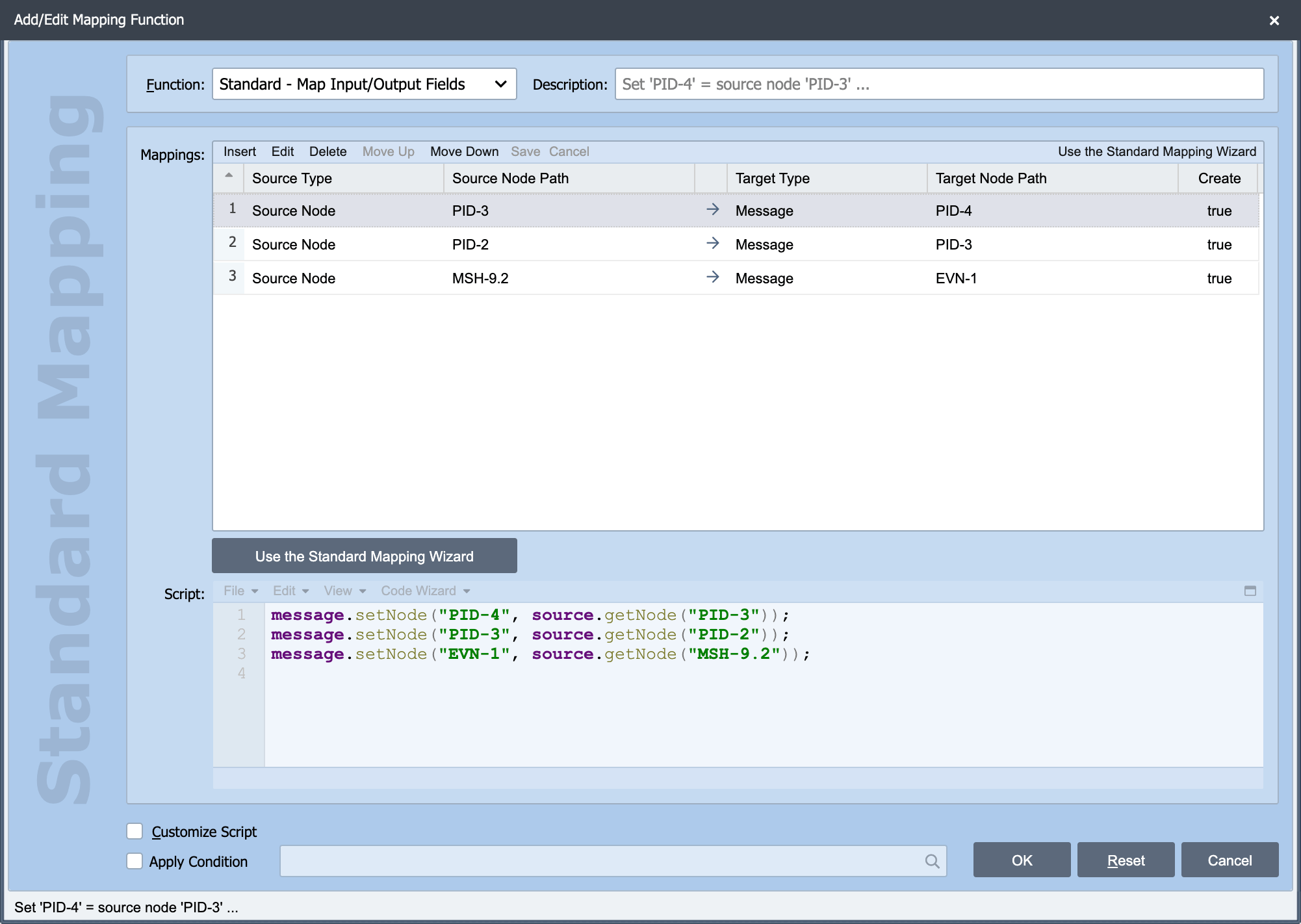
These parameters are common for most of the standard mapping functions. The details of each standard mapping function are detailed below.
Function
Drop-down list of the available functions. All functions are detailed below.
Description
Required. Description of the mapping function. The description associated with the mapping function is displayed in the mapping editor which contains the ordered list of mapping functions. A meaningful description here makes it easier to determine the purpose of the function when viewing the list. If the description field is left blank, QIE calculates a description based on the configuration of the function.
Enabled
Checked by default. Clear this checkbox to keep the mapping function in the list without running it. A disabled function is skipped for every message and for every step in the Test tab, and it is shown in the list with a gray power icon and a grayed description. This applies to every function type, including a Custom Script, which the Apply Condition setting does not cover. Use it to park a function while troubleshooting, or to carry a disabled step over from a configuration converted from another engine.
Source
This field identifies the source of the data to be used in the mapping function. The available sources are detailed in the table below.
| Source Object | Description |
|---|---|
| Channel Cache | The channel cache is a simple key-value pair database associated with the channel (see Channel Cache for more information) |
| Message Cache | The message cache is a simple key-value pair in-memory-only array associated with the message (see Message Cache for more information) |
| Message Node | The message object represents the output message in its current state |
| Source Node | The source object is a read-only copy of the message as it was received by the channel source node |
| String | Use a static string as the source for the mapping function. When using a string as the mapping function source, the string field is set to the value of the static string to be used. |
| Variable | System variables contain static values. When using a system variable as the mapping function source, the variable field contains a drop-down list of all variables available to be used with the mapping function. (see System Variables for more information) |
| WS Username | The username from a specified web service connection. (Web Service function only) |
| WS Password | The password from a specified web service connection. (Web Service function only) |
| WS URL | The URL from a specified web service connection. (Web Service function only) |
Node Path
When using Channel Cache, Message Cache, Message Node or Source Node as the mapping function source, the node path field is used to record the applicable path or reference to the field being retrieved (see Node Paths and Node Tags for more information).
Target
The result of the mapping function can be applied to one or more target nodes or cache values. See Mapping Function Targets for more information.
Script
This is the script that is automatically built by the selected mapping function. This script can be customized by checking the Customize Script checkbox.
Customize Script
Check this box to customize the script.
Apply Condition
Check this checkbox to add a condition to the standard function. This opens the Add/Edit Condition Dialog box.
A condition opened this way has no Enabled checkbox of its own, because a mapping function's condition is a single item rather than a list. To stop the function running, clear the Enabled checkbox on the mapping function itself.