Error Management
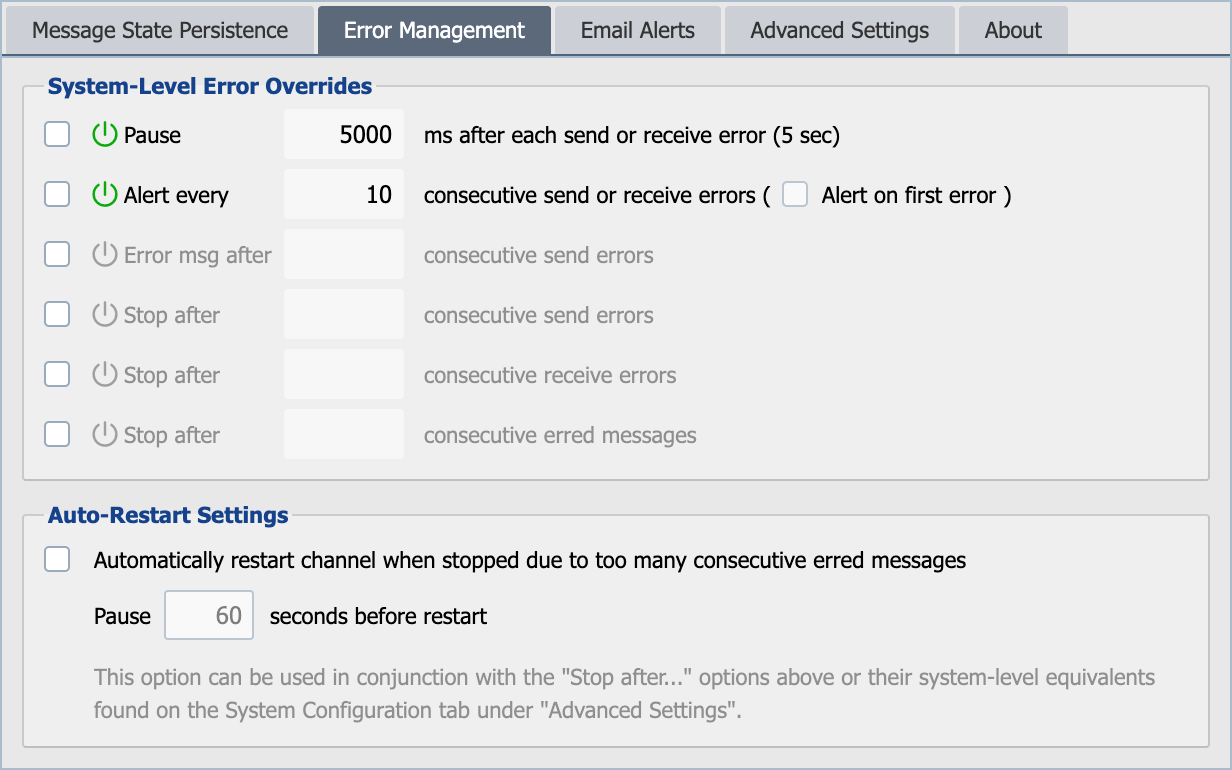
Error Management settings are used to manage how the channel behaves when an error occurs. By default, these setting are inherited from the System Configuration. To override the System Configuration behavior for a setting, select the check box in the 'Override System' column. Select the check box in the 'Enable' column to enable a setting. When overridden and enabled the value can be modified. For more information regarding error management see Error Management from the System Configuration.
Attempt to keep channel running. Pause 'XX' seconds before auto restart.
This setting attempts to keep a particular channel running. If a channel unexpectedly stops with this setting enabled an email alert would be sent out that the channel unexpectedly stopped and that QIE is attempting to restart the channel. After the channel stops QIE waits the number of seconds specified and then attempts to restart the channel. After the channel has successfully restarted another alert email is sent out stating that the channel has been restarted. This setting can work in conjunction with the Stop after 'XX' consecutive send/receive errors to detect a connection problem and stop QIE. Where in the attempt to keep channel running then restart the channel. In many cases this can resolve connectivity issues.
Recommended configurations
The fields above and on the System Configuration's Error Management section combine in many ways. Three patterns cover most real-world needs:
Indefinite retry with auto-restart: best for downstream systems that have transient outages but every message must eventually be delivered. Disable all the Error message after / Stop after counters, raise ACK Max Resends to a very high value (e.g. 99999), and enable Attempt to keep channel running with a short pause (60 s). The channel retries forever, never moving messages to the error queue, and restarts itself on any unexpected stop.
Error after N, stop after M: best when individual failures are tolerable but a sustained failure should stop the channel for review. Set Error message after consecutive send errors to a small value (5) so a stuck message moves aside quickly, then Stop after consecutive send errors to a higher value (10) so the channel only stops after several stuck messages in a row. Leave auto-restart disabled, because operator review is the intent.
Stop after N erred messages: best for batch processing where a small number of errors is fine but a pattern means something is wrong. Set Stop after consecutive erred messages to a small value (5); leave the send/receive error counters disabled so individual messages still retry within the channel. Enable auto-restart with a longer pause (60 s+) if you want the channel to come back online after a cooldown.
In every configuration, set the Pause between errors to a non-zero value (5000 ms is a common starting point) so a runaway loop does not saturate the log.