QIE High Availability Configuration
Starting in version 4.0.47, QIE natively supports High Availability.
A QIE EnterpriseHA configuration allows multiple QIE instances to be clustered together to act as one environment. Each QIE instance connects to the same backend database. A QIE instance can start up and shut down independently, allowing for OS upgrades and hardware upgrades without downtime of the QIE environment. This makes virtualization and use of container environments ideal, which are heavily used in cloud environments. All QIE instances must be on the same QIE build as the database; automatic and manual updates to QIE are synchronized across instances.
QIE EnterpriseHA requires the use of In-Memory tables supported in MariaDB, MySQL, and MSSQL 2016+. For MariaDB and MySQL, In-Memory tables are available by default. For MSSQL 2016+, the QIE schema must be configured to support In-Memory tables. Please see the QIE Install Guide for setting up the In-Memory tables for Microsoft SQL Server.
QIE EnterpriseHA
Once the database is selected and schema created, a single java argument must be added to the QieLauncher service:
This java argument tells QIE that these database configurations are shared in a cluster of QIE Instances. Identical QIE environments may be setup that all point to the same backend database.
A network load balancer can effectively distribute socket-based messages to multiple QIE instances in a cluster.
Pros
-
No extra licensing required. The EnterpriseHA feature is offered to all QIE Enterprise customers at no additional cost.
-
Provides a zero down-time path for upgrading hardware and OS.
-
With a QIE EnterpriseHA configuration, there is no single point of failure.
-
Can be implemented in a container environment like Docker and Kubernetes.
Cons
-
Messages received by one instance are also processed and completed by that same instance.
-
Upgrading QIE still causes a minimal amount of downtime as the database schema may need to be updated.
QIE Disaster Recovery Considerations
QIE supports several different disaster recovery models which can be implemented based on an organization's needs.
| Recovery Model | Description |
|---|---|
| Manual Restore from Backup | A manual restore from backup requires the least configuration up front but typically results in the greatest amount of downtime for QIE. |
| Manual Failover Server | A manual failover server can be maintained and brought online in the case of a primary QIE system failure. |
| High Availability and Fault Tolerance | Advanced High Availability and Fault Tolerance tools such are available that can virtually eliminate downtime. |
Manual Restore from Backup
A manual restore from backup requires the least configuration up front but typically results in the greatest amount of downtime for QIE. In this disaster recovery model, QIE would be re-installed on a new or rebuilt existing server and then the QIE configuration and/or QIE database would be manually restored using your organization's backup and recovery tools.
This disaster recovery model can result in QIE downtimes of up to several hours.
Manual Failover Server
A manual failover server can be maintained and brought online in the case of a primary QIE system failure. In this disaster recovery model a 2nd QIE server is installed and configured on the network. Both environments are configured to use the EnterpriseHAServiceImpl. It remains in standby mode with the same channels running in the primary environment. In the case of a primary QIE server failure, the failover QIE server starts processing any messages being processed by the primary server at the time of failure. Some QIE configurations may need to be adjusted to account for IP address differences between the primary QIE server and the failover QIE server. Alternatively, the IP address of the failover server can be changed to the IP address of the primary server before bringing failover server online.
This disaster recovery model can result in QIE downtimes of up to 60 minutes or more, depending on how long it takes to get sending systems connections routed to the secondary environment.
High Availability and Fault Tolerance
There are many options when considering High Availability and Fault Tolerance. QIE can run in many different environments with different database back ends. Some of these options are listed here, but this list does not contain a full list of options available. As time passes, new and innovative methods for High Availability are being designed that can also be used.
Load Balancing Across Multiple QIE Instances
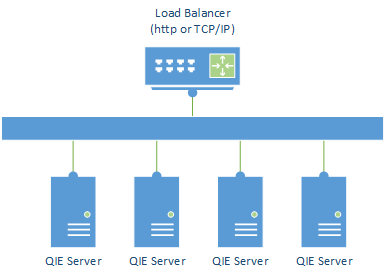
A simple option for incoming messages via http(s) or TCP/IP is to use a load balancer to balance the incoming requests across multiple QIE servers.
Using this configuration ensures that a failure of one or more QIE instances does not take your system offline. The load balancer detects that a server is no longer available and removes it from the list of available servers.
Pros
-
Multiple systems are online improving throughput of the messages.
-
One or more systems can fail without taking your operations offline.
-
Simple implementation, with lower cost of setup.
Cons
- To ensure first-in-first-out (FIFO) processing of incoming messages, the load balancer must be configured to use sticky routes. If sticky routes are not available, FIFO processing cannot be guaranteed, and this solution is not viable. See High Availability in the Install Guide for further information on running FIFO channels in a high availability configuration.
Distributed Cluster using Kubernetes or another Docker Manager
QIE has been designed to run inside of a docker container allowing it to be deployed in a Docker environment such as Kubernetes or Docker-Compose. Nodes can be added or removed from the clustered environment without any worry of causing problems to the QIE environment.
Detailed information about this configuration can be found in the Container Guide.
Pros
-
Multiple systems are online improving throughput of the messages.
-
One or more systems can fail without taking your operations offline.
-
Use industry standards for scaling environments due to increased loads and then scaling back when the additional resources are no longer needed.
Cons
-
Unable to guarantee first-in-first-out processing of incoming messages. If a specific interface requires this, then special rules and routes need to be implemented at the Kubernetes or docker manager level to ensure that new messages are all routed to the same node.
-
Docker management can be complex and difficult to learn and implement. This usually requires an engineer that is familiar with this type of architecture to be employed or contracted by the organization.