OAuth 2.0 Basics
This chapter introduces the concepts behind the rest of the tutorial: the Client Credentials grant, how the QIE Web Service Connection page is organized, and the JSON Web Token format used by most modern Identity Providers.
Understanding OAuth 2.0 and Client Credentials
OAuth 2.0 is an authorization framework that allows applications to access protected resources on behalf of a user or themselves, without sharing credentials directly with the resource server. It introduces the concept of access tokens, which are used to authenticate and authorize API requests.
The Client Credentials grant is the OAuth 2.0 flow designed for scenarios where an application needs to access an API on its own behalf, without involving an end user. This is common in machine-to-machine communication, background processes, and integrations where the application itself is the resource owner.
In the Client Credentials flow, the application (the client) requests an access token directly from the Identity Provider using its pre-registered client ID and client secret. If the credentials are valid, the Identity Provider issues an access token. The client then includes that token in subsequent API requests to the Resource Server to prove its identity and gain access.
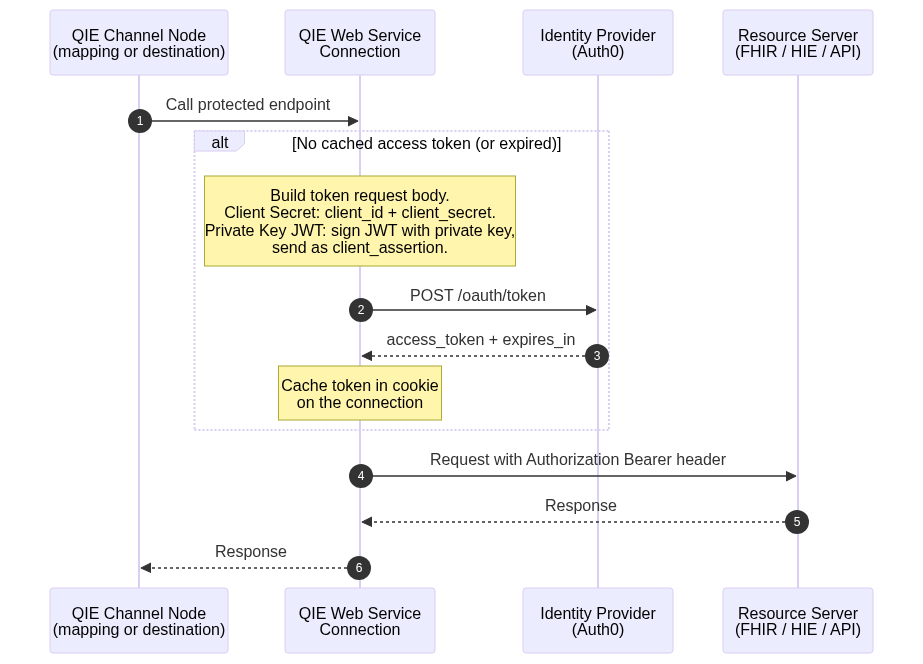
The flow QIE implements:
- A channel in QIE needs to call a protected Resource Server (a FHIR server, state registry, HIE, and so on).
- QIE (the client) sends the client ID and client secret to the Identity Provider's token endpoint.
- The Identity Provider validates the credentials and returns an access token.
- QIE caches the token and includes it in the
Authorization: Bearer ...header on the call to the Resource Server. - The Resource Server validates the token and returns the requested data.
The same flow applies whether the application authenticates with a Client Secret (URL-Encoded and JSON exercises) or a Private Key JWT assertion (JWT exercise). Only the contents of the token request body change:
Web Service Connection in QIE
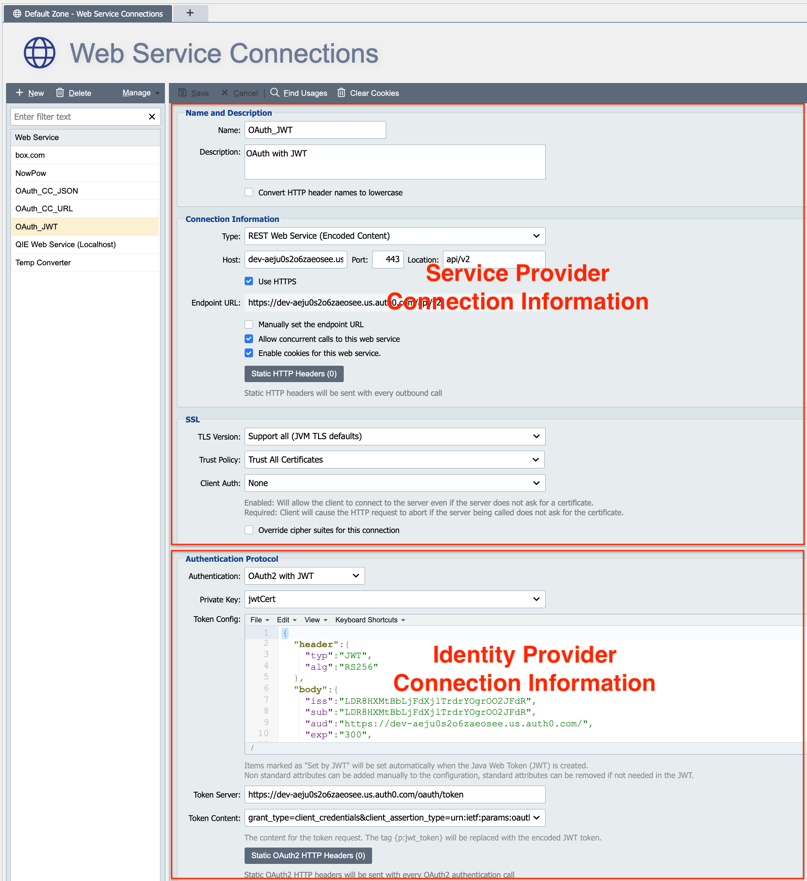
The Web Service Connection page in QIE is divided into two sections. The top section configures the Resource Server (FHIR server, state registry, HIE, and so on). The bottom section configures the Identity Provider (OAuth server) that issues the access token. Once configured, the Resource Server can be called from a mapping node or destination node by Web Service Connection name. QIE automatically initiates the authorization request to the Identity Provider, stores the access token in a cookie, and attaches the token to the HTTP header on each call to the Resource Server.
Understanding JSON Web Tokens
OAuth access tokens are often issued as JSON Web Tokens (JWT, pronounced "jot"). A JWT is a compact, self-contained way to securely transmit information between parties as a JSON object. It consists of three Base64-URL-encoded parts separated by dots:
- Header: metadata about the token, such as the signing algorithm (
alg) and token type (typ). - Payload: claims about the entity (user or application) and any additional data.
- Signature: a cryptographic signature that ensures the token's integrity and authenticity.
A real JWT looks like this:
eyJhbGciOiJIUzI1NiIsInR5cCI6IkpXVCJ9.eyJzdWIiOiIxMjM0NTY3ODkwIiwibmFtZSI6IkpvaG4gRG9lIiwiaWF0IjoxNjk2MDI3MjQwLCJleHAiOjE2OTYwMzEwNDB9.ssXk1H3mP7xeXD0mQ21X-lUv98nQmOiCImffkR2Iejw
Note
To inspect a JWT, highlight it in any QIE editor and choose Edit -> Base64 Commands -> Base64 Decode. You can also paste the token into the online debugger at jwt.io.
Decoding the three parts of the example token produces:
// Header
{
  "alg": "HS256",
  "typ": "JWT"
}

// Payload
{
  "sub": "1234567890",
  "name": "John Doe",
  "iat": 1696027240,
  "exp": 1696031040
}

// Signature — opaque hash bytes, Base64-URL encoded
ssXk1H3mP7xeXD0mQ21X-lUv98nQmOiCImffkR2Iejw
The signature is generated from the header, payload, and a secret key known only to the issuer. It is what proves the token has not been tampered with.
In the URL-Encoded and JSON exercises the access token returned by Auth0 is a JWT, but you do not need to decode it. QIE handles the token transparently. In the JWT Payload Exercise you construct and sign a JWT yourself with a private key and exchange it for an access token.