Remote Management Hub Overview
The QIE Remote Management Hub (RMH, or the Hub for short) is a centralized management deployment of QIE that aggregates many remote QIE sites into a single dashboard. It exists for customers who operate dozens to thousands of QIE installations on isolated hospital networks, where opening a VPN to each site for routine management is no longer operationally feasible.
A Hub-mode QIE looks like a regular QIE installation from the outside: the same WAR, the same launcher, the same login screen. The differences are internal. The engine subsystem does not start, the dashboard shows a list of remote sites instead of channels, and a new mTLS listener accepts persistent tunnels from those sites.
Mode toggle
Hub mode is selected by a JVM system property:
When qie.mode is unset (or set to engine), QIE runs in the default
engine mode. The property is mapped to a Spring active profile of the same
name at startup, which is what actually gates the Hub-only and
engine-only beans inside the application context.
Note
The two modes are mutually exclusive: a single QIE process is either an engine that processes messages or a Hub that aggregates other QIEs. There is no combined mode.
Warning
qie.mode is read once at process start. Changing the value at
runtime has no effect; restart the JVM to switch modes.
Architecture at a glance
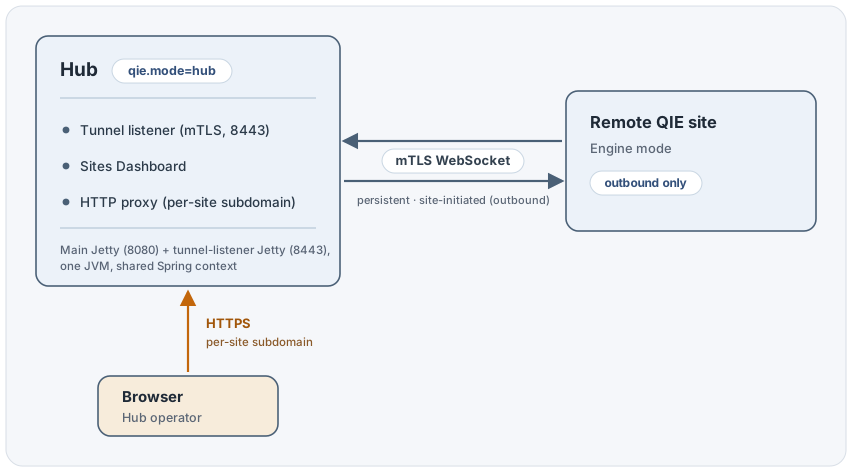
The tunnel is opened by the remote QIE (always outbound from the hospital network), so no inbound firewall rules are required on the hospital side. Each site keeps a single long-lived mTLS WebSocket open to the Hub, and that one connection carries every HTTP request the operator makes against that site through the proxy, plus a periodic status heartbeat.
When an operator clicks a site in the Sites Dashboard, the browser opens a
new tab against the per-site subdomain (site-<label>.hub.example.com).
The Hub's HTTP proxy resolves the subdomain to a site, dispatches each
request over that site's tunnel, and the response stream flows back the
same way. The remote QIE's existing admin UI renders in the browser exactly
as it would if the operator were connected directly to the site.
Two-Jetty topology
The Hub runs two independent Jetty Server instances in the same
JVM:
- The main Jetty (existing, unchanged) on port 8080 by default serves the Sites Dashboard and the per-site HTTP proxy.
- The tunnel listener Jetty (new) on port 8443 by default accepts mTLS WebSocket tunnels from remote sites.
Both servers share the Spring application context. The proxy servlet running under the main Jetty hands requests off to the tunnel multiplexer running under the tunnel listener Jetty, but their Jetty lifecycles are independent. They have separate thread pools, separate SSL configurations, and can be firewalled to different network zones.
On the remote QIE side, the existing main Jetty is also unchanged. A
separate Jetty WebSocketClient is started after the engine is up; it
dials out to the configured Hub and maintains the tunnel. There is no
listening port on the QIE side for Hub traffic.
Per-site login
There is no single sign-on across remote QIE sites. The Hub authenticates the operator into the dashboard with its own user store (local users / LDAP / OIDC, the same as a standalone QIE). When the operator opens a site through the proxy, the remote QIE's own login screen renders, and the operator authenticates separately to that site.
Each site's session cookie scopes to its own subdomain, so a user logged into ten sites in ten browser tabs has ten independent sessions and no cross-site cookie leakage.
The per-site ACL on the Hub restricts which sites a Hub user is permitted to proxy to. The remote QIE's user database is the source of truth for what that user can actually do once logged in to a site.
Nightly check-in
A Hub checks in with Qvera once a day on its own schedule, the same way an engine does, but against Qvera's Hub endpoints rather than the engine ones. The check-in validates the installed license, reports the Hub's registered, enabled and online site totals, and learns about available QIE builds.
The first attempt of the day is made no earlier than 3:05 AM, after a randomized delay so that a large fleet of Hubs does not arrive at once. A failed attempt is retried an hour later. In an HA deployment only one node checks in; the others skip it.
Because a Hub is licensed by the number of sites registered with it, a check-in is also what tells the Hub its licensed site count has changed.
Warning
A Hub that goes too many consecutive days without a successful
check-in first warns administrators by email and by an administrator
alert, and eventually blocks every site connection until a check-in
succeeds. No site is disabled and nothing has to be re-enabled
afterwards. Make sure the Hub can reach qvera.com.
Audience for this manual
This manual is the reference for Hub-mode QIE: installation, listener configuration, site enrollment, the Sites Dashboard, SSL/PKI management, the HTTP proxy, access control and audit logging, and HA deployment. Engine-mode QIE administrators who only need to register their site with an existing Hub need the Register with Hub page.
Where to start
| If you are... | Read |
|---|---|
| Installing the Hub for the first time | Install Guide |
| Configuring an installed Hub for first use | Configuration |
| Sizing the tunnel listener for a large fleet | Listener Thread Pool |
| Enrolling a remote QIE with the Hub | Enrollment |
| Importing a bundle on the remote QIE | Register with Hub |
| Recovering a site that lost its registration | Re-enrollment |
| Managing day-to-day operations | Sites Dashboard |
| Rotating server certificates or planning revocation | SSL & PKI |
| Reviewing proxy security or troubleshooting a session | HTTP Proxy |
| Granting per-site access to operators or reviewing the audit log | ACL and Audit Log |
| Deploying a multi-instance Hub for high availability | HA Deployment |
| Hardening the Hub host | Security Guidance |
| Diagnosing an error or unexpected state | Troubleshooting |