Tags
A tag is a named label that a Hub administrator puts on registered sites. Tags decide where access reaches: a role's grant names tags, and it reaches every site that carries any of them (see Site Access Grants). Tags also decide where a job runs, since a job reaches the sites that carry the tags it names (see Jobs).
A site can carry any number of tags. Because tags decide who can reach which site, only Hub administrators see the Tags page, and every change to a tag or to the sites carrying it is written to the Hub audit log.
The All Sites Tag
Every Hub has a built-in tag, All sites, created when the Hub starts. Every registered site carries it, including each new site as soon as it enrolls, without anyone adding it. It cannot be renamed, deleted or put on chosen sites.
A grant for All sites therefore reaches a new site the moment it enrolls. The site itself still refuses everything the Hub signs for until its own administrator turns on Hub sign-in (see Hub Sign-In).
Tags Page
Open Sites -> Tags. The page lists every tag, All sites first, with its Name, Description and the number of Sites carrying it.
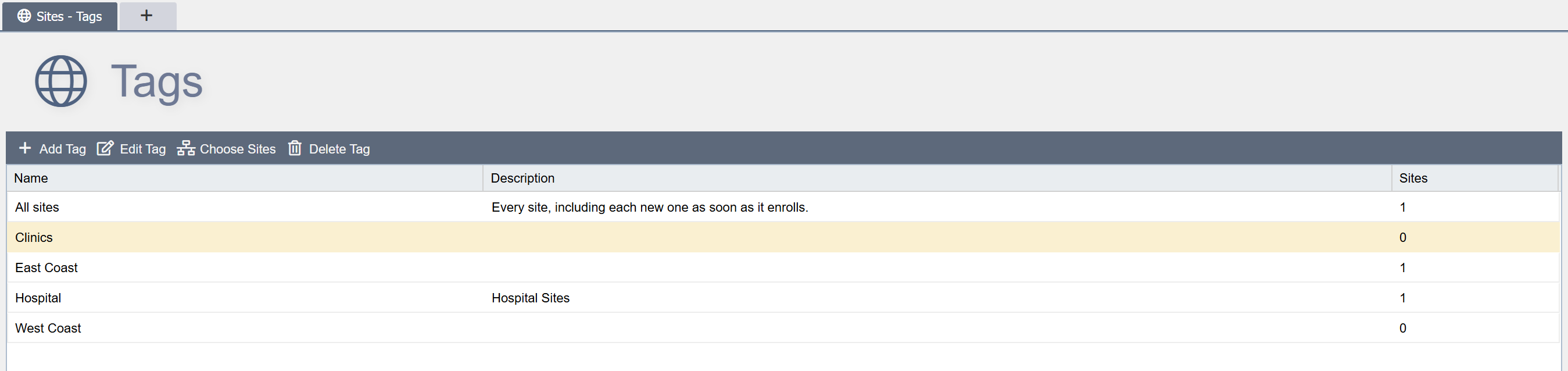
Add Tag: Opens the Add Tag dialog for a new tag.
Edit Tag: Opens the Edit Tag dialog for the selected tag. Double-clicking a tag does the same.
Choose Sites: Opens the dialog that chooses the sites carrying the selected tag.
Delete Tag: Deletes the selected tag. When a role's grant or a draft job names the tag, the Delete Tag dialog lists them and asks for DELETE to be typed first; otherwise a Yes/No question confirms. See Deleting a Tag.
For All sites, clicking Edit Tag, Choose Sites or Delete Tag explains that the tag is built in and every site carries it, and that a grant at every site is given by choosing All sites in the role's Site Access section.
Adding or Editing a Tag
The Add Tag and Edit Tag dialogs have two fields:
Name: Required, at most 100 characters, and unique among the Hub's tags, ignoring case.
Description: Optional, kept to its first 255 characters.
Click Save to save the tag. The Hub writes a TAG_CREATED or TAG_UPDATED audit event.
Choosing a Tag's Sites
Click Choose Sites. A dialog titled Choose Sites for and the tag's name lists every registered site with its Site name and Subdomain. Tick Tagged for each site that carries the tag, clear it for each site that does not, and click Save. Beneath the list the dialog says how many sites are ticked, since the list scrolls when the sites do not fit. Nothing changes until Save is clicked.
A single site's tags can also be changed from its Site Details dialog (see Site Details).
The Hub writes a SITE_TAG_ADDED or SITE_TAG_REMOVED audit event for each site that gains or loses the tag. A site that loses a tag loses the access that role grants for the tag gave there. Where that takes away someone's Console grant at a site, the Hub also ends that person's Hub console sessions there.
Deleting a Tag
Select the tag and click Delete Tag. When a role's grant or a draft job names the tag, the Delete Tag dialog lists them under Role Grants and Draft Jobs: type DELETE in Type 'DELETE' to continue and click Delete. A tag with neither is deleted after a Yes/No question.
The Hub deletes the tag, takes it off every site and removes the role grants that name it. It writes a GRANT_REMOVED audit event for each grant, with the reason tag deleted, and then a TAG_DELETED event. Anyone whose role reached a site only through the tag loses that access. A draft that named the tag lists it on its Sites tab as (a deleted tag), still ticked, and cannot be submitted until it is unticked; see Preparing a Job.
Tagging a Site at Enrollment
The Add New Client dialog lists the Hub's tags other than All sites under Tags (see Enrolling a Site). Tick the tags the new site should carry. The Hub keeps the choice with the bundle it issues, and gives the site those tags when it registers.
- The tags are given only on the site's first enrollment. A site that re-enrolls with a recovery bundle keeps the tags it carries.
- A tag deleted after the bundle was generated is skipped.
- Each tag is written as a
SITE_TAG_ADDEDaudit event, made by the person who generated the bundle.