Hub Audit Log
The Hub audit log records sign-ins to the Hub, proxy sessions, enrollment outcomes, site, tag and grant changes, jobs and certificate steps. Each event is written twice:
- To the
hub_audit_entrytable, which the Audit Log page searches. - To
hub-audit.log, through a dedicated log4j2 appender, for shipping off the Hub host.
The two writes are independent: a database failure does not stop the file line, and a failure to write the file does not stop the database row. Investigators can therefore rebuild the timeline from the file even if the database is unavailable or has been tampered with. See Hub Audit Event Types for every event and the details it carries.
Statements in the Log
Each statement the Hub signs for a site is also written to hub-audit.log, as a STATEMENT_SIGNED line, but not to the hub_audit_entry table. The Hub's database record of a statement is its own statement table, which keeps statements for the Statement Retention (days) set on the Hub Configuration page (see Job Approval Threshold and Statement Retention). The file line is not affected by that setting.
A STATEMENT_SIGNED line carries the statement's id, the site, its purpose and action, the hash of the action's details, and when the statement expires. Where they apply, it also carries the person's Hub role and sign-in method, the approver, the job, any earlier statement it refers to, and the AI access level.
Entry Shape
Each row in hub_audit_entry holds:
| Column | Contents |
|---|---|
id |
Primary key |
timestamp |
When the event was written |
event_type |
One of the event types |
actor_username |
The Hub user who performed the action; empty for an action no user performed, such as a site's /register call or a step the Hub took on its own |
target_site_id |
The site the action affects, where there is one |
source_ip |
The originating address, as the Hub saw it |
details_json |
A JSON object with the event's own fields |
details_json holds the event's own fields, for example:
SITE_PROXY_OPENEDandSITE_PROXY_CLOSEDname the site's subdomain label, and the opening event carries the request's correlation id.GRANT_ADDEDandGRANT_REMOVEDcarry the role's id and name, thegrant(CONSOLE,JOBSorMCP), and the tag's UUID and name.- Every job event carries the job's name and its id.
Log File
The dedicated appender writes one JSON document per line:
- Format:
%m%n. Each line is the bare JSON document: the time, the event, the actor, the site id, the source address and the details are fields inside it. - Rolling policy: size-based, 50 MB per file, up to 20 files kept.
- Logger:
com.qvera.qie.hub.audit, with additivity off. Audit lines never appear inqie.log.
The 50 MB × 20 = 1 GB ceiling is intentional. Long retention happens off the host, by shipping the file to a SIEM or log warehouse. Holding years of audit history on the Hub host is not recommended, because it concentrates risk on a host that is already a tier-1 administrative target. See Security Guidance.
Shipping Off-Host
The recommended deployment ships hub-audit.log to a SIEM or log warehouse continuously. The Hub has no shipping client of its own; the file format is deliberately simple so any of the common log shippers work:
| Tool | Recommended configuration |
|---|---|
| filebeat | One input pointed at the file, JSON parser enabled, sent to the SIEM of your choice |
| rsyslog | The imfile module reading the file, forwarded over TLS to a central rsyslog or syslog-ng |
| vector | A file source, a json transform, any sink |
| fluent-bit or fluentd | The tail input plugin, a JSON parser, a forward output |
Streaming directly from the database to a SIEM is not supported; the file is the integration point.
What Is Not Audited
- Request and response bodies are never logged anywhere, because they may contain PHI.
- Header values are not logged.
- A proxied request refused for lack of the Console grant is written to the Hub's log, not to the audit log.
- Internal listener restarts and other lifecycle events are written to
qie.log. The audit log is kept to operator-visible actions and security events.
Audit Log Page
The Audit Log page, under Sites, searches the hub_audit_entry table with paging on the server. Only Hub administrators see it. It filters by time range (From, To), Event, User and Source IP, and the Event list offers every event type. The To date includes the whole of that day, and pressing Enter in a date, User or Source IP box runs Search. Search with every filter empty lists every entry, newest first, and Clear empties the filters and lists every entry again. The grid shows Time, Event, User, Site ID, Source IP and Details. The Time column shows each entry in the browser's time zone, and hovering over a Details cell shows its full text.
The list is always newest first, and the column headings do not reorder it. Each page holds as many entries as the list shows without scrolling. The paging bar under the list moves between pages and gives the total count.
While the first page is shown, the list reads it again every 3 seconds, so new entries appear at the top without a click. A later page holds still, so entries do not move while you page through them. If a refresh fails, the page says so once, and again only after a refresh has succeeded.
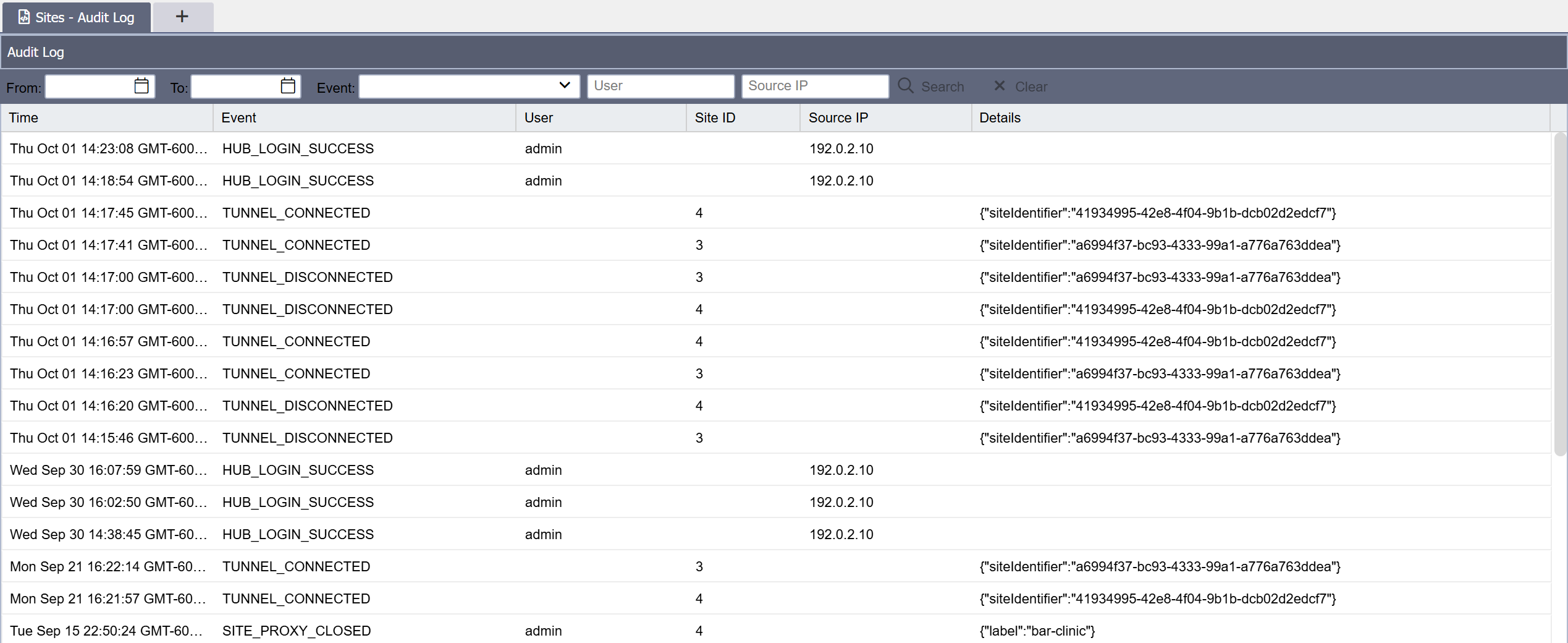
Customers running their own SIEM can also ship the log file off the host as a streaming search surface, with the database and this page as the consistency check at investigation time.
The table has composite indexes for the common questions:
(event_type, timestamp), for questions such as "every bundle generated this month".(target_site_id, timestamp), for one site's timeline.(actor_username, timestamp), for one user's activity.
Exporting the Audit Log
Export on the Audit Log page downloads every entry the filters match as a CSV file, newest first. It needs a From date: the file holds every matching entry from the start of that day through the end of the To date, or through the present when To is empty. The other filters apply as they do to the grid, and paging does not.
The file is named hub-audit-log-<yyyyMMdd-HHmmss>.csv after the Hub server's local time. It has a header row and the grid's columns: Time, Event, User, Site ID, Source IP and Details. Each time is written in the Hub server's time zone with its UTC offset, for example 2026-10-20 09:37:16 -06:00, so it can differ from the time the grid shows. The file is UTF-8 with a byte order mark, which lets Excel read non-ASCII names correctly.
A cell whose text begins with =, +, - or @ is written with a leading apostrophe, so a spreadsheet shows the text instead of running it as a formula. A failed sign-in records whatever username was typed, so this text can come from outside the organization.
Each export writes an AUDIT_LOG_EXPORTED entry naming the administrator, the filters used, the number of rows written, and whether the file was completed. An export the browser cancels part way is recorded with completed: false.